

Batch process outcome is different than manually running action - how to resolve?
I'm running an action that requires precise placement of a file, but when I run the action as a batch process the files end up slightly misaligned. When I manually place the files in photoshop and run the action the files are perfectly aligned as desired. Does anyone know what might cause this? Or any ideas on different ways I can record this action to see resizing/moving the image in a different way resolves this issue?
I'm using a basic transform adjustment:
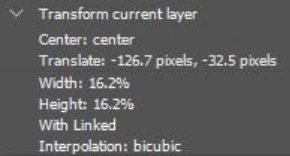
And here's a video showing the type of assets I'm working with / how they look when done manually vs. as a batch action: alignment issue.webm
The source files are all the same size and resolution. The batch process gets the files relatively close to the correct position, but I need it to be precise like when I manually run the action.
Thanks!
 AdChoices