
Known Participant
December 5, 2021
Question

Batch processing fault

  • December 5, 2021
  • 2 replies
  • 949 views

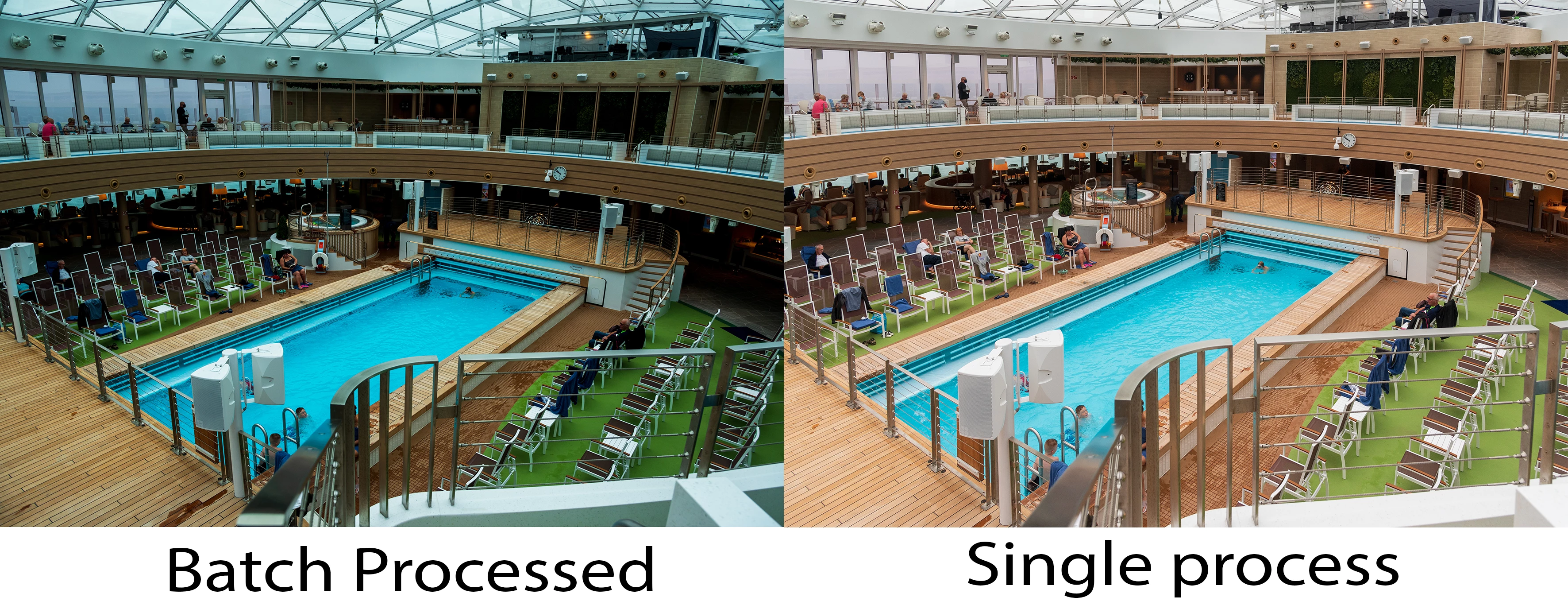
When I batch process files it appears as if the .xmp files are not going across to give the correst colour/exposure details to give correted image in the ,jpg file I am saving the RAW files to. The colours and exposure are really awful compared to when I just open a single shot and save as a .jpg as the sample shows
This topic has been closed for replies.

2 replies

Legend
December 6, 2021

Are you saving changes to XMP when you adjust files in ACR? Default profiles don't do so. Also, there was a bug that may be fixed now, where RAW files used the wrong XMP sidecar during a batch operation. I haven't seen it happen in a while so I assume its fixed now.

IainHamerAuthor
Known Participant
December 7, 2021

Not sure what you mean. I open the files in ACR and make the adjustments close the ACR window and then do a smallish batch process of about 30-40 images through a PS action I created and save the resultant .jpg's to a new folder made for the project.

Legend
December 7, 2021

Just what I asked. Are you exporting changes to XMP?

JJMack
Community Expert
Community Expert
December 5, 2021

Are you stating that when you single processed that image you made no raw conversion settings changes, that you just accepted ACR default conversion and when you batch processed the raw image you did  not have the image processor use setting you made for some first RAW file?  Why are the Raw conversion different?  When you single processed the RAW file did you add layers on make changes with Photoshop tools?   Did the Batch process add  any layer or make Photoshop changes. The pressing done before the Jpegs were saved clearly is not the same in both. You provided no details about your batch process or your single process. 

JJMack
IainHamerAuthor
Known Participant
December 6, 2021

Hi JJ


Sorry I am just so frustrated with this fault.

This has been happening since the last couple of updates on PS, never had anything like this before. I am using an action created in PS to convert the RAW images that I have adjusted in Camera Raw. I have been using Photoshop since version 5 and using batch process since I started using camera raw for the larger numbers of images that I sometimes have taken. Even when I process several hundred RAW images I only do work on about 30 images of the same sort of conditions (Light exposure etc) and then move on to another  style. I dont add layers to my RAW images just use the action to convert the RAW's for a base to start any other adjustment's. The image in the sample is is one that I did this to, no adjustments in PS and no PS tools used. The single process sample was just corrected for colour, exposre, Lens correction and geometry in Camera Raw and then saved as a jpg.

Hope this gives you some idea of the problem and you may be able to help me


Iain

Stay safe and well

JJMack
Community Expert
Community Expert
December 6, 2021

So you made exposure adjustment in ACR when you single process your RAW file you did not user the default conversion the Batch would have used.  Have you tried changing ACR default for the cameras you shoot RAW files.   Different ACR versions have made changes to processes, profiles, setting over time.  Try changing ACR defaults to settings you setup  see if you cans get conversion you like better with  them  Adobe's default settings seem to make conversions that are dark.

JJMack