
Swandive stream
Inspiring
September 14, 2023
Question

Batch processing not working

  • September 14, 2023
  • 2 replies
  • 410 views

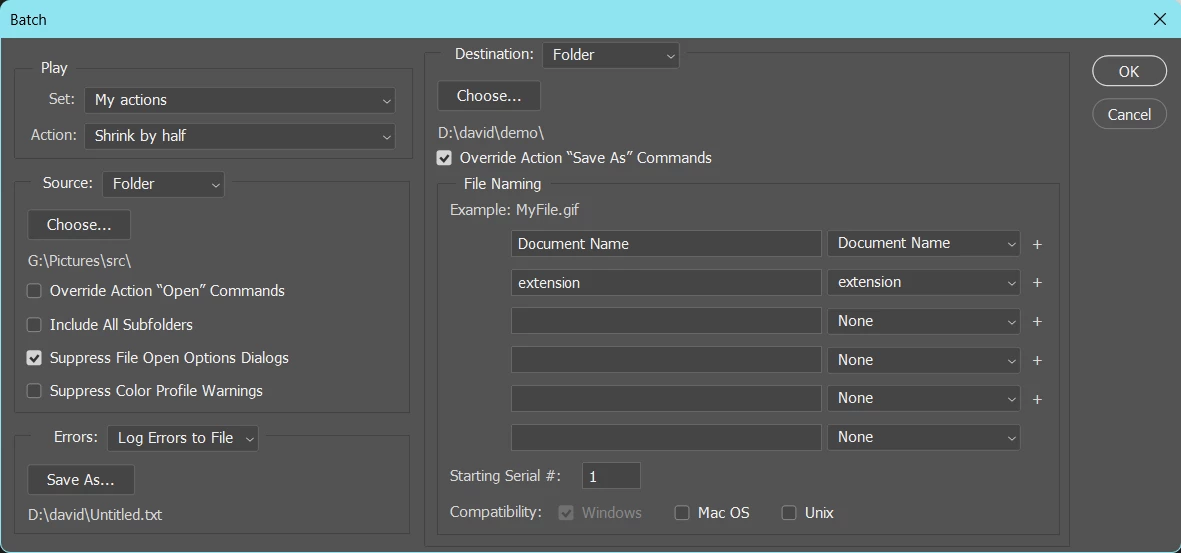
For some reason when I process these photos, the output folder is empty. Odd. What gives?


This topic has been closed for replies.

2 replies

Earth Oliver
Legend
September 14, 2023

In Destination, either use Save and Close or add Saving to your Action.

Swandive stream
Inspiring
September 14, 2023

Aha! I was looking around for the Save and Close function and realised it's in the Batch processing window. What if I wanted to save to another folder as a copy? I'm writing a tutorial on batch processing, for my blog, thinking that I actually know how to do it myself (facepalm). I tried including Save as part of the Action but not sure that worked.

Thanks


This is the post: 
Photoshop: Batch Processing via actions – Computer Tips & Other Tutorials (wordpress.com)

Earth Oliver
Legend
September 14, 2023

Then you'll want to use Image Processor Pro.
We've been begging Adobe to include this in the default installation for more than a decade, but they're not interested. It's an indispensable tool for anyone doing production work.

https://sourceforge.net/projects/ps-scripts/files/Image%20Processor%20Pro/v3_2%20betas/

Stephen Marsh
Community Expert
Community Expert
September 14, 2023

@Swandive stream 


You have ticked 'Override Action "Save As" Commands'... But does your action actually have a Save As command in it?


Posting a screenshot of the action with all steps fully expanded and the panel wide enough to view the expanded content would be helpful.


https://helpx.adobe.com/photoshop/using/processing-batch-files.html#process_a_batch_of_files