
Inspiring
May 16, 2014
Question

Batch Processing with Multiple Actions

  • May 16, 2014
  • 2 replies
  • 2118 views

Hello all,

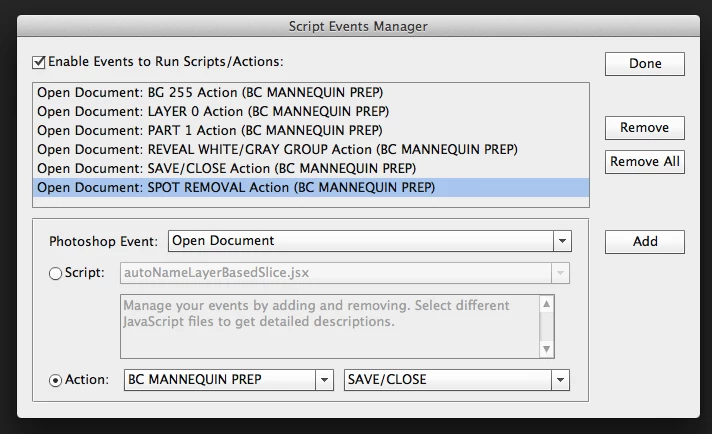
Using the Scripts Events Manager I run a set of seven actions during the file open event to a each file.

The  next steps to apply these seven actions to a folder of images.

What are the Photoshop options available to apply this set of seven actions to a folder of  images? 
This topic has been closed for replies.

2 replies

ojodegatoAuthor
Inspiring
May 18, 2014

I try creating the meta-action package and got a an error message when running the meta-action using the Batch dialog.

In my workflow I must use Layer 0 instead of the Background layer. This is probably the source of this error.

The next approach would be to use a script with the doAction() method.

The complicated part is assigning the a folder of images  to the script to do batch processing.

c.pfaffenbichler
Community Expert
Community Expert
May 19, 2014

If the error does not occur otherwise it should not occur now.

But naturally if a Layer is selected by name in an Action and no such Layer exists in a file the Action is run on that is a problem.

The complicated part is assigning the a folder of images  to the script to do batch processing.

Selection a Folder in JavaScript is not that difficult.

var theFolder = Folder.selectDialog ("select folder");

if (theFolder) {

var theFiles = theFolder.getFiles(/\.(jpg|tif|eps|psd)$/i)

};

c.pfaffenbichler
Community Expert
Community Expert
May 18, 2014

I suppose you could create a meta-Action that combines the seven Actions, use File > Automate > Batch and set the Source to »Folder«.

But why use seven Actions if you apply them all together?