





Question
Batch Save As AVIF script
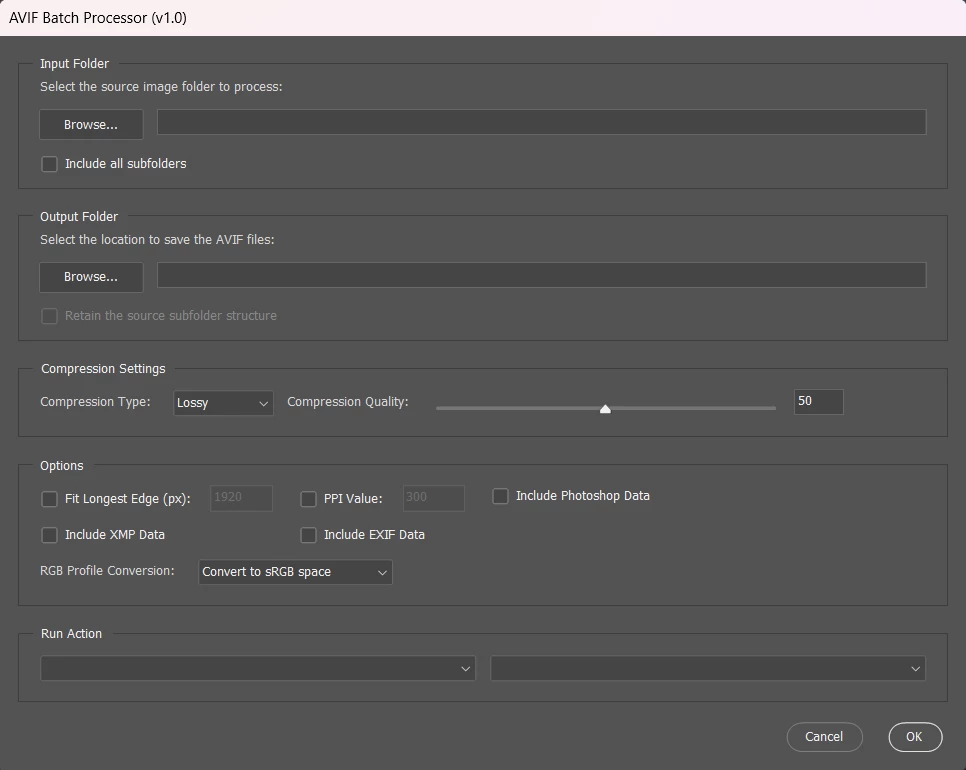
I have created a "Batch Save As AVIF" script, based on my "Batch Save As WebP" script.
Key Features:
* Version Check - Requires Photoshop 2025+ for native AVIF export support.
* Non-Destructive Workflow - Original source files remain unchanged.
* Folder Selection with Recursion - Optionally process subfolders.
* Mirror Folder Structure - Retain the original folder layout in the output.
* Compression Settings - Choose Lossy or Lossless, with adjustable quality (0–100).
* Resize by Longest Edge & PPI - Proportionally scale by longest edge and/or set resolution metadata.
* Automatic RGB Conversion - Converts non-RGB modes (CMYK, LAB, Bitmap, Indexed) to 8-bit RGB.
* sRGB Profile Option - Convert to sRGB IEC61966-2.1 or keep current color profile.
* Metadata Toggles - Include/exclude XMP, EXIF, or Photoshop metadata.
* Action Runner - Apply Photoshop actions during batch processing.
/*
Batch Save As AVIF scriptUI GUI v1-0.jsx
Stephen Marsh
https://community.adobe.com/t5/photoshop-ecosystem-discussions/...
v1.0 - 30th July 2025: Initial release

* Version Check - Requires Photoshop 2025+ for native AVIF export support.
* Non-Destructive Workflow - Keeps original files unchanged.
* Folder Selection with Recursion - Optionally processes subfolders.
* Mirror Folder Structure - Retains original folder layout in output.
* Compression Settings - Choose lossy or lossless for size/quality control.
* Resize by Longest Edge & PPI - Scales proportionally and or sets resolution metadata.
* Auto RGB Conversion - Ensure that non-RGB colour modes are converted to RGB.
* sRGB Profile Option - Standardizes color output.
* Metadata Toggles - Include/exclude XMP, EXIF, or PSD data.
* Action Runner - Applies Photoshop actions during batch.

Based on:
Batch Save As WebP scriptUI GUI v1-9.jsx
https://community.adobe.com/t5/photoshop-ecosystem-discussions/export-many-files-at-once-in-webp-format-photoshop/td-p/13604411/page/4#U14859793
*/

#target photoshop

// Ensure that version 2025 or later is being used
var versionNumber = app.version.split(".");
var versionCheck = parseInt(versionNumber[0]);
if (versionCheck < 26) {
    alert("You must use Photoshop 2025 or later to save using native AVIF format...");

} else {
    // Create the ScriptUI dialog window
    var theDialogWin = new Window("dialog", "AVIF Batch Processor (v1.0)");

    theDialogWin.orientation = "column";
    theDialogWin.alignChildren = "left";

    // Input Folder Section
    var inputFolderPanel = theDialogWin.add("panel", undefined, "Input Folder");
    inputFolderPanel.orientation = "column";
    inputFolderPanel.alignChildren = ["fill", "top"];
    inputFolderPanel.alignment = ["fill", "top"];

    inputFolderPanel.add("statictext", undefined, "Select the source image folder to process:");
    var inputFolderRow = inputFolderPanel.add("group");
    inputFolderRow.orientation = "row";
    inputFolderRow.alignment = ["fill", "top"];

    var inputFolderButton = inputFolderRow.add("button", undefined, "Browse...");
    inputFolderButton.alignment = ["left", "top"];

    var inputFolderText = inputFolderRow.add("edittext", undefined, "");
    inputFolderText.characters = 30;
    inputFolderText.alignment = ["fill", "top"];

    // Process Subfolders Checkbox
    var recursiveCheckbox = inputFolderPanel.add("checkbox", undefined, "Include all subfolders");
    recursiveCheckbox.value = false;

    // Output Folder Section
    var outputFolderPanel = theDialogWin.add("panel", undefined, "Output Folder");
    outputFolderPanel.orientation = "column";
    outputFolderPanel.alignChildren = ["fill", "top"];
    outputFolderPanel.alignment = ["fill", "top"];

    outputFolderPanel.add("statictext", undefined, "Select the location to save the AVIF files:");
    var outputFolderRow = outputFolderPanel.add("group");
    outputFolderRow.orientation = "row";
    outputFolderRow.alignment = ["fill", "top"];

    var outputFolderButton = outputFolderRow.add("button", undefined, "Browse...");
    outputFolderButton.alignment = ["left", "top"];

    var outputFolderText = outputFolderRow.add("edittext", undefined, "");
    outputFolderText.characters = 30;
    outputFolderText.alignment = ["fill", "top"];

    // Mirror Directory Structure Checkbox
    var mirrorStructureCheckbox = outputFolderPanel.add("checkbox", undefined, "Retain the source subfolder structure");
    mirrorStructureCheckbox.value = false;
    mirrorStructureCheckbox.enabled = false;

    // Enable/Disable "Mirror Structure" based on the recursive option
    recursiveCheckbox.onClick = function () {
        mirrorStructureCheckbox.enabled = recursiveCheckbox.value;
    };

    // Create a panel for the compression settings
    var compressionPanel = theDialogWin.add("panel", undefined, "Compression Settings");
    compressionPanel.orientation = "column";
    compressionPanel.alignChildren = ["left", "top"];
    compressionPanel.margins = 15;
    compressionPanel.alignment = ["fill", "top"];

    var mainGroup = compressionPanel.add("group");
    mainGroup.orientation = "row";
    mainGroup.alignChildren = ["left", "center"];
    mainGroup.alignment = ["fill", "top"];
    mainGroup.spacing = 10;

    mainGroup.add("statictext", undefined, "Compression Type:");
    var compTypeDropdown = mainGroup.add("dropdownlist", undefined, ["Lossy", "Lossless"]);
    compTypeDropdown.selection = 0;

    mainGroup.add("statictext", undefined, "Compression Quality:");

    var qualityGroup = mainGroup.add("group");
    qualityGroup.orientation = "row";
    qualityGroup.alignChildren = ["left", "center"];
    qualityGroup.spacing = 10;

    var compValueSlider = qualityGroup.add("slider", undefined, 50, 0, 100);
    compValueSlider.size = [281, 20];
    var compValueText = qualityGroup.add("edittext", undefined, "50");
    compValueText.characters = 4;

    // Update the text while dragging slider
    compValueSlider.onChanging = function () {
        compValueText.text = Math.round(this.value).toString();
    };

    // Update the text when slider changes via keyboard or release
    compValueSlider.onChange = function () {
        compValueText.text = Math.round(this.value).toString();
    };

    // Update the slider when text changes
    compValueText.onChange = function () {
        var inputValue = parseInt(this.text, 10);
        if (!isNaN(inputValue) && inputValue >= 0 && inputValue <= 100) {
            compValueSlider.value = inputValue;
        } else {
            this.text = Math.round(compValueSlider.value).toString();
        }
    };

    // Function to toggle the slider based on compression type
    function updateCompressionControls() {
        var enableControls = compTypeDropdown.selection.text !== "Lossless";
        compValueSlider.enabled = enableControls;
        compValueText.enabled = enableControls;
    }

    updateCompressionControls();

    compTypeDropdown.onChange = updateCompressionControls;

    // Create a panel for all checkboxes
    var checkboxPanel = theDialogWin.add("panel", undefined, "Options");
    checkboxPanel.orientation = "column";
    checkboxPanel.alignChildren = ["left", "top"];
    checkboxPanel.margins = 15;
    checkboxPanel.alignment = ["fill", "top"];

    var checkboxGroup = checkboxPanel.add("group");
    checkboxGroup.orientation = "row";
    checkboxGroup.alignChildren = ["left", "top"];
    checkboxGroup.alignment = ["left", "top"];
    checkboxGroup.spacing = 20;

    // Left column
    var leftColumn = checkboxGroup.add("group");
    leftColumn.orientation = "column";
    leftColumn.alignChildren = ["left", "top"];

    var fitImageGroup = leftColumn.add("group");
    fitImageGroup.orientation = "row";
    fitImageGroup.alignChildren = ["left", "center"];
    fitImageGroup.alignment = ["fill", "top"];
    var fitImageCheckbox = fitImageGroup.add("checkbox", undefined, "Fit Longest Edge (px):");
    fitImageCheckbox.value = false;
    var fitImageInput = fitImageGroup.add("editnumber", undefined, "1920");
    fitImageInput.helpTip = "Proportionally resize the longest edge of the image to the specified value";
    fitImageInput.characters = 5;
    fitImageInput.enabled = fitImageCheckbox.value;
    fitImageCheckbox.onClick = function () {
        fitImageInput.enabled = fitImageCheckbox.value;
    };

    var xmpDataCheckbox = leftColumn.add("checkbox", undefined, "Include XMP Data");
    xmpDataCheckbox.value = false;

    // Middle column
    var middleColumn = checkboxGroup.add("group");
    middleColumn.orientation = "column";
    middleColumn.alignChildren = ["fill", "top"];

    var ppiGroup = middleColumn.add("group");
    ppiGroup.orientation = "row";
    ppiGroup.alignChildren = ["left", "center"];
    ppiGroup.alignment = ["left", "top"];
    var ppiCheckbox = ppiGroup.add("checkbox", undefined, "PPI Value:");
    ppiCheckbox.value = false;
    var ppiInput = ppiGroup.add("editnumber", undefined, "300");
    ppiInput.characters = 5;
    ppiInput.enabled = ppiCheckbox.value;
    ppiCheckbox.onClick = function () {
        ppiInput.enabled = ppiCheckbox.value;
    };

    var exifDataCheckbox = middleColumn.add("checkbox", undefined, "Include EXIF Data");
    exifDataCheckbox.value = false;

    // Right column
    var rightColumn = checkboxGroup.add("group");
    rightColumn.orientation = "column";
    rightColumn.alignChildren = ["fill", "top"];

    var psDataCheckbox = rightColumn.add("checkbox", undefined, "Include Photoshop Data");
    psDataCheckbox.value = false;

    var rgbGroup = checkboxPanel.add("group");
    rgbGroup.orientation = "row";
    rgbGroup.alignChildren = ["left", "center"];
    rgbGroup.spacing = 10;
    rgbGroup.add("statictext", undefined, "RGB Profile Conversion:");
    var rgbConversionDropdown = rgbGroup.add("dropdownlist", undefined, ["Convert to sRGB space", "Keep Current RGB space"]);
    rgbConversionDropdown.selection = 0;

    // Create a panel to contain the action dropdowns
    var actionPanel = theDialogWin.add("panel", undefined, "Run Action");
    actionPanel.orientation = "column";
    actionPanel.alignChildren = ["fill", "top"];
    actionPanel.margins = 15;
    actionPanel.alignment = ["fill", "top"];

    var dropdownWidth = 350;

    var actionGroup = actionPanel.add("group");
    actionGroup.orientation = "row";
    actionGroup.alignChildren = ["left", "top"];
    actionGroup.alignment = ["fill", "top"];

    var actionSetColumn = actionGroup.add("group");
    actionSetColumn.orientation = "column";
    actionSetColumn.alignChildren = ["left", "top"];
    actionSetColumn.alignment = ["fill", "top"];

    var actionSetDropdown = actionSetColumn.add('dropdownlist', undefined, []);
    actionSetDropdown.preferredSize.width = dropdownWidth;

    var actionLabelColumn = actionGroup.add("group");
    actionLabelColumn.orientation = "column";
    actionLabelColumn.alignChildren = ["left", "top"];
    actionLabelColumn.alignment = ["fill", "top"];

    var actionDropdown = actionLabelColumn.add('dropdownlist', undefined, []);
    actionDropdown.preferredSize.width = dropdownWidth;

    actionSetDropdown.onResizing = actionSetDropdown.onResize = function () {
        this.size.width = dropdownWidth;
    };
    actionDropdown.onResizing = actionDropdown.onResize = function () {
        this.size.width = dropdownWidth;
    };

    // Populate the action set dropdown
    actionSetDropdown.add('item', '');
    var actionSets = getActionSets();
    for (var i = 0; i < actionSets.length; i++) {
        actionSetDropdown.add('item', actionSets[i]);
    }
    actionSetDropdown.selection = actionSetDropdown.items[0];
    actionDropdown.add('item', '');

    actionSetDropdown.onChange = function () {
        actionDropdown.removeAll();

        if (actionSetDropdown.selection && actionSetDropdown.selection.text != '') {
            var actions = getActions(actionSetDropdown.selection.text);
            for (var i = 0; i < actions.length; i++) {
                actionDropdown.add('item', actions[i]);
            }
            if (actions.length > 0) {
                actionDropdown.selection = actionDropdown.items[0];
            }
        } else {
            actionDropdown.add('item', '');
            actionDropdown.selection = actionDropdown.items[0];
        }
    };

    var buttonGroup = theDialogWin.add("group");
    buttonGroup.alignment = "right";
    var cancelButton = buttonGroup.add("button", undefined, "Cancel");
    var okButton = buttonGroup.add("button", undefined, "OK");

    inputFolderButton.onClick = function () {
        var inputFolder = Folder.selectDialog("Select the input folder:");
        if (inputFolder) {
            inputFolderText.text = inputFolder.fsName;
            if (!outputFolderText.text) {
                outputFolderText.text = inputFolder.fsName;
            }
        }
    };

    outputFolderButton.onClick = function () {
        var outputFolder = Folder.selectDialog("Select the output folder:");
        if (outputFolder) {
            outputFolderText.text = outputFolder.fsName;
        }
    };

    cancelButton.onClick = function () {
        theDialogWin.close();
    };

    okButton.onClick = function () {
        theDialogWin.close();
        app.refresh();
        app.togglePalettes();
        if (inputFolderText.text === "" || outputFolderText.text === "") {
            alert("Ensure that you select both input and output folders and other options before pressing OK!");
            app.togglePalettes();
            return;
        }

        var inputFolder = new Folder(inputFolderText.text);
        var outputFolder = new Folder(outputFolderText.text);

        var compType = compTypeDropdown.selection.text === "Lossless" ? "compressionLossless" : "compressionLossy";
        var compValue = Math.round(compValueSlider.value);
        var xmpData = xmpDataCheckbox.value;
        var exifData = exifDataCheckbox.value;
        var psData = psDataCheckbox.value;
        var rgbConversion = rgbConversionDropdown.selection.text;

        var fitValue = fitImageCheckbox.value ? parseInt(fitImageInput.text) : null;
        var ppi = ppiCheckbox.value ? parseInt(ppiInput.text) : null;

        processFiles(inputFolder, outputFolder, compType, compValue, xmpData, exifData, psData, fitValue, ppi, recursiveCheckbox.value, mirrorStructureCheckbox.value, rgbConversion);
        theDialogWin.close();
    };

    theDialogWin.show();
}


// Main processing function with optional recursion and mirroring structure
function processFiles(inputFolder, outputFolder, compType, compValue, xmpData, exifData, psData, fitValue, ppi, recursive, mirrorStructure, rgbConversion) {
    var fileList = getFilesRecursive(inputFolder, recursive);
    fileList.sort();
    var savedDisplayDialogs = app.displayDialogs;
    app.displayDialogs = DialogModes.NO;

    var inputFileCounter = 0;
    var fileCounter = 0;

    // Create the progress bar palette
    var progressBar = new Window("palette", "Processing Files");
    progressBar.preferredSize = [350, 100];
    // Status text
    var statusText = progressBar.add("statictext", undefined, "Preparing...");
    statusText.alignment = "fill";
    // Progress bar
    var progress = progressBar.add("progressbar", undefined, 0, fileList.length);
    progress.preferredSize.width = 300;
    progressBar.show();
    app.refresh();

    // Process each file
    for (var i = 0; i < fileList.length; i++) {
        // Update progress UI
        var percent = Math.round(((i + 1) / fileList.length) * 100);
        statusText.text = "Processing file " + (i + 1) + " of " + fileList.length + " (" + percent + "%)";
        progress.value = i + 1;
        app.refresh();

        // Open file
        open(fileList[i]);

        // Prepare target folder
        var relativePath = fileList[i].parent.fsName.replace(inputFolder.fsName, "");
        var targetFolder = outputFolder;
        if (mirrorStructure && relativePath !== "") {
            targetFolder = new Folder(outputFolder + "/" + relativePath);
            if (!targetFolder.exists) {
                targetFolder.create();
            }
        }

        // Mode conversion logic
        if (activeDocument.mode == DocumentMode.BITMAP) {
            activeDocument.changeMode(ChangeMode.GRAYSCALE);
            activeDocument.changeMode(ChangeMode.RGB);
            //if (rgbConversion === "Convert to sRGB space") {
            if (rgbConversionDropdown.selection.index === 0) {
                activeDocument.convertProfile("sRGB IEC61966-2.1", Intent.RELATIVECOLORIMETRIC, true, false);
            }
            activeDocument.bitsPerChannel = BitsPerChannelType.EIGHT;
        } else if (activeDocument.mode == DocumentMode.INDEXEDCOLOR || activeDocument.mode == DocumentMode.CMYK || activeDocument.mode == DocumentMode.LAB) {
            activeDocument.changeMode(ChangeMode.RGB);
            //if (rgbConversion === "Convert to sRGB space") {
            if (rgbConversionDropdown.selection.index === 0) {
                activeDocument.convertProfile("sRGB IEC61966-2.1", Intent.RELATIVECOLORIMETRIC, true, false);
            }
            activeDocument.bitsPerChannel = BitsPerChannelType.EIGHT;
        } else {
            activeDocument.changeMode(ChangeMode.RGB);
            //if (rgbConversion === "Convert to sRGB space") {
            if (rgbConversionDropdown.selection.index === 0) {
                activeDocument.convertProfile("sRGB IEC61966-2.1", Intent.RELATIVECOLORIMETRIC, true, false);
            }
            activeDocument.bitsPerChannel = BitsPerChannelType.EIGHT;
        }

        // Run actions if selected
        if (actionSetDropdown.selection && actionSetDropdown.selection.text != '' &&
            actionDropdown.selection && actionDropdown.selection.text != '') {
            runAction(actionSetDropdown.selection.text, actionDropdown.selection.text);
        }

        // Fit image if needed
        if (fitValue !== null || ppi !== null) {
            fitImage(fitValue, ppi);
        }

        // Save & close
        saveAVIF(compType, compValue, xmpData, exifData, psData, targetFolder);
        activeDocument.close(SaveOptions.DONOTSAVECHANGES);

        // Increment the counters
        inputFileCounter++;
        fileCounter++;
    }

    // Return focus to the host and close the progress bar palette
    app.bringToFront();
    progressBar.close();

    // End of script notification
    app.displayDialogs = savedDisplayDialogs;
    app.beep();
    alert('Script completed!' + '\r' + inputFileCounter + ' source files saved as ' + fileCounter + ' AVIF files!');
    app.togglePalettes();
}


/// Helper Functions ///

function getFilesRecursive(folder, recursive) {
    var fileList = [];
    var allFiles = folder.getFiles();
    for (var i = 0; i < allFiles.length; i++) {
        var file = allFiles[i];
        if (file instanceof Folder && recursive) {
            fileList = fileList.concat(getFilesRecursive(file, recursive));
        } else if (file instanceof File && /\.(avif|webp|tif|tiff|jpg|jpeg|psd|psb|png|tga)$/i.test(file.name)) {
            fileList.push(file);
        }
    }
    return fileList;
}

function fitImage(fitValue, ppi) {
    if (fitValue !== null && ppi !== null) {
        if (activeDocument.height.value > activeDocument.width.value) {
            activeDocument.resizeImage(null, UnitValue(fitValue, "px"), ppi, ResampleMethod.BICUBIC);
        } else {
            activeDocument.resizeImage(UnitValue(fitValue, "px"), null, ppi, ResampleMethod.BICUBIC);
        }
    } else if (fitValue !== null) {
        if (activeDocument.height.value > activeDocument.width.value) {
            activeDocument.resizeImage(null, UnitValue(fitValue, "px"), activeDocument.resolution, ResampleMethod.BICUBIC);
        } else {
            activeDocument.resizeImage(UnitValue(fitValue, "px"), null, activeDocument.resolution, ResampleMethod.BICUBIC);
        }
    } else if (ppi !== null) {
        activeDocument.resizeImage(undefined, undefined, ppi, ResampleMethod.NONE);
    }
}

function saveAVIF(compType, compValue, xmpData, exifData, psData, outputFolder) {
    var exportSettings = {
        isLossy: compType === "compressionLossy",
        quality: compValue,
        outputFolder: outputFolder
    };
    var AVIFDocName = activeDocument.name.replace(/\.[^\.]+$/, '');
    try {
        function s2t(s) { return stringIDToTypeID(s); }
        var descSave = new ActionDescriptor();
        var descAVIFOptions = new ActionDescriptor();
        var idAVIFCompression = s2t("AVIFCompression");
        if (exportSettings.isLossy) {
            descAVIFOptions.putEnumerated(s2t("colorCompression"), idAVIFCompression, s2t("compressionLossy"));
            descAVIFOptions.putInteger(s2t("colorQuality"), exportSettings.quality);
        } else {
            descAVIFOptions.putEnumerated(s2t("colorCompression"), idAVIFCompression, s2t("compressionLossless"));
        }
        descAVIFOptions.putEnumerated(s2t("alphaCompression"), idAVIFCompression, s2t("compressionLossless"));
        descAVIFOptions.putEnumerated(s2t("colorFormat"), s2t("AVIFColorFormat"), s2t("AVIFFormat422")); // Options: AVIFFormat444, AVIFFormat422, AVIFFormat420
        descAVIFOptions.putEnumerated(s2t("sampleDepth"), s2t("AVIFSampleDepth"), s2t("AVIFDepth12bit"));
        descAVIFOptions.putInteger(s2t("encoderSpeed"), 6); // Options: 2 (slowest/smallest), 4, 6, 8, 10 (fastest/largest)
        descAVIFOptions.putBoolean(s2t("includeXMPData"), xmpData);
        descAVIFOptions.putBoolean(s2t("includeEXIFData"), exifData);
        descAVIFOptions.putBoolean(s2t("includePsExtras"), psData);
        descSave.putObject(s2t("as"), s2t("AVIFFormat"), descAVIFOptions);
        descSave.putPath(s2t("in"), new File(exportSettings.outputFolder + '/' + AVIFDocName + '.avif'));
        descSave.putBoolean(s2t("lowerCase"), true);
        descSave.putEnumerated(s2t("saveStage"), s2t("saveStageType"), s2t("saveSucceeded"));
        executeAction(s2t("save"), descSave, DialogModes.NO);
    } catch (e) {
        alert("Error saving AVIF:\n" + e.message + "\nLine: " + e.line);
    }
}

function getActionSets() {
    var actionSets = [];
    var i = 1;
    while (true) {
        try {
            var ref = new ActionReference();
            ref.putIndex(charIDToTypeID('ASet'), i);
            var desc = executeActionGet(ref);
            var name = desc.getString(charIDToTypeID('Nm  '));
            actionSets.push(name);
            i++;
        } catch (e) {
            break;
        }
    }
    return actionSets;
}

function getActions(actionSet) {
    var actions = [];
    var i = 1;
    while (true) {
        try {
            var ref = new ActionReference();
            ref.putIndex(charIDToTypeID('Actn'), i);
            ref.putName(charIDToTypeID('ASet'), actionSet);
            var desc = executeActionGet(ref);
            var actionName = desc.getString(charIDToTypeID('Nm  '));
            actions.push(actionName);
            i++;
        } catch (e) {
            break;
        }
    }
    return actions;
}

function runAction(actionSet, actionName) {
    var actionRef = new ActionReference();
    actionRef.putName(charIDToTypeID('Actn'), actionName);
    actionRef.putName(charIDToTypeID('ASet'), actionSet);
    var desc = new ActionDescriptor();
    desc.putReference(charIDToTypeID('null'), actionRef);
    executeAction(charIDToTypeID('Ply '), desc, DialogModes.NO);
}
https://prepression.blogspot.com/2017/11/downloading-and-installing-adobe-scripts.html
 AdChoices