Inspiring
July 28, 2022
Answered

Bei "Speichern unter" wird "bearbeitet" angehängt

  • July 28, 2022
  • 1 reply
  • 364 views

Hallo zusammen!

Etwas nervt mich schon länger. Ich öffne eine Datei in PS aus LR heraus, bearbeitet diese in PS und mache  "Speichern unter". Im Explorer (Windows) wird dann automatisch an den Dateinamen "bearbeitet" angehängt. Wie werde ich das wieder los? (Unter Voreinstellungen -> Dateihandhabung finde ich nichts). VG, Harald

This topic has been closed for replies.
Correct answer Per Berntsen
quoteSomething has been annoying me for a long time. I open a file in PS from LR, edit it in PS and do "Save As". In the Explorer (Windows) is then automatically appended to the file name "edited". How do I get rid of this? (I can't find anything under Preferences -> file handling).
 

I assume you are using Lightroom Classic.
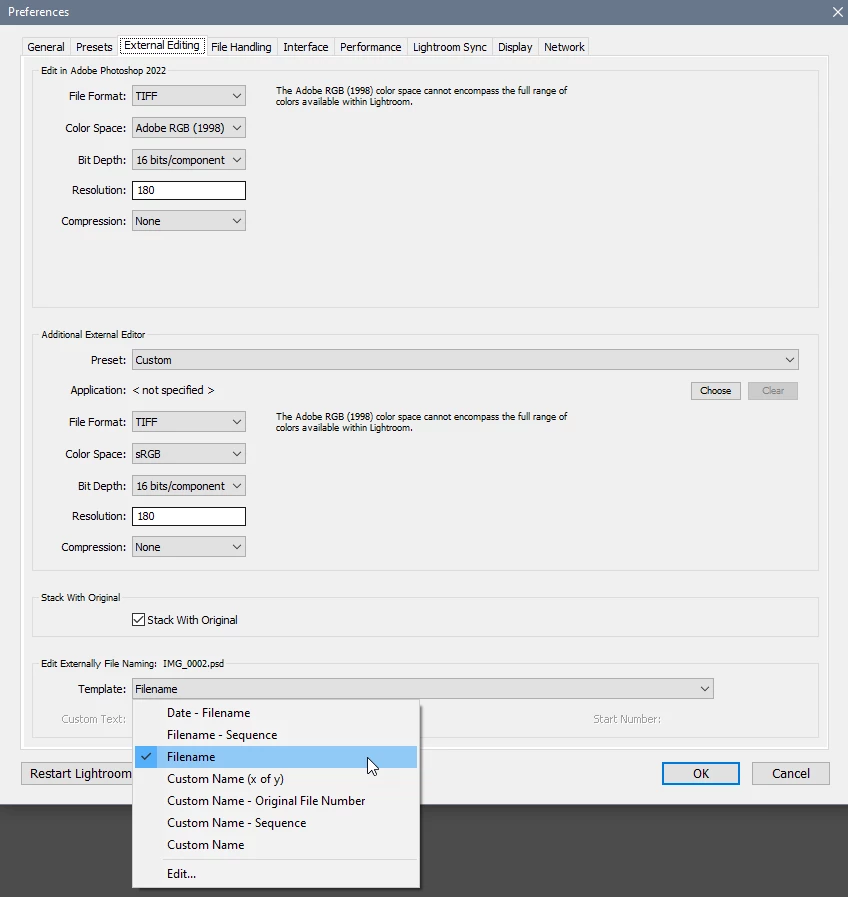
Try setting Template to Filename under Edit Externally File Naming in the LR preferences > External Editing.

If you Save instead of Save As, the edited file will be imported to Lightroom, and unless there are other files with the same name and file type already in Lightroom, nothing will be appended to the file name.

This is how Edit in Photoshop is designed to be used, just do a Save.


1 reply

Per Berntsen
Community Expert
Per BerntsenCommunity ExpertCorrect answer
Community Expert
August 1, 2022
quoteSomething has been annoying me for a long time. I open a file in PS from LR, edit it in PS and do "Save As". In the Explorer (Windows) is then automatically appended to the file name "edited". How do I get rid of this? (I can't find anything under Preferences -> file handling).


I assume you are using Lightroom Classic.
Try setting Template to Filename under Edit Externally File Naming in the LR preferences > External Editing.

If you Save instead of Save As, the edited file will be imported to Lightroom, and unless there are other files with the same name and file type already in Lightroom, nothing will be appended to the file name.

This is how Edit in Photoshop is designed to be used, just do a Save.


HaraldAuthor
Inspiring
August 2, 2022

Thanks very much! It works perfectly now.