Participating Frequently
March 10, 2018
Answered

Black borders

  • March 10, 2018
  • 9 replies
  • 3376 views

Having just updated Photoshop CC I have found that I can no longer print a simple narrow black border round my images using the Border option in the print settings box. This had been working perfectly satisfactorily until I installed an update a day or two ago - but now clicking on the button to produce a black border just has no effect.

I have tried the more elaborate way of producing a border using layers with increased canvas size etc but have again been unable to translate this into a print - albeit that the image with border does appear on the screen.

I have looked for an answer but can find nothing which really addresses this precise issue. Any help would be hugely appreciated!
This topic has been closed for replies.
Correct answer Terri Stevens

Not all printers are capable of printing right up to the edge of the paper, but if yours was working a few days ago this might indicate a problem with the printer driver. If I want a border I always generate it myself.

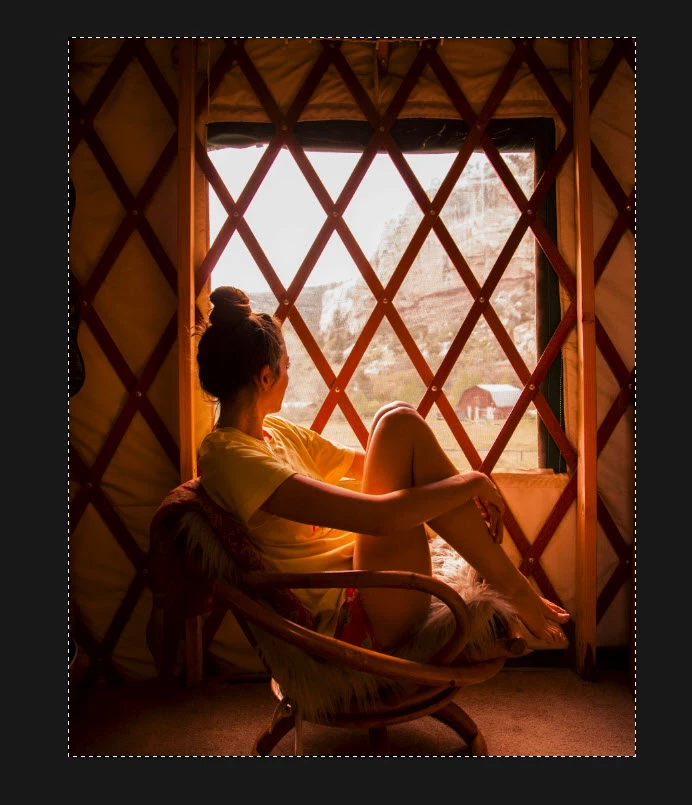
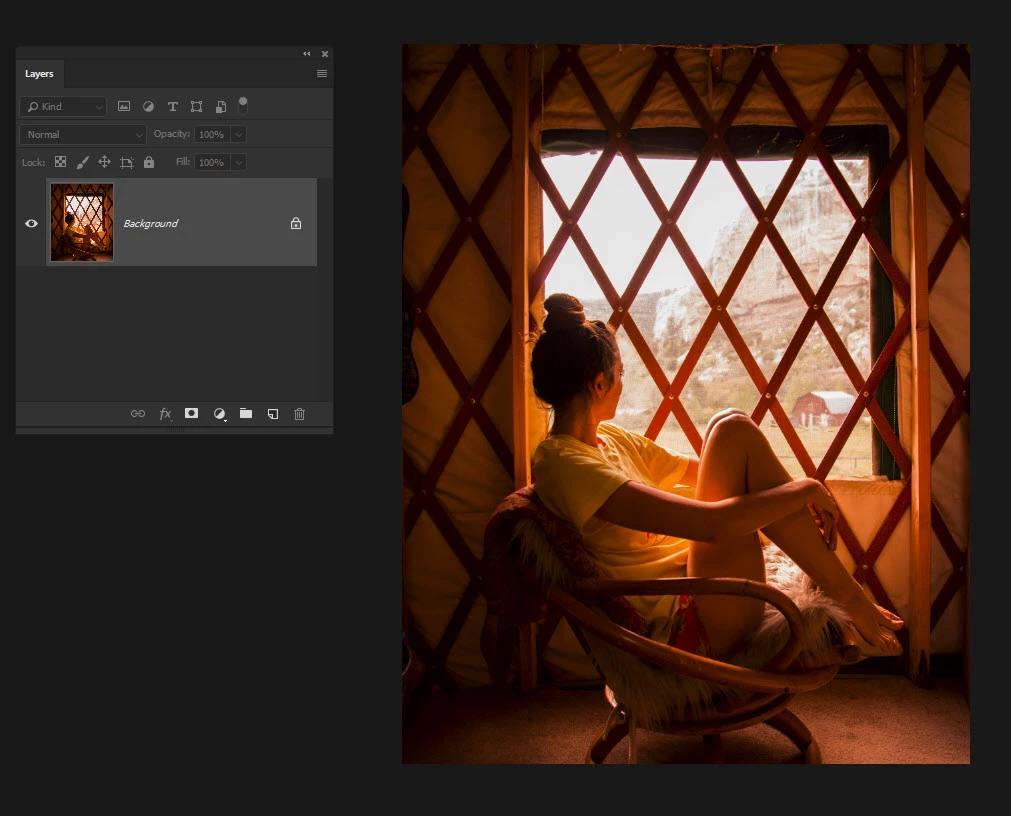
Starting with your image

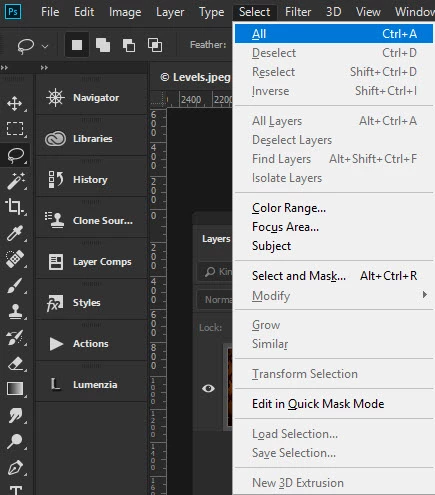
Select everything control or command A or use the menu

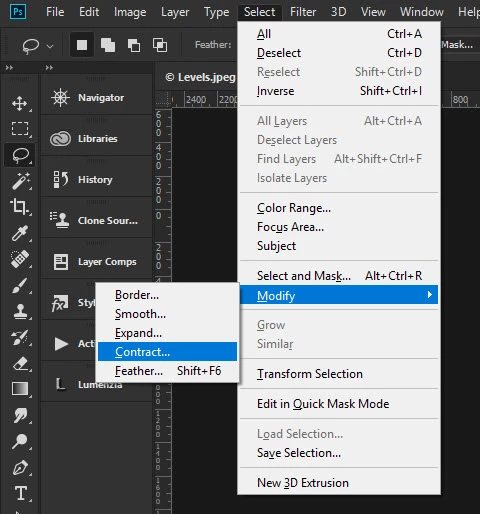
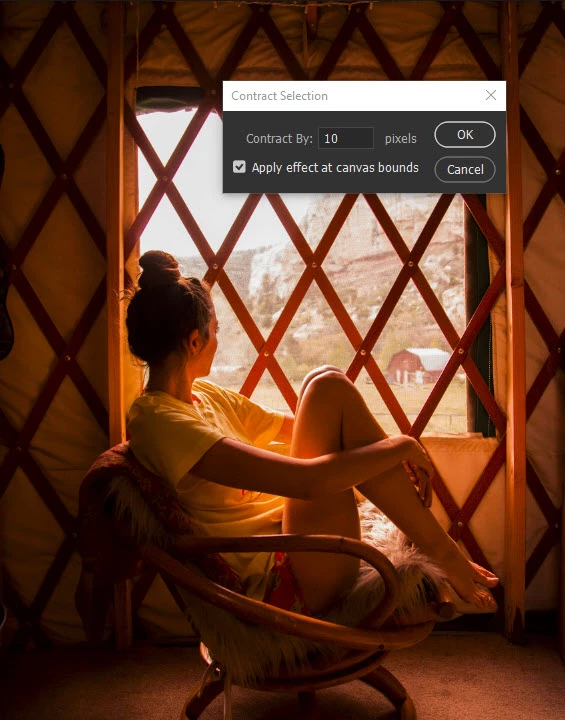
Then contract the selection to the size of border you want

In this case 10 pixels, which is tiny with even a 72ppi image like this 10/72 so the border will be approx. 1/8 inch

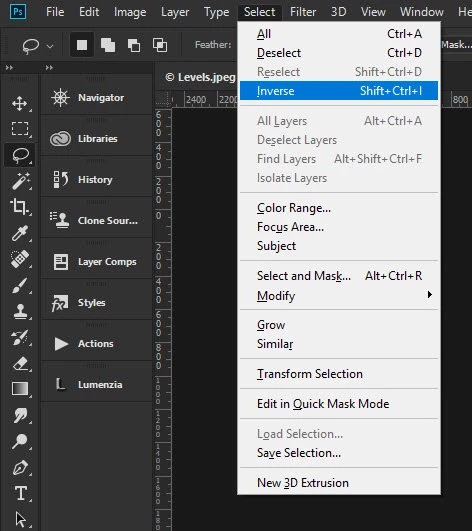
Invert the selection so the border is selected

Press alt or option backspace/delete on the keyboard to fill with the foreground color, in this case black.

You can see on screen it works, but print to a pdf to check it is printable. It's possible you are just making your border to narrow.

9 replies

Simone Pompei
Inspiring
March 21, 2018

i have this problem too. Of course it's something you can bypass by editing, but the print settings was useful for prints with a white border around the image and was quick and straight forward without touching the image.

And since we are talking about it could be useful to add some settings about the color of the line.

Bikie John
Known Participant
March 14, 2018

Thanks JJ. There is a larger thread over there about general problems with the print dialogue after 19.1.1 so I have appended to that, and asked whether it merits starting a new thread.

Photoshop CC 2018 (19.1): Print dialog box always opens at top left corner of screen and when maximised does not retain …

John

JJMack
Community Expert
Community Expert
March 14, 2018

Start a new bug report that bug is listed as fixed in 19.1.2 Fixed issues in Adobe Photoshop CC  if border still do not print. If you look down in the comment in the link you posted you will see an offical entry the bug is fixed in 19.1.2

JJMack
Bikie John
Known Participant
March 14, 2018

I have opened a new problem as you suggest:

Photoshop print border not working after 19.1.1 (and still not at 19.1.2) | Photoshop Family Customer Community

I am new to the forums and finding it quite hard to navigate around so I hope this is in the right place.

John

Bikie John
Known Participant
March 14, 2018

This looks like a bug that came in with a PS update. I have been using this for years - I regularly make prints on A4 paper to go into 10 x 8 inch frames, and having PS add a border is a very easy way to see where to guillotine them. As far as I can see the borders disappeared with update 19.1.1 (Feb 2018), which introduced all sorts of other problems with the print dialogue. And it is still there after updating to 19.1.2 (Mar 2018).

Yes I know it can be achieved by adding the border with Select All / Stroke. But I would be a lot happier if it carried on working like it always did.

JP

JJMack
Community Expert
Community Expert
March 14, 2018

You should summit a bug report then to Adobe at Photoshop Family Customer Community

JJMack
Trevor.Dennis
Community Expert
Community Expert
March 11, 2018

You can get printer accessories that help produce borderless prints.

JJMack
Community Expert
Community Expert
March 11, 2018

Yes replace the cutter with a black pen to add the black borders the OP wants

JJMack
JJMack
Community Expert
Community Expert
March 10, 2018

Yes there seems to be a bug I did the print and the border did not print. Someone else has a problem with the image name label option printing as vertical line not text my labels printed correctly with cc 2018.

JJMack
Participating Frequently
March 11, 2018

Thanks - that's good to know. Hopefully it will be corrected in the future.

JJMack
Community Expert
Community Expert
March 11, 2018

If you want to add the border without loosing any image if there is a background layers for printing you could  easily create an action to do the job and then revert the document to its state before the pint action.  The action would flatten the document so there would be a background layer only add canvas  that is black on all sides some number of pixels to add the black borders print then revert the history to before the action first step flatten. Max border print provides is 3.5mm the action would do that.

JJMack
JJMack
Community Expert
Community Expert
March 10, 2018

Does Photoshop Print Preview shoe the border will fit one the paper you using.  He I set the border to be max size 0.15" You can see in the preview the side Borders will be on the paper. However, in this case the top and bottom borders would not fit on the paper used. It also shows this printer can not print edge to edge borderless

Changing the printer Paper setting can almost print edge to edge the top and bottom border still ]will not fit

JJMack
Participating Frequently
March 10, 2018

I generally use A3 paper but a considerably smaller image size - probably not much larger than A4.  I then have used the 'Border' button in the Photoshop Print Settings box to create a narrow black border (usually about 0.5mm) around the image area - so I don't think that there is any question of it not being able to fit. My method has worked perfectly in the past and I have changed nothing other than through adoption of the latest update.

Any further thoughts would be welcome - and thank you for your suggestions so far.

cmgap
Community Expert
Community Expert
March 10, 2018

Have you changed any settings in your print dialog box? Is that how you were Printing a border?

Participating Frequently
March 10, 2018

Yes - that is what I was doing. Very straightforward and I had encountered no problems using this method until now. No other settings have been changed - unless through installation of the latest PS update...!

cmgap
Community Expert
Community Expert
March 10, 2018

Okay - that's what I was wondering. I'll test that as well.

Norman Sanders
Legend
March 10, 2018

Select > All

Edit > Stroke...  2 (or more px), Black, Inside, Normal 100%

Select > Deselect

Participating Frequently
March 11, 2018

Many thanks. This works and seems a relatively simple way to achieve the desired result.

Terri Stevens
Terri StevensCorrect answer
Legend
March 10, 2018

Not all printers are capable of printing right up to the edge of the paper, but if yours was working a few days ago this might indicate a problem with the printer driver. If I want a border I always generate it myself.

Starting with your image

Select everything control or command A or use the menu

Then contract the selection to the size of border you want

In this case 10 pixels, which is tiny with even a 72ppi image like this 10/72 so the border will be approx. 1/8 inch

Invert the selection so the border is selected

Press alt or option backspace/delete on the keyboard to fill with the foreground color, in this case black.

You can see on screen it works, but print to a pdf to check it is printable. It's possible you are just making your border to narrow.

Participating Frequently
March 11, 2018

Thank you so much. That seems to work perfectly - albeit with the slight loss of image area.