Not sure what caused the border, but here's one thing to check:
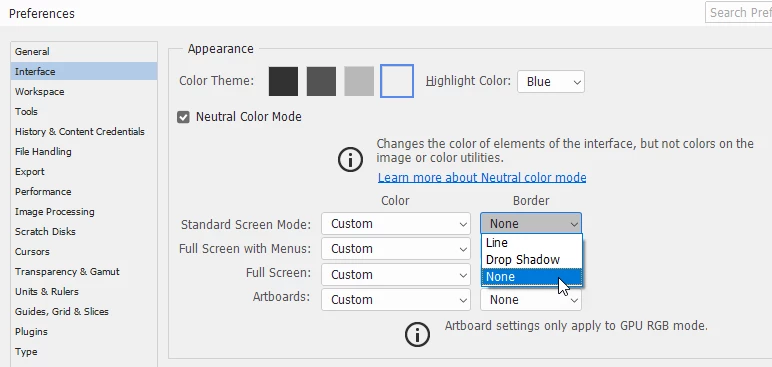
Go to Preferences > Interface > Standard screen mode > Border, and make sure that it's set to None.
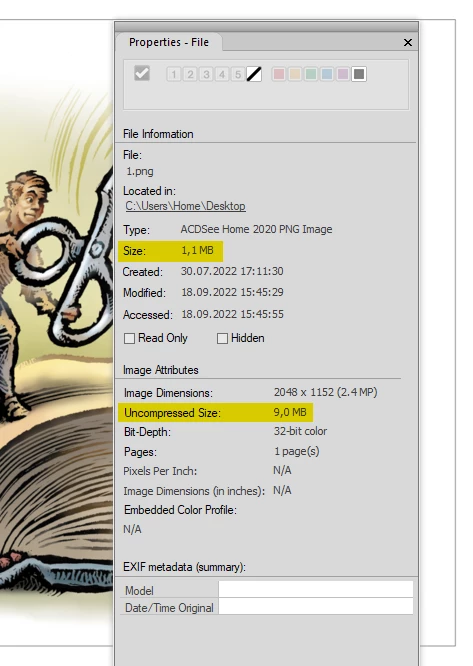
As for your other question, the size of your screenshot is 1.1 MB, but the uncompressed size is 9 MB.
The file type is PNG, which is the best choice for graphics and large areas with flat color. (like the PS interface)
Jpg is best suited for continuous tone photographs.
Ppi is only used for printing, has no effect on file size, and is irrelevant for screen viewing, where the image is displayed according to its pixel dimensions.
Pixel dimensions divided by ppi value = Printed dimensions in inches.
 AdChoices