Andrea24723164383b
Participant
June 3, 2022
Answered

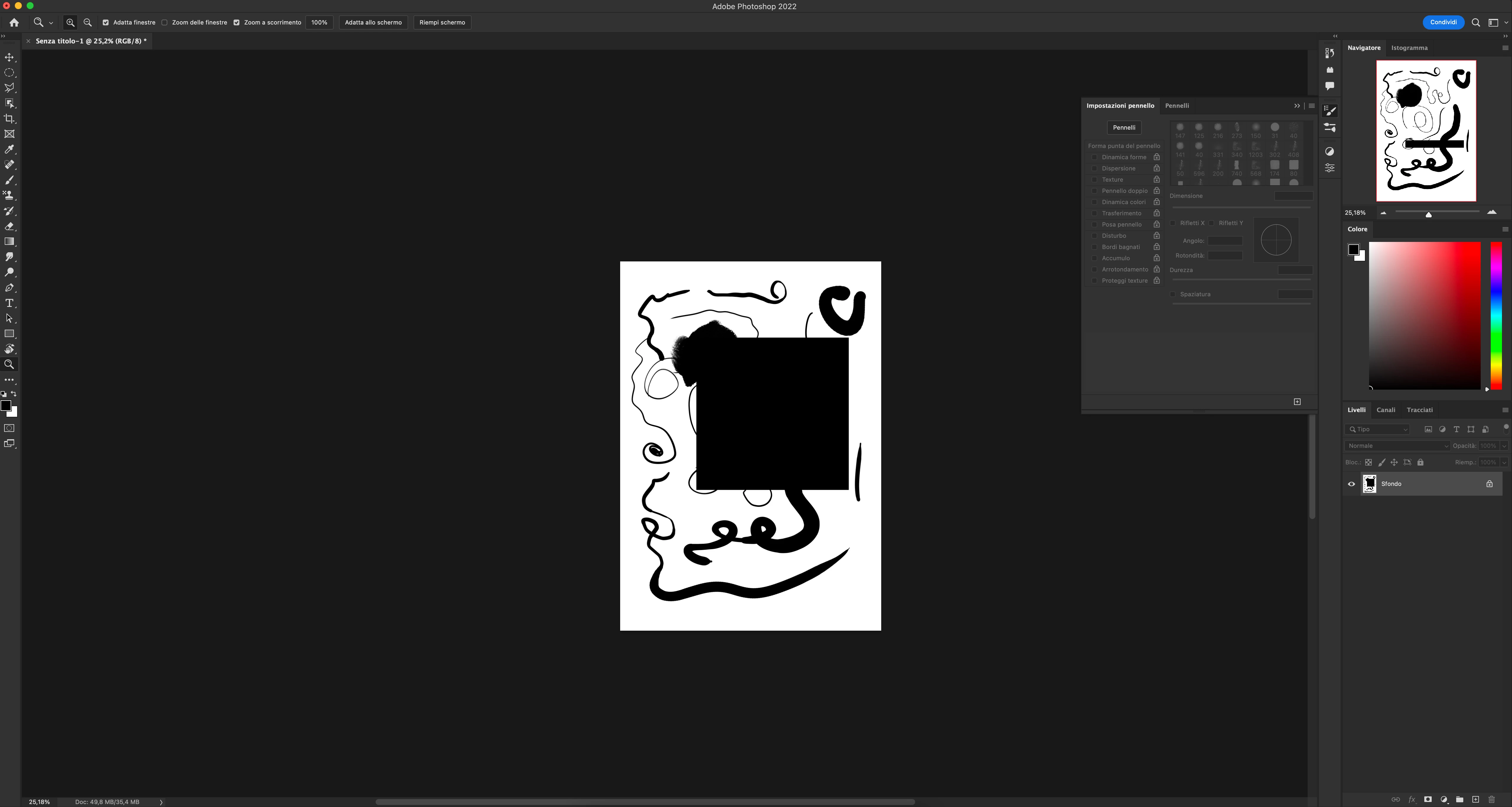
Black Square appeared & Brush lagging in files with more than one Layers in Photoshop 2022 on M1 Mac

  • June 3, 2022
  • 2 replies
  • 1739 views

Hi, I'm using latest version of photoshop on a M1 Mac with a wacom tablet. After drawing for a few seconds, I'd notice a brush lagging and all of a sudden a black square in center of the page... 

Someone has the same problem?

This topic has been closed for replies.
Correct answer nikunj.m

Hi,


We're sorry about the trouble with Photoshop. Would you mind sharing the macOS version you're working on?


You can try going to the Preferences for Photoshop, then Performance, then Advanced Settings for the Graphics Processor & uncheck the option for GPU compositing. Once done, relaunch Photoshop to check if that helps.

If the issue persists, you can try disabling the option Use Graphics Processor completely & then relaunching Photoshop to check if that makes a difference.


You can also try to reset the preferences of Photoshop using the steps mentioned here: https://helpx.adobe.com/photoshop/using/preferences.html#reset_preferences

Please backup your settings prior to resetting the preferences. You can check: https://helpx.adobe.com/photoshop/using/preferences.html#BackupPhotoshoppreferences


Let us know how it goes!

Regards,

Nikunj

2 replies

nikunj.m
nikunj.mCorrect answer
Legend
June 3, 2022

Hi,


We're sorry about the trouble with Photoshop. Would you mind sharing the macOS version you're working on?


You can try going to the Preferences for Photoshop, then Performance, then Advanced Settings for the Graphics Processor & uncheck the option for GPU compositing. Once done, relaunch Photoshop to check if that helps.

If the issue persists, you can try disabling the option Use Graphics Processor completely & then relaunching Photoshop to check if that makes a difference.


You can also try to reset the preferences of Photoshop using the steps mentioned here: https://helpx.adobe.com/photoshop/using/preferences.html#reset_preferences

Please backup your settings prior to resetting the preferences. You can check: https://helpx.adobe.com/photoshop/using/preferences.html#BackupPhotoshoppreferences


Let us know how it goes!

Regards,

Nikunj

Participant
June 11, 2022

GPU unchecked and now photoshop is working perfectly. Thanks! My macOS is 12.4

Andrea24723164383b
Participant
June 3, 2022

I've re-installed it, and now this: