


Participant
May 30, 2021
Question

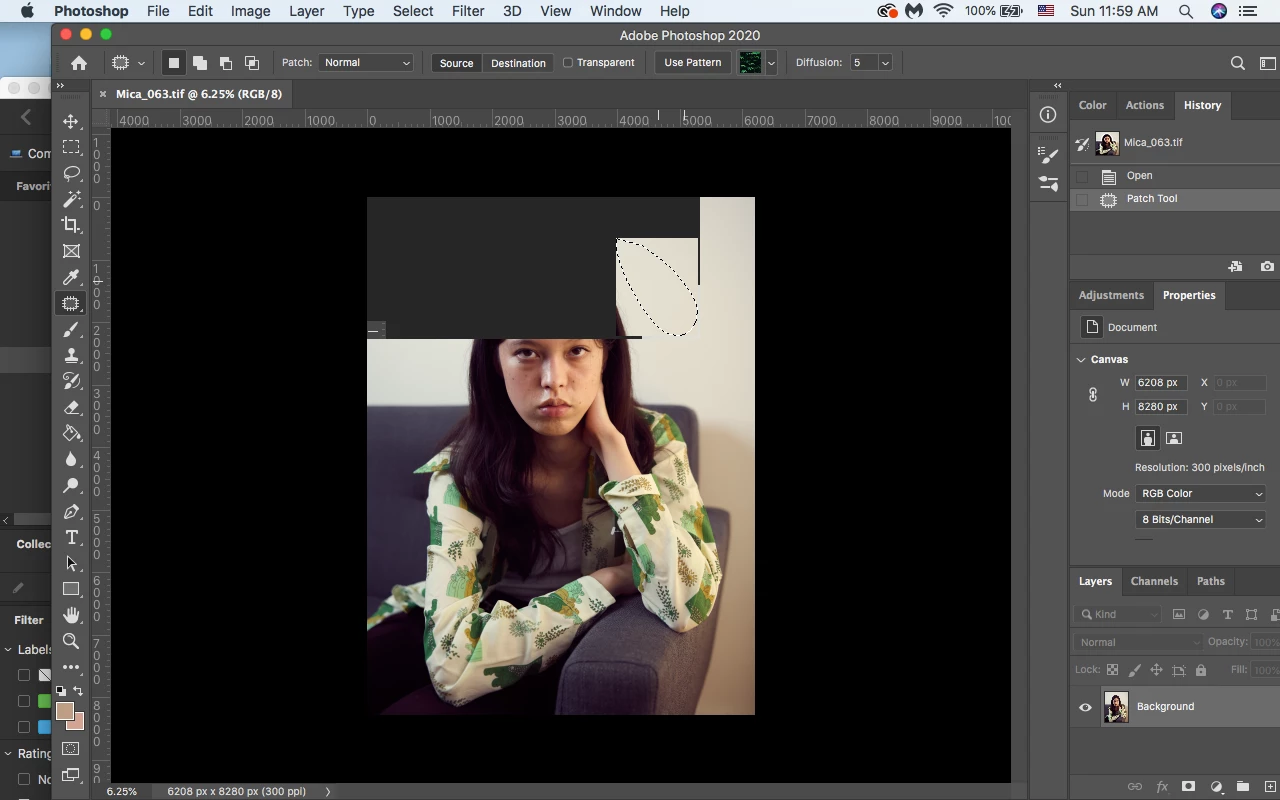
Black squares appear when using patch tool

  • May 30, 2021
  • 1 reply
  • 746 views

Hi there, I still haven't found an answer to this problem... anytime I use the patch tool not at 100% or 90% I get these black squares on my image and I have to move the image for them to go away. It's really a pain.  I'm using Adobe Photoshop 2020 with an older computer but still this shouldn't happen. Does anyone know how to fix this besides turning off the graphics processor because that doesn't work. Thanks you! 
This topic has been closed for replies.

1 reply

TheDigitalDog
Inspiring
May 30, 2021

First, try disabling GPU in the preferences (Preformance tab). Any better?
If turning OFF GPU works, it's a GPU bug and you need to contact the manufacturer or find out if there's an updated driver for it.
Also see: https://helpx.adobe.com/photoshop/kb/acr-gpu-faq.html

Author “Color Management for Photographers" & "Photoshop CC Color Management/pluralsight"