Participating Frequently
June 4, 2020
Answered

Blocage de Photoshop 21.1.3 dans la fenêtre de réglage Luminosité - contraste on macOS Catalina

  • June 4, 2020
  • 2 replies
  • 969 views

Bonjour 

Je rencontre un problème avec Photoshop version 21.1.3, depuis une mise à jour de Catalina  ou de Photoshop semble t-il :

La fenêtre de réglage Luminosité-Contraste se bloque après un réglage ou deux des curseurs, il est impossible de fermer cette fenêtre et même de quitter l'application, focer la fermeture est la seule solution pour sortir mais Photoshop n'apparait comme bloquée dans le fenêtre pour forcer à quitter.

Merci de votre aide.


Cordialement

Philippe


{Thread title edited by moderator}
This topic has been closed for replies.
Correct answer nikunj.m
Hi Philippe,
 
Apologies for the frustrating freeze with some Photoshop adjustments. We have been able to reproduce the freeze on Mac and the engineering team is currently investigating a fix. If you are using a Mac, the current workarounds that we’re aware of are:
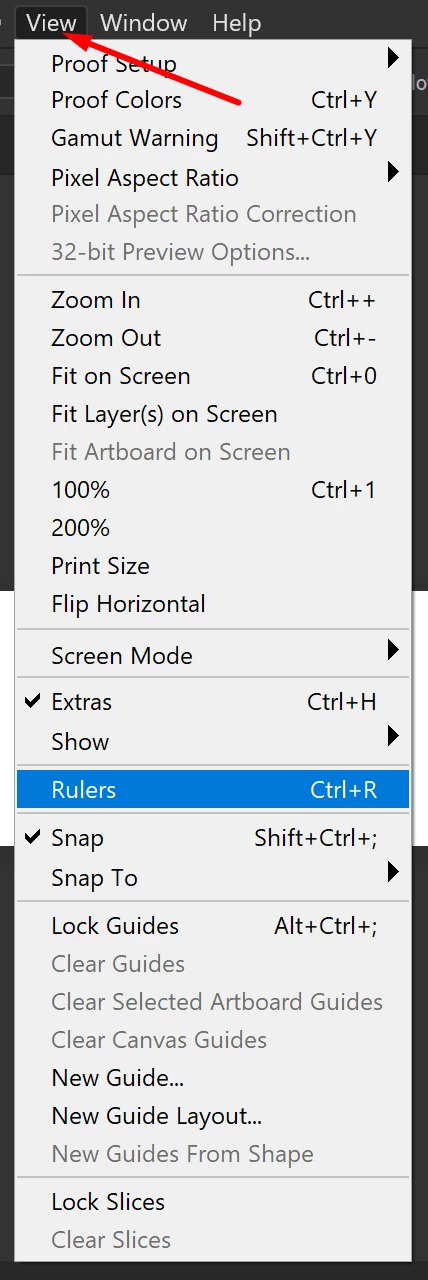
  • Disable Rulers (CMD+R on Mac, Ctrl+R on Win), or by going to the View menu.


  • Or move the Adjustment dialog outside of Photoshop’s workspace/interface before touching any sliders.
 
Let us know how this goes!
Regards,
Nikunj

2 replies

Mohit Goyal
Community Manager
Community Manager
June 16, 2020

Hi there,


We are happy to announce the release of  Photoshop 21.2.


This update includes the fix for Photoshop 21.1.3: Hue Saturation dialog not responsive


Here's a list of fixed issues in this release: Bug fixes


Let us know if the update resolves the problem for those affected and share your feedback with us.

Regards,
Mohit

Participating Frequently
June 17, 2020

Hello Mohit

It's perfect, the bug is killed !!

Thanks very much

Best regards

Phil

nikunj.m
nikunj.mCorrect answer
Legend
June 4, 2020
Hi Philippe,
 
Apologies for the frustrating freeze with some Photoshop adjustments. We have been able to reproduce the freeze on Mac and the engineering team is currently investigating a fix. If you are using a Mac, the current workarounds that we’re aware of are:
  • Disable Rulers (CMD+R on Mac, Ctrl+R on Win), or by going to the View menu.


  • Or move the Adjustment dialog outside of Photoshop’s workspace/interface before touching any sliders.
 
Let us know how this goes!
Regards,
Nikunj
Participating Frequently
June 5, 2020

Hello

Thanks for your answer.

Now it's OK with each of your 2 tips : Rulers disabled or moving window outside workspace.

Waiting for update

Thanks

Best regards


Philippe