Participant
January 18, 2019
Answered

Blown out highlights ? [How to deal with banding?]

  • January 18, 2019
  • 1 reply
  • 750 views

Hi everyone,

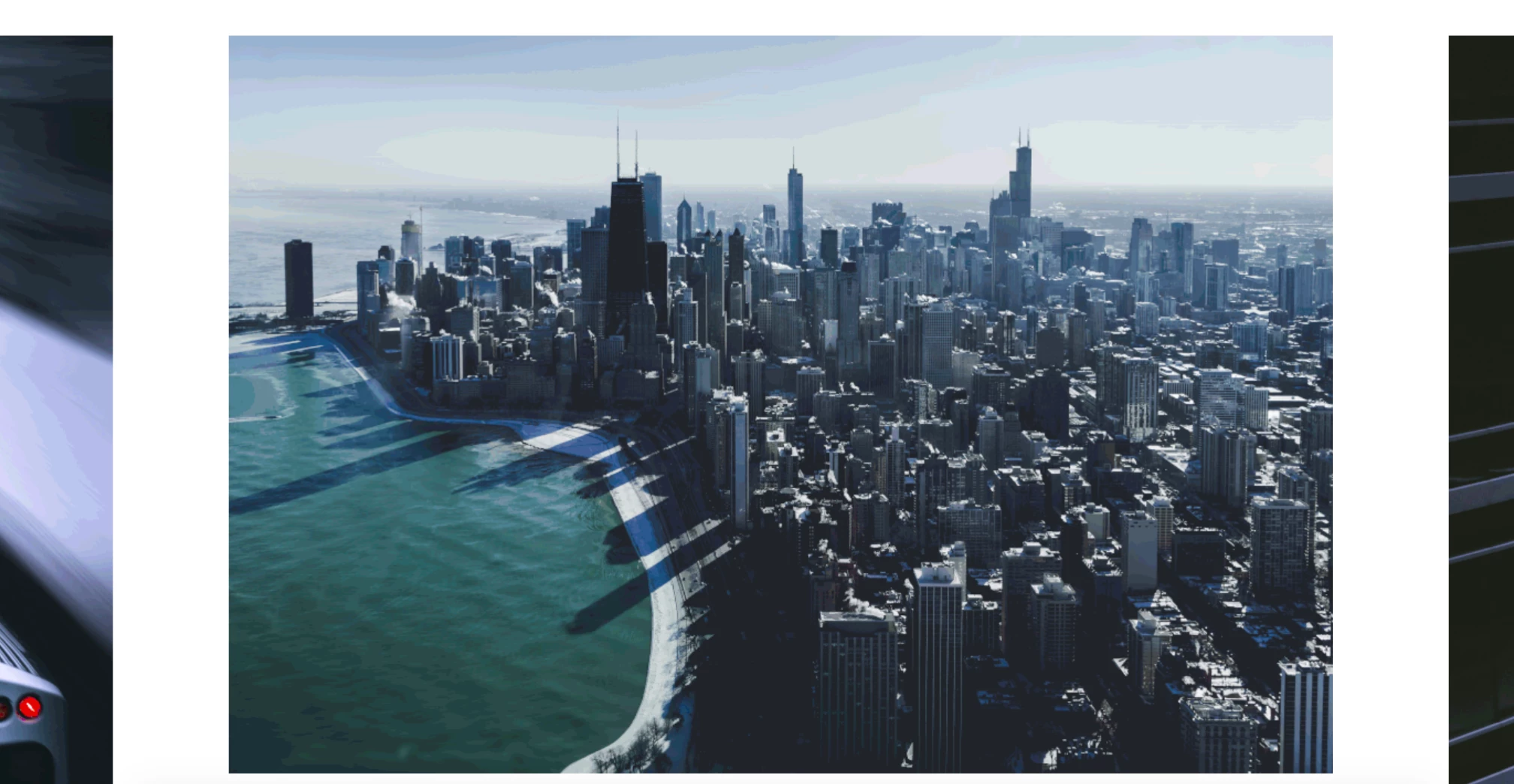
I recently upload a picture on my website based on squarespace and something weird happen to the picture.

When you take a closer look at the sky you can see some waves or different layers of blue/white... and I don't know what is it and how to remove it.

I can't see it on the original picture but only when I upload the picture on my website after some edit on it. (take a look at the print screen).

I have few pictures with the same problem.

If anyone knows a solution it would be much appreciated.

Look forward to hear from you ASAP !

See ya !

    This topic has been closed for replies.
    Correct answer D Fosse

    That's called banding, and I suspect the reason here is repeated jpeg compression.

    Banding happens whenever your data are limited to a restricted number of discrete steps. In a normal 8 bit file, or an 8 bit display pipeline, this is 256 steps per channel. But jpeg compression can reduce this to a lot less - especially if it happens more than once. Then the effect is cumulative, and it can get really ugly.

    The gradient here is really shallow. So the limited range of values is spread over a large area, and it becomes very obvious.

    In situations where banding is inevitable, the most effective way to break it up is to add a tiny amount of noise. It doesn't take much.

    1 reply

    D Fosse
    Community Expert
    D FosseCommunity ExpertCorrect answer
    Community Expert
    January 18, 2019

    That's called banding, and I suspect the reason here is repeated jpeg compression.

    Banding happens whenever your data are limited to a restricted number of discrete steps. In a normal 8 bit file, or an 8 bit display pipeline, this is 256 steps per channel. But jpeg compression can reduce this to a lot less - especially if it happens more than once. Then the effect is cumulative, and it can get really ugly.

    The gradient here is really shallow. So the limited range of values is spread over a large area, and it becomes very obvious.

    In situations where banding is inevitable, the most effective way to break it up is to add a tiny amount of noise. It doesn't take much.

    Participant
    January 19, 2019

    Hi man,

    Thanks for the details, I tried to add some noise on the picture it works but not fully, I still have the banding.

    If I understand what you are saying is that I export the picture too many times between different editing app and the banding is the result of this ? Is it better if I re-edit the picture from the beginning and try to limit export it ?

    John Waller
    Community Expert
    Community Expert
    January 19, 2019