
belindajane81
Participating Frequently
November 19, 2016
Question

Blue colour cast when printing - Photoshop CC (2017)

  • November 19, 2016
  • 6 replies
  • 10531 views

I'm having a very frustrating issue which I don't really understand.

Some (not all) of the images I'm printing from Photoshop are coming out with a very obvious blue colour cast. I calibrate my monitor on a regular basis. I have the most up to date drivers for my printer (Canon Pixma MG7760) and I use the ICC profiles for the printer and paper type supplied with the printer drivers.

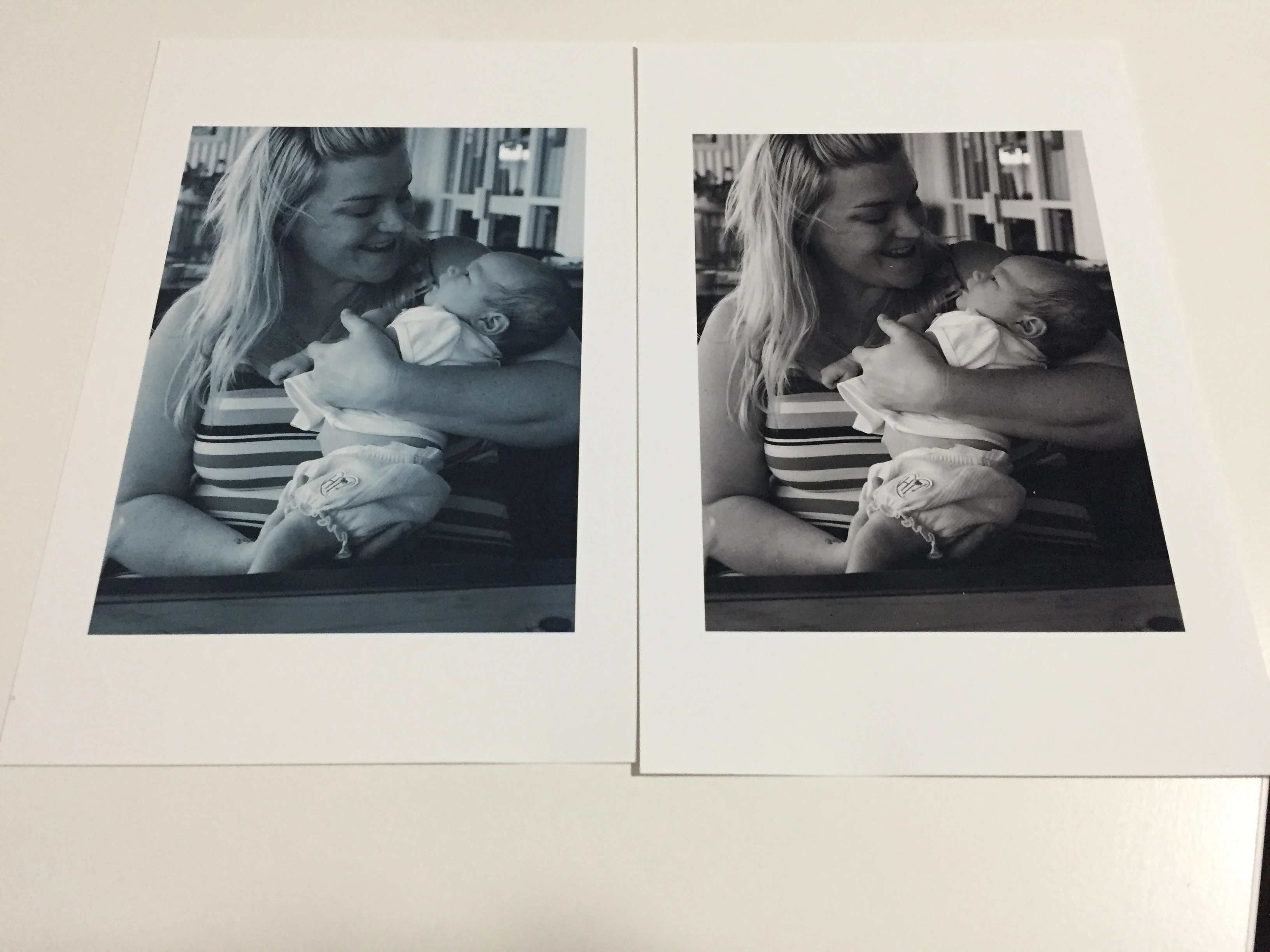
The problem only seems to exist when I'm printing directly from Photoshop. When I save the image to jpg and then print using Preview on my mac, there is no colour cast. I've uploaded a photo of the same image - one printed direct from photoshop and the other via Preview.

Does anyone have any ideas on what is going on here?
This topic has been closed for replies.

6 replies

Eric Schoen
Participant
October 31, 2020

Very very late to the party here, but I just had the same problem and the solution for me was stuid and easy - I switched from my specific printer model's profile to the generic "Canon IJ Color Printer Profile 2005"


Not sure why the 'correct' printer profile was giving me such incorrect colors - maybe a recent printer driver or firmware update corrected a problem that the Adobe profiles were originally compensating for, and Adobe never updated the profile?


I assume the original poster corrected things, but perhaps if anyone else has an issue, try NOT using your printer-specific profile and switch to generic?


Note that I have my printer set up to give its own preview prior to printing, and it the preview very clearly showed a blue hue to everything which was not in the original image, so Adobe definitely was skewing the image itself and not just printing it weird. Once I switched to the generic profile, the preview looked just like the original and printed correctly.

D Fosse
Community Expert
Community Expert
October 31, 2020

"maybe a recent printer driver or firmware update corrected a problem that the Adobe profiles were originally compensating for, and Adobe never updated the profile?"


Those aren't "Adobe profiles". They come from Canon, and they are installed when you install the Canon printer driver. But profiles are sometimes defective/inaccurate/corrupt, and like the driver itself they may be updated from time to time.


Photoshop just works with what it gets from Canon. It can't fix bad profiles or driver problems.

Eric Schoen
Participant
October 31, 2020

Fair enough, but wherever they came from, swapping to 'generic' is what corrected my issue with things printing out blue, and maybe it might help someone else too.

rob day
Community Expert
Community Expert
January 10, 2019

When I save the image to jpg and then print using Preview on my mac, there is no colour cast.

In your Photoshop print dialog you are letting Photoshop color manage and setting the Print profile to a generic Canon MG7700 Series profile.

When you get the good print out of Preview, you would have to choose a print profile somewhere in the Preview drop down (there isn't the equivalent of Photoshop Manages Colors in the Preview Print dialog). For example here's an Epson driver in Preview where I'm choosing a media profile from the Epson driver's Printer Features:

You might want to check and see if there is a problem with the Canon profile you are choosing in the Photoshop Print dialog. As a test, try choosing the document's RGB profile instead, and then use the same settings under the Print Settings... button that you are using in Preview.

adamt66388181
Participant
January 10, 2019

This worked for me

Run-Appdata-Roaming-Adobe-Adobephtoshop CS6- Adobephtoshop CS6 settings you will find a prefs file. you just need to rename it to .old.

oilking
Participant
December 18, 2016

Noticed your problem and I have a similar problem in that it does not matter what I change in my system which is Mac OS10.12.2 Sierra or Photoshop CC 2017.0.1 I get a yellow colour cast to my Epson R2880 (new drivers installed the lot). I even contacted Martin Bailey and everything he said to do I am doing and my prints are all frankly scrap.

I have probably in the last two days used about $100 of paper and ink to try and sort this out. 'I have come from Windows to Mac and never had this issue with windows and the prints were all fantastic.

Very disappointed with Apple as you just do not seem to have the ability to control anything.

PS I also bought Scott Kelby's book on printing to try to resolve this and still no decent results.

belindajane81
Participating Frequently
November 25, 2016

OK, so how do I go about escalating this to Adobe? Is it even worthwhile? Will anything be done/achieved or do I just have to suck this up and deal with it - just like I/we dealt with not being able to print AT ALL for a couple of months.

Mylenium
Legend
November 19, 2016

Does anyone have any ideas on what is going on here?

Sure. Lack of colour management. You know, as per your explanation you never tell PS that there actually are printer profiles involved and inevitably just lumping them on after the fact in the printer's settings will mess with colors because PS operates on wrong assumptions when sending the print data. You need to configure your proff settings accordingly as wel las possibly instate specific color profiles for your documents as per Canon's instructions. The only reason why externally printed files do not show a color cast is because in this case the printer assumes a standard sRGB profile to which no doubt its own profiles are tailored.

Mylenium

belindajane81
Participating Frequently
November 20, 2016

Hmmm, so even though I'm using the ICC profiles in the print window in Photoshop and Photoshop is managing colours, you're saying that Photoshop isn't actually aware of the printer profiles? I don't understand how that works.

I will admit I am not super knowledgeable in these things but as far as I can tell (and through countless hours of searching for information online), I've followed all the instructions Canon has provided for printing and I'm allowing Photoshop to manage colours according to the Canon profiles. Is there a step I've missed somewhere?

davescm
Community Expert
Community Expert
November 20, 2016

Hi

Just for clarity in order that we can try and help you, can you post screenshots of

a. The image in Photoshop - and let us know what is the image mode and  the colour profile of the image

b. The Photoshop printer dialogue - showing the profile being used to print etc

c. The Canon printer settings (this should show that no colour management is being applied in the printer driver)

Dave