Participant
March 17, 2020
Question

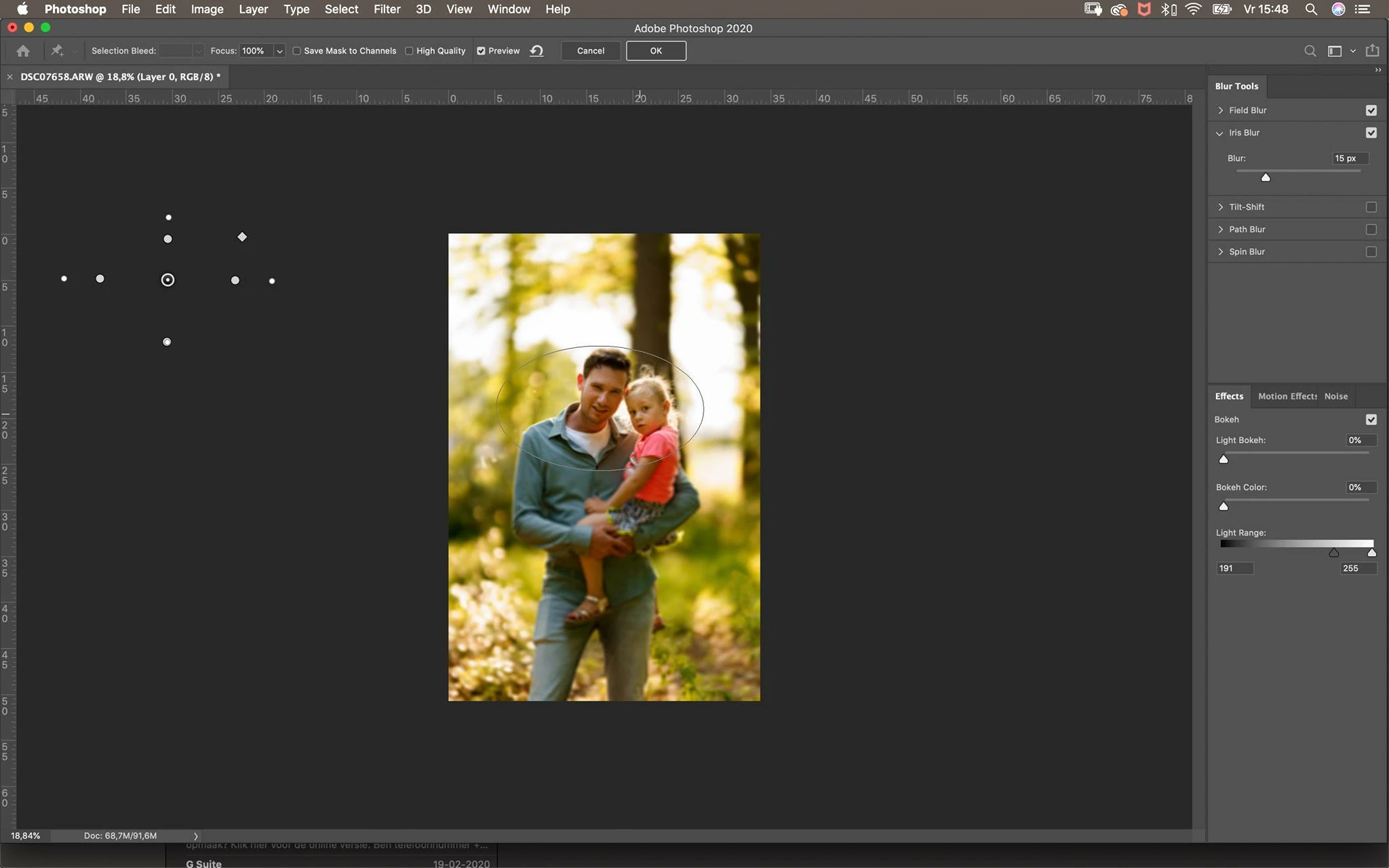
Blur gallery pins not on photo in Photoshop

  • March 17, 2020
  • 1 reply
  • 334 views

I was trying to use iris blur from the Blur gallery, the pins are not on the photo but to the side of the photo. I can't move the pins to the photo. See the printscreen.. So I can't adjust the pins. Only outer circle i can turn. I think it's something I am not seeing. I am using a Macbook. ios Catalina latest version. Also with photoshop latest version. 


{Thread renamed by moderator}

This topic has been closed for replies.

1 reply

Sahil.Chawla
Adobe Employee
Adobe Employee
March 17, 2020

Hi there,

That does not sound good, could you please let us know the version of Photoshop you're working with?
Does it happen with only one image or all images?

Have you tried resetting the preferences of Photoshop and see if it helps? 

https://helpx.adobe.com/photoshop/using/preferences.html


Regards,
Sahil

Participant
March 18, 2020

the reset worked for me! Thanks for helping me Sahil 🙂

Have a nice day