
Participant
December 29, 2017
Answered

Bristle Tips not showing up in Adobe Photoshop 2018

  • December 29, 2017
  • 1 reply
  • 4371 views

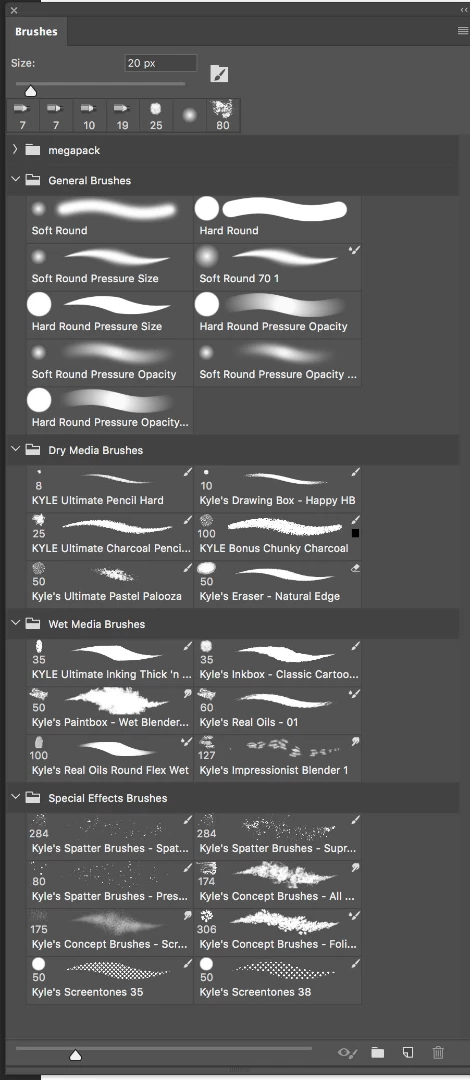
Hi, I can't seem to find the bristle tips in my brush panels. I doubt see the icons in any of my brushes. This is driving me crazy! I have the latest version of photoshop, running OS 10.12.6 on an 2017 iMac. I am also having the same issue on my laptop. I do have the "Erodable Point" icon though. Any help is appreciated! thanks
This topic has been closed for replies.
Correct answer davescm

Have you tried loading the legacy brushes, from the drop down menu at the top right of the brush panel?

Dave

1 reply

davescm
Community Expert
davescmCommunity ExpertCorrect answer
Community Expert
December 29, 2017

Have you tried loading the legacy brushes, from the drop down menu at the top right of the brush panel?

Dave

Participant
December 29, 2017

Thank you kind sir!

davescm
Community Expert
Community Expert
December 29, 2017

You're welcome

Dave