Brush and eraser tool only makes dots using pen
I'm using CS6, and after switching to a new laptop recently, the brush and eraser tools are not working well when I am using the pen (also for tools that involve continuous strokes like the clone stamp tool). I can only make a dot for all strokes I am doing, but PS seems to recognise me doing the dragging movement since it still works for tools like dragging the rectangle tool... very occasionally makes a straight line but never the intended strokes.
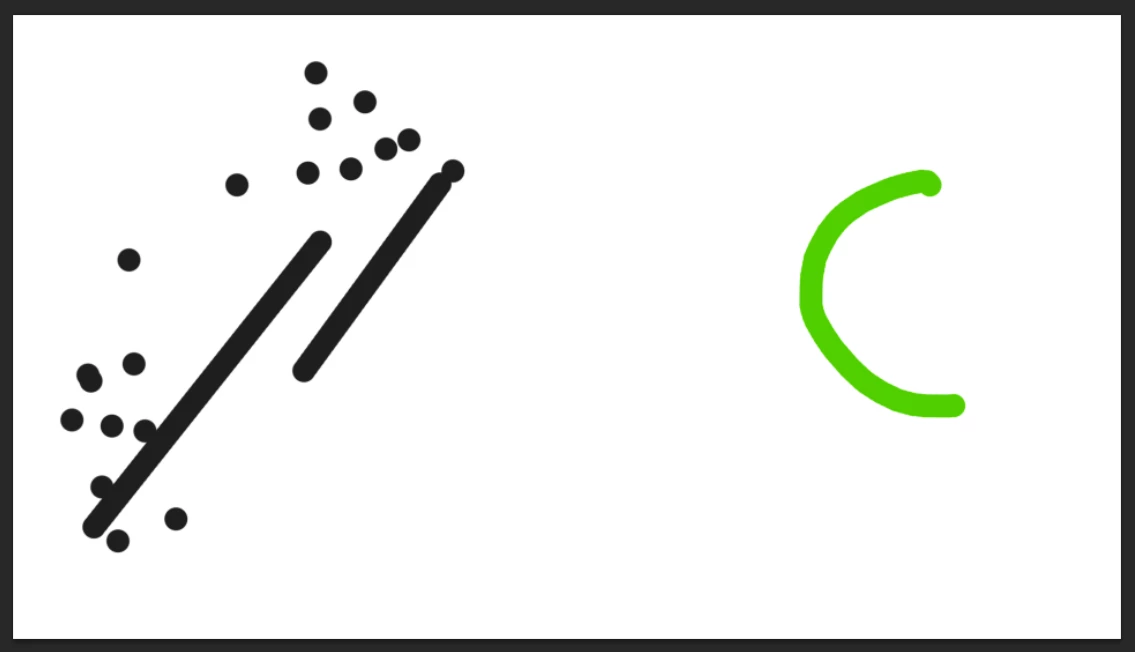
The brushes do not seem to have issues when I use the mouse or trackpad (green) but only have issues with the pen (black). I tried with Paint and Microsoft Word and the continuous strokes are recognised so I think it may be something at the PS side.
I've never experienced this in the old laptop, so I am not sure what settings did I change... I've tried to toggle pen pressures in brush settings (using preset brushes) to on and off and it doesn't seem to solve the problem. Also tweaked the pen pressure sensitivity and still doesn't seem to work. I've tried reinstalling and installing and it does not appear to work as well.
I am using Windows 10, CS6, Lenovo Yoga C740.
Would appreciate any help!
 AdChoices