deanp59348653
Participating Frequently
September 29, 2020
Question

Brush becomes Eraser and vice versa

  • September 29, 2020
  • 1 reply
  • 1782 views

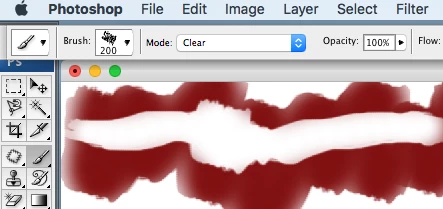
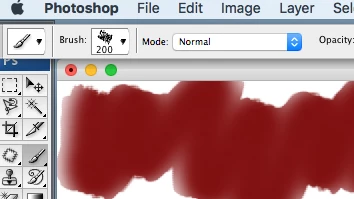
If your brush suddenly becomes an eraser for no reason and you do not understand why. Here is the fix. On the top menu on the left, change the MODE  selection to Normal and your brush is back to normal. If you want it becomes an eraser brush change Mode to CLEAR. 
This topic has been closed for replies.

1 reply

Nancy OShea
Community Expert
Community Expert
September 30, 2020

Which version # of Photoshop & OS do you have?


The Eraser can be a brush, pencil or block with the characteristics available to each. For example if brush is selected, the eraser's size, hardness, opacity, flow and smoothing can be adjusted as you would with a normal paint brush.  Ditto for pencil.   See screenshot from PS CC 20.


Nancy O'Shea— Product User & Community Expert
Participant
December 26, 2020

this does not work on my 2021 german version .


brushes which worked before as brush now are erasors and it cannot be switched to be brush again

julianf42670563
Participant
February 3, 2021

This bug is a nightmare, any fix coming soon?