

Brush blend mode is not working.
Last week I spend 5 days in a class learning how to do digital painting. We used the brush blend mode in both multiply and screen. When using these blend modes the color in the image would either be darkened or lightened. NOTE: it was the color in the image that was affected.
Recently something changed. Now when I use these blend modes in this way the program picks up the color that is in the color picker box (I don't know the term for it, in default it is black or white).
This happened after I was using the blend mode of COLOR. It seems to me that the brush is now broken because it will not release the COLOR ASPECT of the brush.
It didn't behave this way before.
I have spent 3 separate times (many hours) working with the techs at Adobe who are telling me this is the way it is supposed to work. I tell them that they are incorrect, but alas they don't believe me.
As I said I spent 5 days last week and a lot of time before using multiply and screen to create light and shadows directly on an image. At that time it didn't pull outside colors, it just darkened or lightened the color of the subject I was working on.
The techs had me reset preferences (3x's). It didn't help. He deleted the application (upon my request) and reinstalled it. Still doesn't work. I'm not sure the application actually was deleted as all my extensions were present.
I'm at a loss for what to do.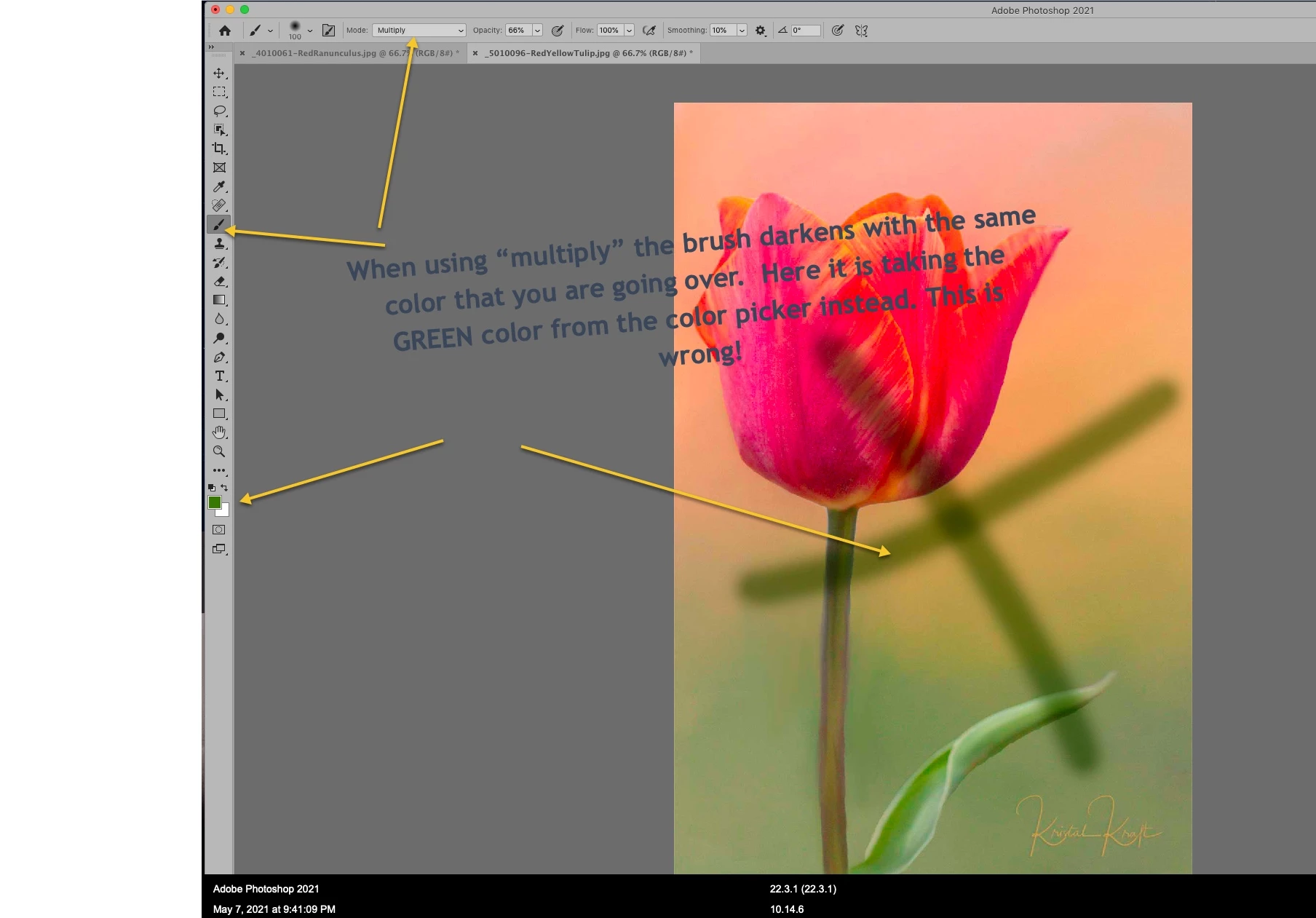
Suggestions?
Thank you in advance. (Mac operating system, Mojave, Photoshop CC)
kk
 AdChoices