Participant
August 26, 2010
Question

Brush cursor problem with photoshop CS5 MAC painting

  • August 26, 2010
  • 15 replies
  • 32861 views

Hi all,

i got a serious and annoying problem when i paint,and i'm going crazy because with CS4 photoshop i never got this problem

example:

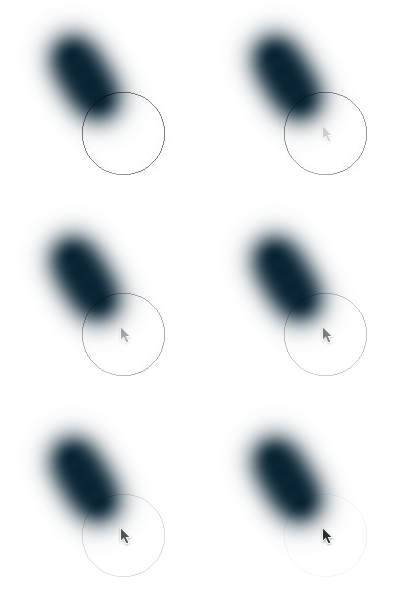
when i paint and press with my tablet WACOM INTUOS 4 and release pen my brush cursor change aspect from circle to cursor  to OS X Mouse Cursor for a little bit second and then return to classic brush round circle repeatedly in any brush press-release -press-relase (painting)


if i rotate my grip-pen to erase something, this "change" move cursor about 5/10 pixel and then return in start position and any work become impossible and hard.

I tried to install the new driver wacom for a night trying to solve this problem.

but ....at the end i give up and turn off my wacom, and i discovered that my problem isn't the tablet but Photoshop CS 5!

why???

if i  draw/paint with the mouse the "blink cursor joke" is the same!!!

i'm very frustrated for this problem!

i read a lot of forums,

try to turn off open-gl

try to re-install

try this.. try that..

nothing!

please help me!!

thank you and sorry for bad English

PS: here is a gif example for the problem
    This topic has been closed for replies.

    15 replies

    Participant
    February 23, 2011

    Hello guys

    i already update my photoshop, is the last version (12.0.2) supose to fix the bug cursor and the cmd+t...

    and my  mac 10.6...

    but the bugs still there...

    i already reboot my mac....sometimes works fine...but sometimes still the bug

    can anyone help me? =/

    Participating Frequently
    January 30, 2011

    After dealing with it for so long I've figured out that my problem occurs each time I use the free transform tool (Ctrl+T), and can be recovered by merging a new blank layer back down. Hope it would be useful information for anyone who's still trying to fix it, if there is.

    Participating Frequently
    December 6, 2010

    I came up with a solution that might fix the issue temporarily, that is, when the problem appears, create a new layer and merge it back to the layer you are working on. So far it seems to work better than to restart photoshop. Hope it works for you too.

    Still, I wish a formal solution form adobe would come out soon.

    Participant
    December 6, 2010

    Started having this problem with cursor some short time ago.

    Mac Pro - 2 months old, Mac OS X  10.6.5, Quad-Core Intel Xeon, Chipset Model: ATI Radeon HD 5770

    PS CS5 Extended,

    For the last week or so, regardless of the tool chosen I get this cursor

    I have read this whole thread and tried all the usual - trashed preferences, switched on off OpenGL, etc.

    Anyone any ideas. I am finding this very frustrating and makes using the app very difficult.

    Just loaded up PS CS4 extended and the same problem occurs. Never used to.

    Why is PS locked into this one cursor and how do I unlock it?

    Thanks in advance.

    Inspiring
    December 7, 2010

    Pugwash,

    Sounds like you may be running into this:

    http://forums.adobe.com/thread/760893?tstart=0

    There are many different symptoms.

    November 17, 2010

    I want to thank all of you for your posts in my adobe forum thread!!

    I can't belive how many of you got the same problem!

    I'm not using CS5 anymore since my problem!!!  I use it for some kind of graphic works (  Content-Aware Fill is very usefull) but anymore with my wacom!

    I'm using CS4 for my personal painting works with wacom intuos 4L.

    Is impossible to paint with CS5.... so all of us are waiting for some update or fix.

    Thank you again......

    adobe WAKE UP! what are you waitin' for?

    bye

    Legend
    December 7, 2010

    The 12.0.2 update addresses the original issue posted on this thread:

    http://blogs.adobe.com/jnack/2010/12/photoshop-cs5-update-12-0-2-now-available.html

    (not the Apple API change issue listed just above this post). We're still working with Apple on the issue since it affects more products than just Photoshop.

    Message was edited by: Jeffrey Tranberry

    Adobe Employee
    December 7, 2010

    Damn you I was waiting to send this out too.

    HA

    Dave

    Participant
    November 17, 2010

    I'm having the same problem. Just purchased my 27" 2.8 iMac. Retouching in PS CS5 and i noticed my cursor was 'jumping' every now and then when brushing with my Intuos4 Medium. I went to trusty google and came across this thread. Not happy

    I'd love it to be fixed!

    Participant
    November 17, 2010

    It's mid November. Where's the fix? I've used a Macbook Pro i7 since August and occasionally using a Wacom Graphire3 tablet. No problem. 

    Hoping it will be here, ASAP.

    Wacom, Apple, and CS5 are problematic for me. The pen does not funk out in other programs until after it freezes while using it in CS5 Photoshop.

    Issues:

    Switching between the key commands for hand and direct selection tool (A) it will hang/freeze on the hand. I have to restart the whole computer because the cursor freezes in the hand no matter what program or where I go to on my computer. I started having problems after I upgraded the tablet driver. The pen was too jumpy making it difficult to grab the pen handles. The problem did not occur when using the pen tool, only after I tried to edit using the direct selection.


    I switched the driver but the problem remains. Quitting Photoshop does not alleviate the problem.

    I can't go back to CS3. I moved straight to CS5 after the third Nvidia card fried my last Macbook Pro.

    Eager for that fix!

    Participant
    October 29, 2010

    Hello everybody,

    I can't belive nobody hasn't come up with a fix for this problem. I mean cs5 and intuos4 won't work properly on mac!

    Somebody, please!

    Adam Jerugim
    Inspiring
    October 29, 2010

    We've got a fix in-hand and are currently testing it to ensure that it solves your issue.  I can't comment on when it'll be available, but just know that we're aware of the problem and are working to get a solution out to users ASAP.

    Thanks.

    Participant
    October 29, 2010

    Great to hear Adam. I hope you guys will get it work soon, good luck!

    Edward Caruso Photography
    Participating Frequently
    September 28, 2010

    Any chance those also effected by the slow painting all have Nvidia video cards? I have access to 3x Mac pros with these cards (updated and w/openGL off) and they all have same problem but my old macbook pro with ATI Raedon card is fine

    Participant
    September 28, 2010

    ATI Radeon HD 4850

    My problem may be different as it is with the cursor dancing between whatever tool I'm using and the black arrow, but I haven't noticed any performance issues.  Just the cursor disappears while I am painting and I have to guess where the boundaries are of the brush I am using.

    Participant
    September 29, 2010

    nVIDIA GE FORCE 120 

    OPEN GL <on>       

    Similar to above. We just upgraded to CS5 to see if it works any better, also performed some maintenance (font cache, permissions).

    Brush cursor changes to a standard black arrow. When I hit "E" the eraser cursor does appear, but hit "B", and arrow, again. Keep messing around between "E" and "B" and you can get the proper brush cursor back.

    No sense worrying, hopefully the 10.6.5 will bring the smooth Photoshopping back.

    Participant
    September 28, 2010

    Sometimes, after working on large files, making huge edits with brush tools, occasionally I'll be stuck with the brush tool when I want to change to the move tool, or any other tool. So any tool I change to, the correct tool is highlighted, but it will still be a brush. Only fix is to restart Photoshop.

    I think there are tons of bugs with GL, I've come across almost everyday that forces me to restart... and i'm still on CS4, moving to CS5 now....I ran the demo for a month, seems the same unfortunately. Graphics Update did not help much, but at least someone is aware.

    I have to say this hasn't been the most stable last 2 years for MacPro/Photoshop combo. We spend a lot of cash for these updates/upgrades, and lots of times we end up with issues that prevent us from efficiently getting our jobs done. Yet one upgrade needs another, life gets faster, demands increase... we must update. Rather than features, I really prefer performance enhancements. A lot of this new stuff seems like it's for internet kids who only want to superimpose photos. Some of us actually have work to do.

    Participant
    September 28, 2010

    Hi.

    Are you a specialist?

    Participant
    September 28, 2010

    Have you considered asking a question with more than 4 words, to get a proper response... yet? Or are you still working on it?

    Participant
    September 17, 2010

    I'm having the same exact issue.  iMac 2.8 GHz Intel Core i7 w/ 8gb RAM, Wacom Intuos4 Tablet. 

    Everything described above is the same for me, but the strange thing is that I have been using CS5 for a few weeks now and the problem just started happening to me right in the middle of an edit.  Restarted everything, tried booting in 32-bit, nothing I do will make it stop.  It even does it while I'm in the Preferences menu, it dances between the arrow and the hand.

    It is very annoying to say the least.  When I paint the oscillating brush/mouse pointer turns into a solid mouse and I have to guess where the edge is at.  God I hope there's a solution soon!

    September 28, 2010

    @horkington  ... i hope too! :\