megans9119429
Participant
June 27, 2018
Answered

Brush flow setting missing from options bar

  • June 27, 2018
  • 2 replies
  • 6649 views

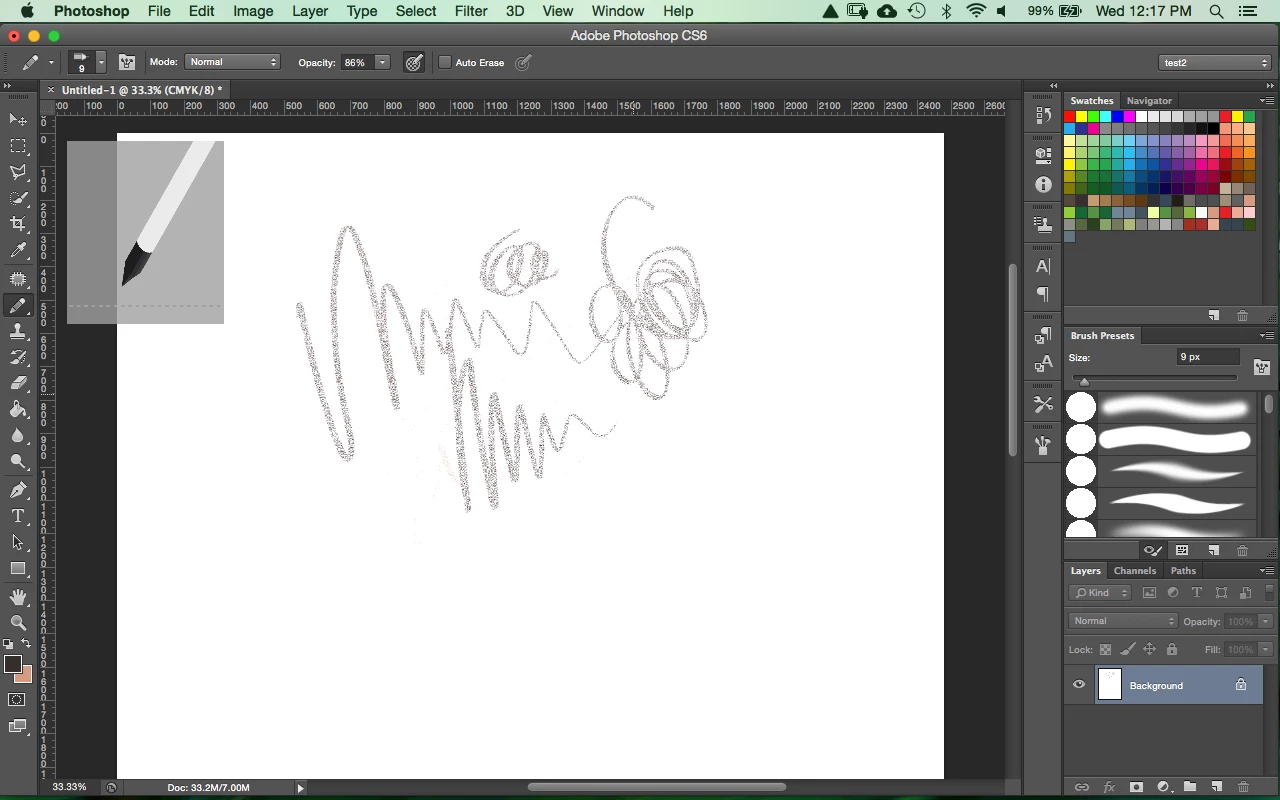
My flow option is missing from my options bar for my brushes. Only the opacity is showing. The brush strokes look terrible for a basic pencil preset and I can only make strokes with my wacom tablet, not even on my trackpad. Help Please!! What else can I do? I've tried resetting my workspace and clicking the options in the window drop menu with no success. Here is a screen shot of my menu bar and what the pencil stroke looks like...
This topic has been closed for replies.
Correct answer c.pfaffenbichler

You might be confusing the Brush Tool and the Pencil Tool.

2 replies

megans9119429
Participant
June 27, 2018

As soon as I posted this question I figured that out. I never switch my paint brush to pencil and some how it got switched without me noticing. Thanks for responding.

c.pfaffenbichler
Community Expert
Community Expert
June 27, 2018

Do you have Photoshop > Preferences > Tools > Use Shift Key for Tool Switch checked?

Otherwise inadvertently hitting the single key shortcut multiple times might change the Tool selection.

c.pfaffenbichler
Community Expert
c.pfaffenbichlerCommunity ExpertCorrect answer
Community Expert
June 27, 2018

You might be confusing the Brush Tool and the Pencil Tool.