
Zesty_wanderlust15A7
Known Participant
July 12, 2022
Answered

Brush Group adding Subfolder (repeat)

  • July 12, 2022
  • 1 reply
  • 282 views

I see someone asked about this long time ago and there was no definitive solution...?

Custom brush sets all load with group folders - is... - Adobe Support Community - 9595738


When I arrange My Brushes like this...
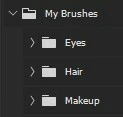
 

... then delete the group and load it again, I always get this...
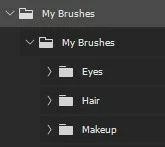
 

Is a solution known by now?

And if not, how come some brush sets do load properly with just one level of subfolders? How are people making them?

Correct answer c.pfaffenbichler

What do you select when you »Export Selected Brushes«? 

The Groups »Eyes«, »Hair«, … or the Group »My Brushes«? 

1 reply

c.pfaffenbichler
Community Expert
c.pfaffenbichlerCommunity ExpertCorrect answer
Community Expert
July 14, 2022

What do you select when you »Export Selected Brushes«? 

The Groups »Eyes«, »Hair«, … or the Group »My Brushes«? 

Zesty_wanderlust15A7
Known Participant
July 14, 2022

"My Brushes," and seems that's my error...

Selecting the subfolders and Export as "My Brushes" does work! Phew & thanks! 🙂

I feel both ways should work properly, cos this is the less intuitive way to me, but there may be some logic to it I have yet to realize.