
Participant
January 14, 2017
Answered

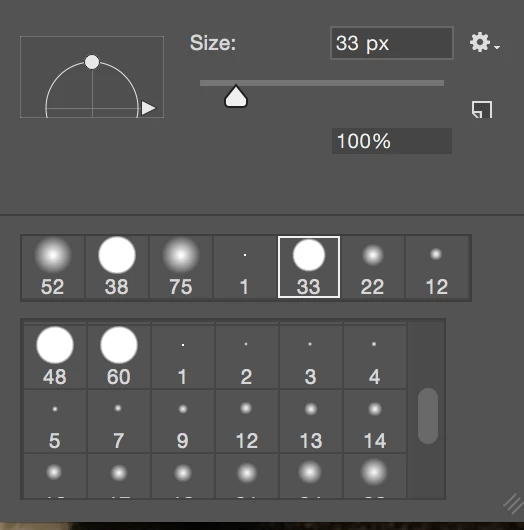
Brush hardness has disappeared?

  • January 14, 2017
  • 2 replies
  • 9304 views

I am using Photoshop CC 2017 and no longer see the Hardness setting when I use a brush, so I can't adjust the fuzziness of the brush. is this a "feature" of PS 2017? Did I accidentally change a setting? Is this a bug? How do I get it back, not having it is driving me nuts
    This topic has been closed for replies.
    Correct answer barbara_a7746676

    Try deleting the Photoshop preferences file.

    1. Quit Photoshop.
    2. Position your fingers over Ctrl-Alt-Shift (WIndows) or Cmd-Ctrl-Option-Shift (Mac), but do not press those keys yet.
    3. Start Photoshop.
    4. IMMEDIATELY after starting Photoshop, press down on those keys.
    5. A dialog box will appear asking if you want to reset. Select Yes. If you don't see the dialog box, you didn't press the keys down fast enough.

    2 replies

    barbara_a7746676
    Community Expert
    barbara_a7746676Community ExpertCorrect answer
    Community Expert
    January 15, 2017

    Try deleting the Photoshop preferences file.

    1. Quit Photoshop.
    2. Position your fingers over Ctrl-Alt-Shift (WIndows) or Cmd-Ctrl-Option-Shift (Mac), but do not press those keys yet.
    3. Start Photoshop.
    4. IMMEDIATELY after starting Photoshop, press down on those keys.
    5. A dialog box will appear asking if you want to reset. Select Yes. If you don't see the dialog box, you didn't press the keys down fast enough.
    Trevor.Dennis
    Community Expert
    Community Expert
    January 14, 2017

    What brush preset?  Not brushes have that option.   Try selecting one of the round brushes at the top of the panel.

    Participant
    January 14, 2017

    I've tried selecting all sorts of the brushes and tried multiple brush presets, I tried to hit "Reset Brushes". Nothing is making it appear.