
Answered
Brush Issue - will not paint black or white when selected (changes shade with each stroke)
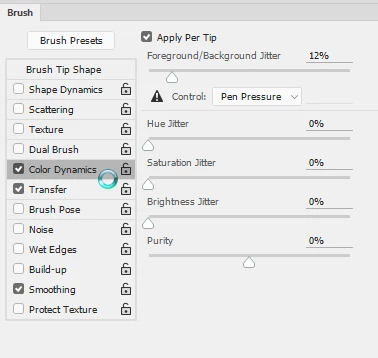
I've noticed lately that when I try to use the brush tool in Photoshop, be it for masking purposes or otherwise, it will not paint pure black or white when I first try to paint. It seems to toggle between different shades of black, white and grey with every click/brush stroke. My opacity is at 100% and the blend mode on my layer is "Normal". I don't know if I'm doing something wrong or if it's a glitch, but I've never had this issue before.
I am working on a retina display MacBook Pro with the newest version of Photoshop CC. Any help would be greatly appreciated! Thanks!
 AdChoices