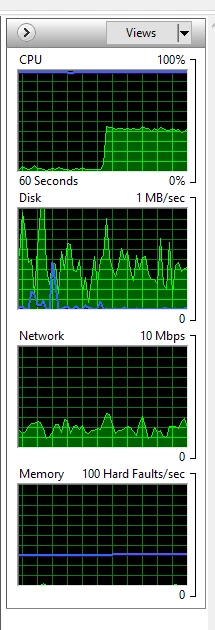
It's interesting that your ram usage is so level. Could it be maxing out the full alocation to Photoshop?
Have you tried restarting Photoshop or going Edit > Purge > All?
Check the root directory of your primary scratch drive.
What size are the Photoshop Temp files, and are there any orphaned temp files (they don't have todays date, or are still there when Photoshop is closed). If you have orphaned Photoshop temp files delete them. What I am getting at here is that if alocated ram is maxed out, then it will be using scratch space, but it seems unlike that would be happening with a small brush preset in a small document.
Try starting Photoshop while holding down the Shift key to prevent third party plugins from loading. If that fixes it then you';; have to eleminate one by one.
Try turning off the rulers, if on.
Is this mouse or tablet btw? Or both? If tablet, which one and which API are you using? (Windows Ink or WinTab)
I just tried my system with a 5000 pixel brush in a 20000 pixel square document, and it barely lagged. There is some disk activity and I have a 14Gb temp file on the scratch drive. It is using hardly any ram (I have 64Gb)
It's my bed time so someone else might help you for a while.
Good luck
I've found out what was the problem.
Smoothing in Brush Settings.
https://www.bwillcreative.com/ways-to-fix-brush-lag-in-photoshop/#:~:text=The%20most%20common%20reason%20for,in%20the%20upper%20settings%20bar.

 AdChoices