
Question
Brush opacity % inputting incorrectly
I have a minor but irritating issue. When I manually input the brush opacity % into its field it often swaps the numbers around.
For instance, 25% becomes 52%,
50% becomes 05%, and so on.
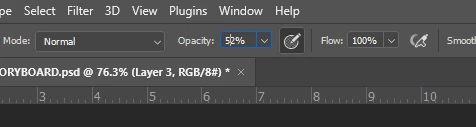
As you can see, the cursor seems to jump back one space after the first number is entered. Weirdly, this only seems to happen if a number lower than 6 is entered. (For instance, 59% will become 95%, but 60% will remain 60%, and so on up)
This is not a dire problem. Once the incorrect number is entered, I can usually clear it and input the number correctly. But it sure would be nice if this weren't happening in the first place.
 AdChoices