
Participant
July 17, 2023
Question

Brush painting in black and white

  • July 17, 2023
  • 4 replies
  • 242 views

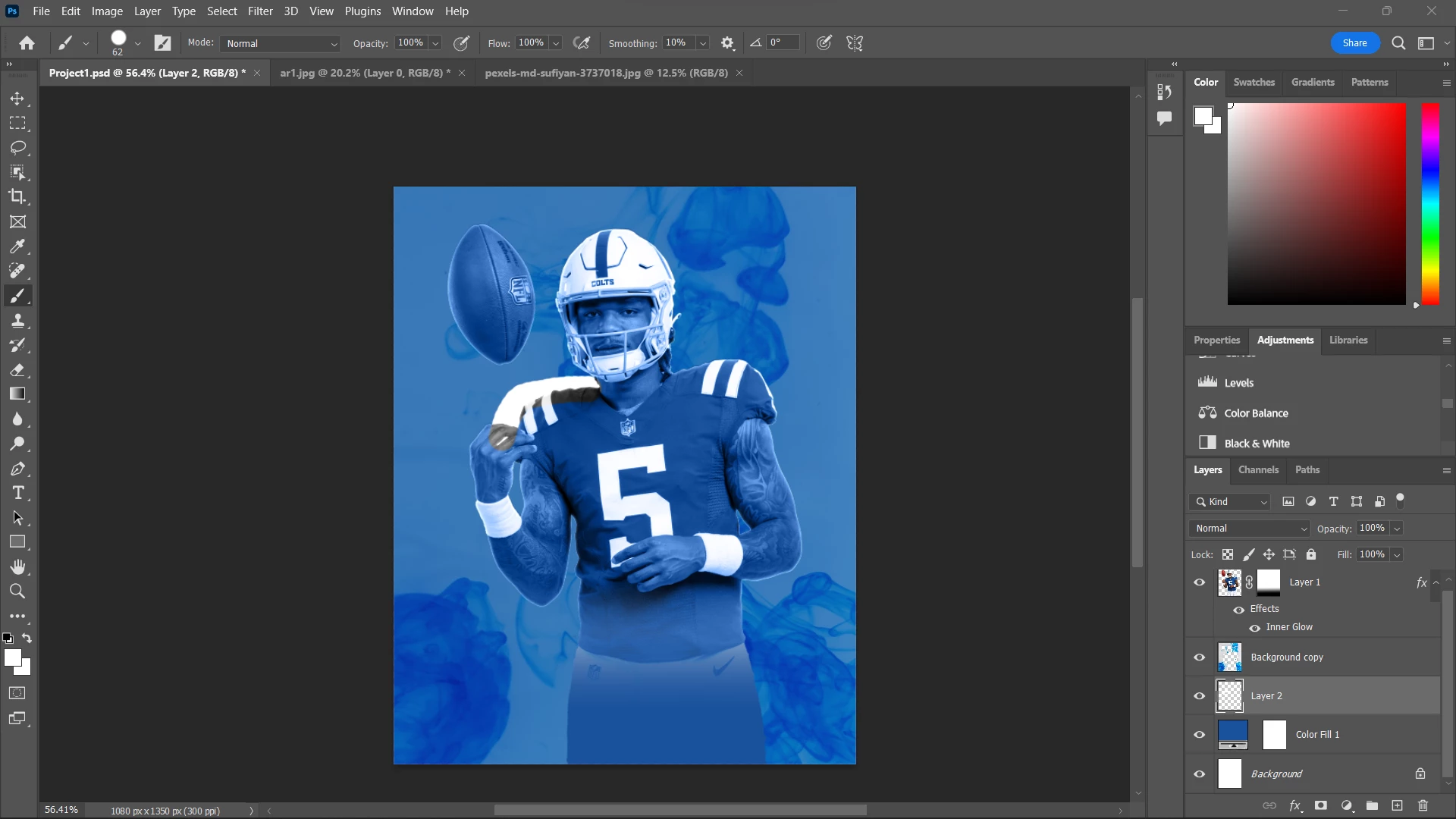
Hi! I'm trying to follow a tutorial (using my own ideas and player) and I noticed my gradient and paintbrush tool were acting weird. I'm trying to paint a white outline around my player, but it's turning black and white for some reason. What is going on? Similar when I tried to make a gradient, it would turn everything black and white even though only white was selected. Thank you! You can see the issue on the top left shoulder. It's my first day so I would appreciate some kindness!
    This topic has been closed for replies.

    4 replies

    jane-e
    Community Expert
    Community Expert
    July 22, 2023

    @Fiona31118171w3o4 


    Your post was moved from Using the Community to Photoshop Developers, but you are not a developer and your question is not a developer question. I've moved it again from Photoshop Developers to Photoshop for you.


    • When tools get weird, you want to reset them. Right-click the tool in the options bar (not Tools panel) and choose Reset Tool(s).
    • Instead of painting a white ouline, try adding a white stroke as a Layer Style (fx at bottom of panel)
    • If the Gradients don't work, choose Classic Gradient in the options bar instead of Gradient.
    • If you have an older GPU that does not support DirectX 12: 
      Go to Preferences > Technology Previews > Enable "Deactivate Native Canvas" > Restart Photoshop


    Jane


    John T Smith
    Community Expert
    Community Expert
    July 17, 2023

    That MAY be a video driver problem


    Do not count on Windows to be fully up to date when it comes to device drivers
    Go to the vendor site to be sure you have an updated driver for your graphic adapter
    .
    nVidia Driver Downloads https://www.nvidia.com/Download/index.aspx?lang=en-us
    -for all Adobe programs use the STUDIO driver, not the GAMING driver
    -To achieve the highest level of reliability, Studio Drivers undergo extensive
    -testing against multi-app creator workflows and multiple revisions of the top
    -creative applications from Adobe to Autodesk and beyond
    .
    If you have a laptop you MAY also need to check for a laptop specific nVidia driver
    -SOME laptops require an approved driver from the laptop company, not nVidia
    .
    AMD/ATI Driver https://www.amd.com/en/support
    .
    Intel https://downloadcenter.intel.com/product/211969/Intel-HD-Graphics-Family
    https://www.askwoody.com/newsletter/free-edition-working-with-the-intel-driver-support-assistant/

    Participant
    July 17, 2023

    Hi! Thank you both for helping me move my question. Like I said, first day woes, haha.


    I asked the question in Reddit as well, and I figured out it's because I'm using a layer blend mode called Luminosity, which is affecting my outline layer. How do I make the layer blend stop bleeding? Do I need to apply the filter to layer 1, save it as a png, and then reinsert it so that way it doesn't need the layer blend but still have the color? Is there any easier way? Hopefully that makes sense. Thank you!

    John T Smith
    Community Expert
    Community Expert
    July 17, 2023

    You need to ask program questions in the forum for the program you are using
    To ask in the forum for your program please start at https://community.adobe.com/
    Moving from Using the Community (which is about the forums) to the correct forum

    kglad
    Community Expert
    Community Expert
    July 17, 2023

    in the future, to find the best place to post your message, use the list here, https://community.adobe.com/

    p.s. i don't think the adobe website, and forums in particular, are easy to navigate, so don't spend a lot of time searching that forum list. do your best and we'll move the post if it helps you get responses.


    <"moved from using the community">