
Participating Frequently
November 6, 2017
Answered

Brush samples to background color

  • November 6, 2017
  • 2 replies
  • 3365 views

Something new is going on and I can’t find the fix. When sampling a color using the brush tool the sampled color is set as the background color. I used to go to the foreground color where it could be used. Now I have to switch background to foreground to use the color. Anyone have the fix for this? Thank you!
    This topic has been closed for replies.
    Correct answer Semaphoric

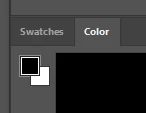
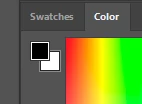
    Look in the Color panel, you may have the background color selected. You need to look closely, as the highlighting is very subtle

         Foreground Color selected:


         Background Color selected:


    2 replies

    Semaphoric
    Community Expert
    SemaphoricCommunity ExpertCorrect answer
    Community Expert
    November 6, 2017

    Look in the Color panel, you may have the background color selected. You need to look closely, as the highlighting is very subtle

         Foreground Color selected:


         Background Color selected:


    Participating Frequently
    November 6, 2017

    Ronald, Semaphoric, Everyone here, Thank you!

    Legend
    November 6, 2017

    Make sure the foreground swatch is active in the color panel