Participant
December 31, 2016
Answered

Brush size thumbnail while drawing

  • December 31, 2016
  • 2 replies
  • 920 views

Basically how do I increase or decrease size of thumbnail of my brush while I am drawing. I mean basic brush  have 5 size but thumbnail looks like its about 20 size? Saw it in twitch

    This topic has been closed for replies.
    Correct answer Trevor.Dennis

    Sounds like you might be using a soft brush.  Check which cursor you are using in Preferences > Cursors
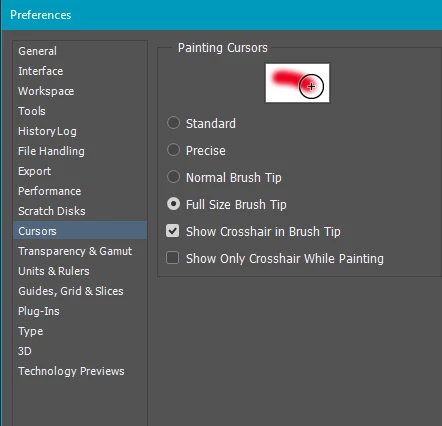
    I prefer Full Size and Show Crosshairs which gives me the best of both worlds.

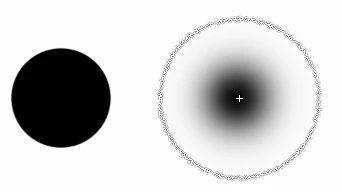
    This shows the same brush first fully hard, and then fully soft.  In the first case the cursor exactly matched the brush as it stamped down.  In the second example, it shows how far the gradient extends
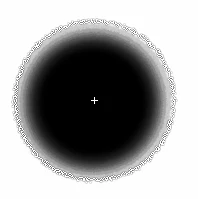
    If I copy the layer enough times, it shows how far the pixels had spread — the full extend of the cursor
    2 replies

    Participant
    January 1, 2017

    No i´m asking more about cursors. Is there more ways to play with how they look? I´m using Win 10

    Trevor.Dennis
    Community Expert
    Community Expert
    January 1, 2017

    StarlitTheHeavens wrote:

    No i´m asking more about cursors. Is there more ways to play with how they look? I´m using Win 10

    No sorry.  Just what you see in Preferences > Cursors.  As I said in post #1, using the Full size cursor works for me, as I like to know how far the softest pixels are going to spread, and I also like to know where the centre of the brush is for single stamps of the brush.  If you think in terms of all the tools that use the same cursors, like the Clone tool, then you can see why positional accuracy is important.

    Trevor.Dennis
    Community Expert
    Trevor.DennisCommunity ExpertCorrect answer
    Community Expert
    December 31, 2016

    Sounds like you might be using a soft brush.  Check which cursor you are using in Preferences > Cursors

    I prefer Full Size and Show Crosshairs which gives me the best of both worlds.

    This shows the same brush first fully hard, and then fully soft.  In the first case the cursor exactly matched the brush as it stamped down.  In the second example, it shows how far the gradient extends

    If I copy the layer enough times, it shows how far the pixels had spread — the full extend of the cursor

    Participant
    December 31, 2016

    but is there any way to play with thumbnails even more ?

    Jeff Arola
    Community Expert
    Community Expert
    December 31, 2016

    What operating system are you using?