
aleisha7468705
Participant
March 9, 2020
Answered

Brush Smoothing when combined with Buildup in Photoshop 21.1.0

  • March 9, 2020
  • 2 replies
  • 350 views

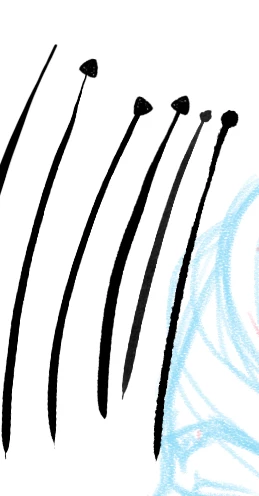
Hi, whenever I turn on the smoothing option for any of the Kyle brushes that have Buildup turned on, it gets this weird max pressure spot at the start of the stroke. This doesn't seem to affect other brush packs for some reason. Anyone else having this issue?


Edit: I'm using a wacom tablet. Have tested this with an intuos and cintiq, with current drivers and previous driver, on a macbook pro and iMac.
 

This topic has been closed for replies.
Correct answer PECourtejoie

Hi, please update to 21.2.1, and report here it it helped, as brush issues involving buildup seem to be addressed: https://helpx.adobe.com/photoshop/kb/fixed-issues.html#photoshop-desktop-fixed-issues

2 replies

PECourtejoie
Community Expert
PECourtejoieCommunity ExpertCorrect answer
Community Expert
July 23, 2020

Hi, please update to 21.2.1, and report here it it helped, as brush issues involving buildup seem to be addressed: https://helpx.adobe.com/photoshop/kb/fixed-issues.html#photoshop-desktop-fixed-issues

Bojan Živković11378569
Community Expert
Community Expert
March 9, 2020

No, I am testing with watercolor brushes / Kyle's Real Watercolor - 80.../ and everything works fine, using latest version of Photoshop on Win machine. I have tested using mouse.

aleisha7468705
Participant
March 9, 2020

Ahh I should have mentioned in the post.. I'm using a wacom tablet. Have tested this with an intuos and cintiq, with current drivers and previous driver.