Participant
December 20, 2018
Question

Brush stroke not smooth

  • December 20, 2018
  • 2 replies
  • 652 views

Hi there,

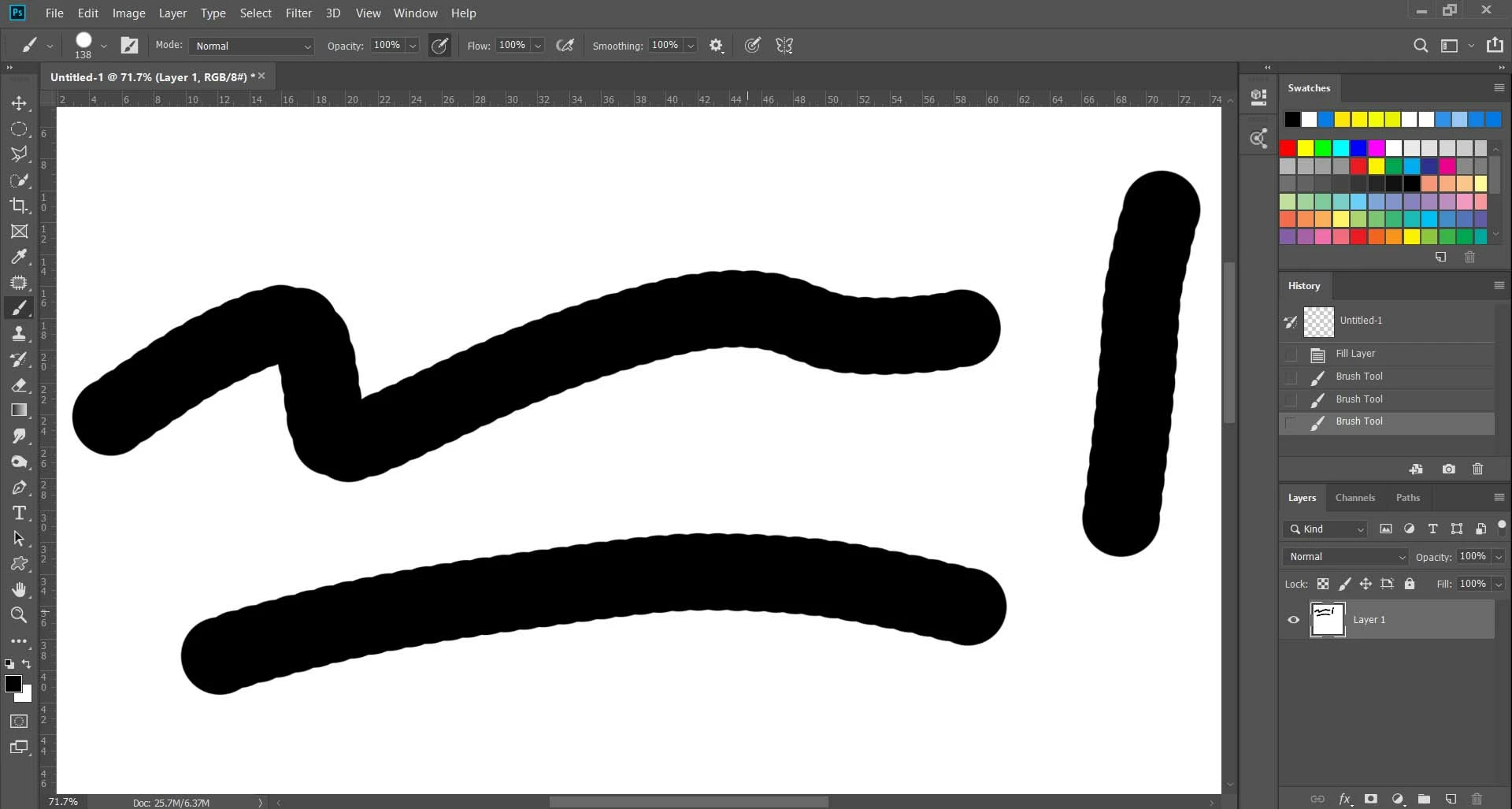
I am having a weird problem stroking with brush. When I stroke or draw with brush it gives some sort of jagged line instead of smooth lines. How do I solve this.

This topic has been closed for replies.

2 replies

BeanFactory
Participating Frequently
December 20, 2018

Have you checked your brush settings to see how much spacing you have on this brush? It looks like you have 100% hardness and at least a little spacing. Turn the spacing down and that should help.

Sahil.Chawla
Adobe Employee
Adobe Employee
December 20, 2018

Hi there,

This shouldn't be happening, let us help make this right.

Could you please let us know the exact version of Photoshop and operating system you're working on?

If the brush is at 100% hardness it makes a smooth outline. Choose a standard brush like Hard Round and it should be a smooth circle. Reduce the hardness and it will become rough to indicate a feathered edge. To get rid of this go to Preferences > Cursor then change to Normal brush tip, and see if it helps.


Regards,
Sahil