
Brush strokes looking jagged and pixelated compared to other programs with the same canvas settings
Hey there!
Unsure if this belongs in Descussions or Bugs, but I put it in discussins just in case.
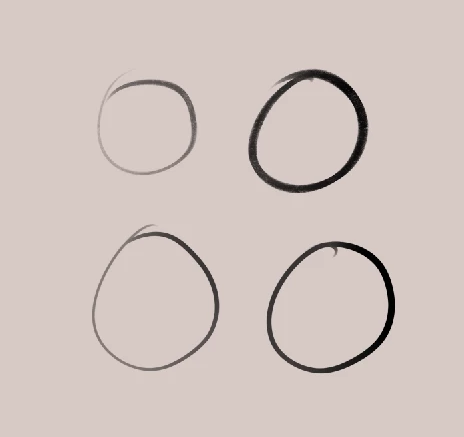
I recently got photoshop, since I wanted to test it out and see if it fits my illustration needs a bit more than my previous program Clip Studio Paint. The program is quite bit more complex than CSP and has a different layout than I am used to, but the biggest problem I have been facing is the canvas, or rather my brush strokes looking pixelated. I of course use a high resolution, since my illustrations tend to get quite large. Unfortunately, in Photoshop all of my strokes look incredibly jagged and pixelated. I have used a huge variety of brushes, since I wanted to get my favorite brush pack together consisting of different textures and brush shapes, so I tried out almost every kind of size, shape, texture etc.. I opened numerous new files with different settings, hoping one thing would make my brush strokes less jagged. I did get a couple of canvases where my brush strokes actually looked good, though the problem is that even with the same settings, another file looks completely different!
I will attach screenshots below, hoping that it shows the issue. I have looked everywhere on youtube and on the internet to see if there is a cause to this problem. Be it my pc being too weak, my settings being wrong, photoshop just looking that way or anything like that.
I apologize for the long text!
Maybe as a little note if this is important: its photoshop 2024 and the tablet I am using is the Huion Kamvas 24 plus. Also, my Windows version is Windows 10.
Canvas settings: 3500x4000 pixels ppi: 600
screenshot from photoshop. Top shows textured brush pressing lightly and then hard, bottom shows basic round brush pressing lightly then hard.
screenshot from clip studio paint, exact same resolution and size, textured brush on top, round brush on the bottom
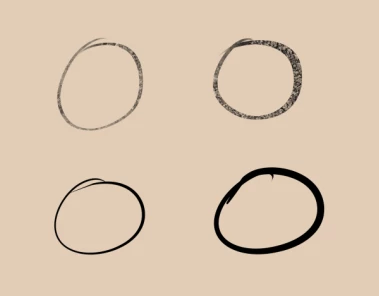
I hope it is clear enough that in Clip studio, it looks much smoother and better.
I really want to know if this is because of my pc, because of my settings or just because this is what it is supposed to look like in Photoshop. Never before have I seen artists have jagged and pixelated looking brush strokes on their canvas in photoshop.
I would be really grateful for any help with this!
 AdChoices