applesnail
Participant
February 9, 2019
Answered

Brush tool color picker and opacity problems

  • February 9, 2019
  • 1 reply
  • 434 views

Hello,

I just recently started using CC 2019 on my Mac -and it has been great - however all of a sudden I am having problems with my brush tool color picker and opacity.

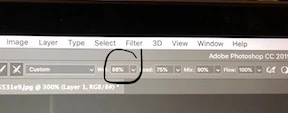
I will be using my brush tool and go to access the color picker by pressing "alt" or a Wacom stylus button, (I use both options) and the color picker does not show up with either- instead a strange little compass looking thing does (image below.)

Also when I am using the brush tool and go to change it's opacity by pressing a number key it doesn't change - the "wetness" changes instead.

I have never had these issues before and no amount of google searches is helping me.

I'd love to know what I'm doing wrong and why it suddenly started acting this way.

Thank you!

    This topic has been closed for replies.
    Correct answer Mohammad.Harb

    the option bar shows that you are using the mixer brush tool NOT the brush tool. Activate the brush yool from the option bar and everything will work properly.

    1 reply

    Mohammad.Harb
    Community Expert
    Mohammad.HarbCommunity ExpertCorrect answer
    Community Expert
    February 9, 2019

    the option bar shows that you are using the mixer brush tool NOT the brush tool. Activate the brush yool from the option bar and everything will work properly.

    applesnail
    Participant
    February 10, 2019

    Thank you so much, this was the problem.

    Because the brush tool, mixer brush, and color replacement brush all have the same keyboard shortcut I kept pressing 'B' and it took me to the mixer brush instead of the regular brush (I must have clicked it by accident and it became the last brush tool that was active so every time I used the keyboard shortcut it took me to the wrong brush tool.

    Thank you very much for your help!