Inspiring
October 22, 2021
Answered

Brush Tool lagging with dot but lines

  • October 22, 2021
  • 1 reply
  • 469 views

Hi!!


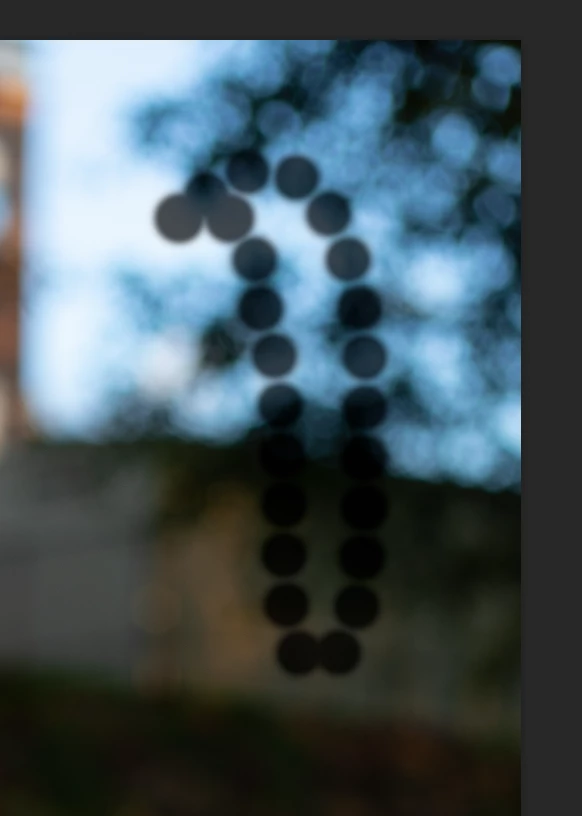
      I am a photographer and retocuher. I did not have the issue before but now (editing a lot pictures recently). The brush tool and healing brush start to lag and leave dots but lines. I use a lot frequency seperation tech, and the stupid brush toll impacted my work a lot and spend double work time. Any idea to solve? 


     Thanks. 
 

This topic has been closed for replies.
Correct answer barbara_a7746676

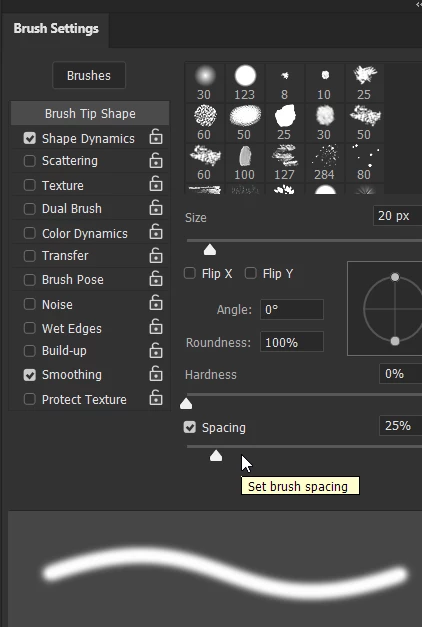
In the Brush Setting panel, what is the Spacing set to?

1 reply

barbara_a7746676
Community Expert
barbara_a7746676Community ExpertCorrect answer
Community Expert
October 22, 2021

In the Brush Setting panel, what is the Spacing set to?

Inspiring
October 22, 2021

Hi:


     It's 100% for spacing. I use the color frequency and not very efficient so changed to 100%.   So.. I have to save to 25%? 


barbara_a7746676
Community Expert
Community Expert
October 22, 2021

You will see a preview of what the spacing looks like at the bottom of the Brush Settings dialog box.

100% is too much spacing for what you want.

Even 25% can look a little lumpy sometimes.