
Inspiring
January 12, 2019
Answered

Brush tool weird behavior.

  • January 12, 2019
  • 4 replies
  • 1348 views

Hi, I have  this problem with the brush tool: When I use the brush and I want to create curved lines photoshop keeps make them angular. I have not found any solutions elsewhere, could you help me,please? I enclose an example.

(sorry for my bad english, I'm Italian)
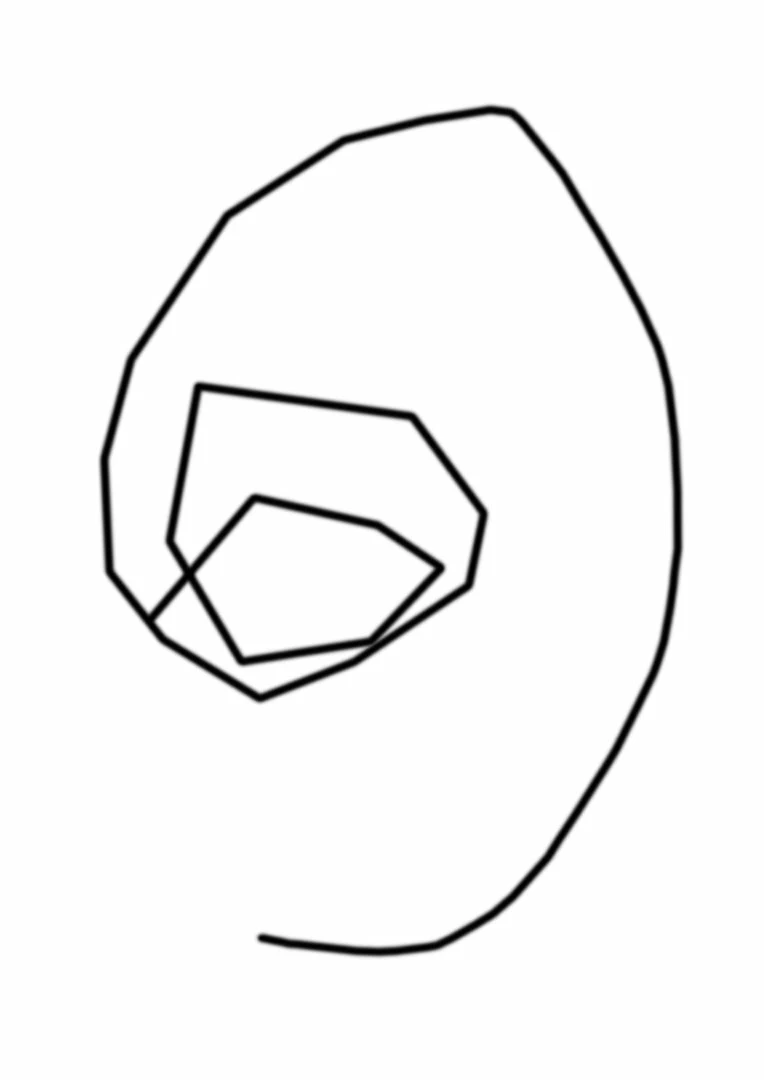
This topic has been closed for replies.
Correct answer rossellor46783896

I've tried to make a clean reinstallation of Windows 10 and now it works, I don't know why. Maybe it could have been the recent windows' upgrades(?)

4 replies

rossellor46783896AuthorCorrect answer
Inspiring
January 19, 2019

I've tried to make a clean reinstallation of Windows 10 and now it works, I don't know why. Maybe it could have been the recent windows' upgrades(?)

Semaphoric
Community Expert
Community Expert
January 13, 2019

Is this drawn using a tablet? Could be something mapped to the Shift key.

Inspiring
January 13, 2019

Yes, it's drawn using a graphic tablet, but even if I use the mouse the result is the same

Trevor.Dennis
Community Expert
Community Expert
January 13, 2019

So the Grid is not turned on?

The behaviour is the same for mouse and tablet?

What scale is your screen shot? Was it zoomed 1:1 (Ctrl Alt 0) or (Cmd Opt 0)?

Is it only happening with the Brush tool?

What about other tools that use presets (Healing brush, Smudge tool etc.)?

I wonder if it is to do with Smoothing and pulled string set to catch up?  OK, I just tried to duplicate it and could not get your exact results, but try turning smoothing off to eliminate it.

Can you confirm your Photoshop version and operating system for a start off?

Thanks

Inspiring
January 13, 2019

no, it's not checked

Bojan Živković11378569
Community Expert
Community Expert
January 13, 2019

I cannot reproduce your problem with Photoshop CC 2019 (20.0.1). Have you tried to reset tool/preferences?

Tool(s) can be reset using right-click on the tool icon in the Options bar.

Preferences can be reset from Preferences > General tab.

Inspiring
January 13, 2019

I already tried that.

Legend
January 12, 2019

Could it be that Snap to grid is checked?