Inspiring
April 21, 2021
Answered

brush tool with Alt + Shift key (Windows)

  • April 21, 2021
  • 2 replies
  • 731 views

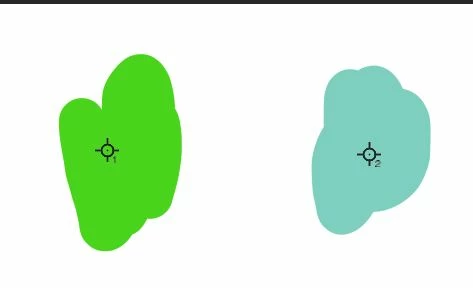
I discovered this by accident. If you are using the brush tool and hold the Alt + Shift key you get an eyedropper along with crosshairs as your tool. If you click anywhere you will get a crosshair along with a number. What is the purpose for this? 


This topic has been closed for replies.
Correct answer Trevor.Dennis

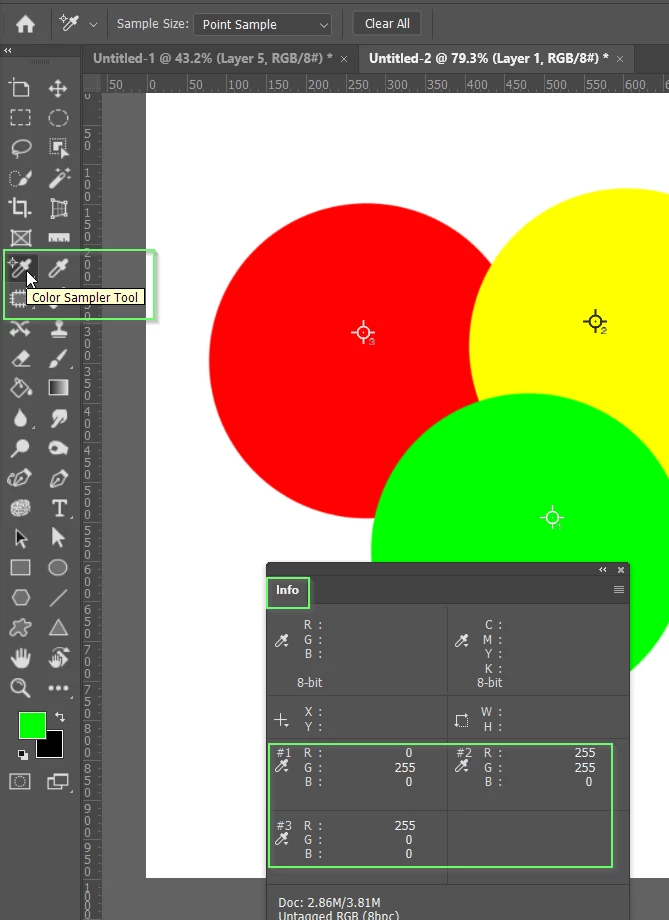
Photoshop has a number of 'spring loaded' shortcutss that momentarilly take you to another tool.  In this case it is the Color Sampler tool.  The values it records can be found in the Info panel.  Note to clear the cross hairs, select the color sampler tool and click on Clear All in the Options Bar

2 replies

Trevor.Dennis
Community Expert
Community Expert
April 21, 2021

If you are interested in spring loaded shortcuts, check out this video by Michael Ninness from MAX.  It's eight years old and some of it is out of date, but most of it is still relevant, and the content is pure gold.

Trevor.Dennis
Community Expert
Trevor.DennisCommunity ExpertCorrect answer
Community Expert
April 21, 2021

Photoshop has a number of 'spring loaded' shortcutss that momentarilly take you to another tool.  In this case it is the Color Sampler tool.  The values it records can be found in the Info panel.  Note to clear the cross hairs, select the color sampler tool and click on Clear All in the Options Bar