thelivingtrashcan
Participant
January 29, 2022
Question

Brushes disappeared overnight

  • January 29, 2022
  • 2 replies
  • 207 views

I normally use Photoshop with Kyle's megapack brush set, but when I opened up my computer today, all the brushes were gone except for the default folders. This has happened to me once before (about a year back or so), difference being that this time around I had reorganized the megapack into more accessible folders. 


I'm wondering if there's any chance of recovering the brushes - I know that I'm supposed to save them to the brush presets folder (which they are currently not in) - because for some reason I'm still able to use the lost brushes in my brush history (circled in red):
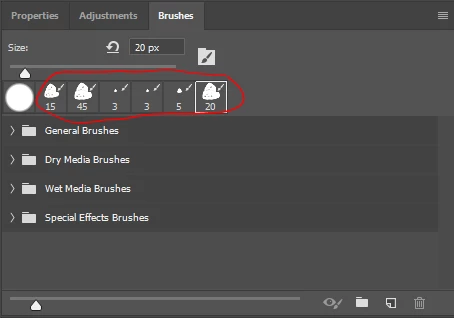
Does this mean it's possible somehow to recover the brushes with the folders intact without having to reimport them?


(also, WHY is this happening to begin with anyways?????)


OS: windows 

version: CC 2019

This topic has been closed for replies.

2 replies

Inspiring
February 3, 2022

I always save my brushes outside of Photoshop, on an external hard drive.

Sameer K
Community Manager
Community Manager
February 3, 2022

Hi,  

Thanks for reaching out! We are sorry about the trouble with Brushes on Photoshop on Windows. We are here to help!  


Could you please share the exact version of the operating system on your computer? Have you recently updated the operating system? Did Photoshop close properly, or did you notice any specific error messages during launch or exit? Were the brushes into a single group, or did you arrange them in different preset folders? 


You are working on Photoshop 2019; it is advised that you keep Photoshop up to date. Please update Photoshop 2019 to 2022 from the Creative Cloud desktop app.  

https://helpx.adobe.com/photoshop/kb/uptodate.html 


Please let us know if this helps!  

Regards, 

Sameer K.