
Inspiring
October 9, 2021
Question

Brushes missing

  • October 9, 2021
  • 2 replies
  • 415 views

Device: MAC Big Sur, Photoshop 22.5.1

Hi,

I was shocked to see that all of my brush presets have disappeared. 
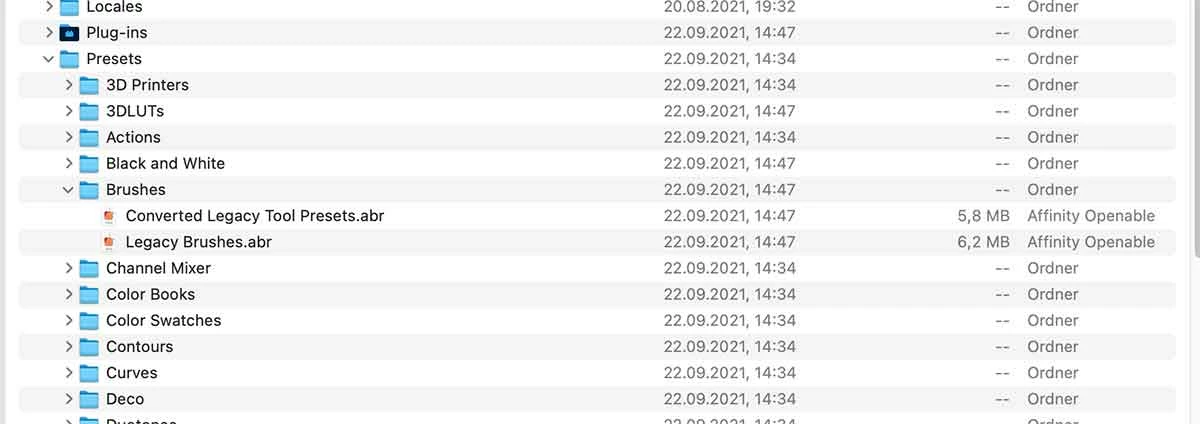
In the preset folder there is nothing more than two files that are unknown to me. So I need help!!! Where are all my brushes gone?
 
This topic has been closed for replies.

2 replies

Trevor.Dennis
Community Expert
Community Expert
October 12, 2021

Some presets used to get left behind in previous versions, but I have not seen this happening for several upgrades.  Worth a look though.

I take it those folders/groups are not there in Photoshop now?

Can you search for *.abr files?


I periodically back up the entire Appdata > Adobe folders just in case, so I always have most of my presets, spread over multiple drives,  in case of disaster.  

Inspiring
October 12, 2021

Thank you! I get the abr now from the time machine.

Case can be closed.

c.pfaffenbichler
Community Expert
Community Expert
October 9, 2021

Please post the actual full path you are looking at. 

Is it (username)/Library/Application Support/Adobe/Adobe Photoshop 2021/Presets/Brushes or in the Application Folder? 

Inspiring
October 9, 2021

Thank you for answering!
It is in the application folder (screenshot above).

The brushes folder in path you mentioned is completely empty. See enclosed screenshot.

c.pfaffenbichler
Community Expert
Community Expert
October 9, 2021

I see no screenshot in your last post. 

By default custom Brushes would not be saved in the Application Folder but in the Library.