Participating Frequently
September 12, 2021
Question

"Brushes" preview does not work correctly

  • September 12, 2021
  • 2 replies
  • 686 views

Hello there,


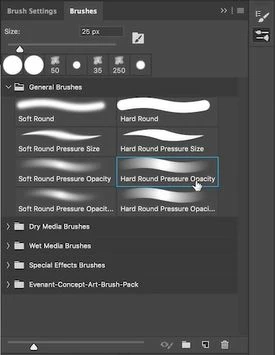
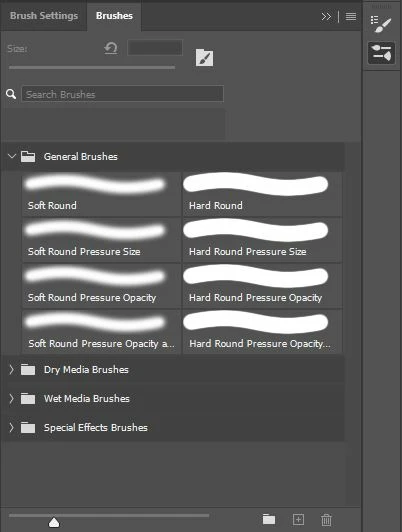
When using the "brushes" window, the preview does not work correctly. It occurs in both version 22.5 and versions 22.4 of Photoshop running on Windows 10, 21H1 version, 19043.1165 compilation. I have attached screenshot of the error and how it should look correctly.


I have checked the Preferences / Performance settings and I have seen that the "Use Graphics Processor" option is checked and when opening the "Advanced Settings" option the "Use OpenCL" and "Anti-alias Guides and Paths" options are also checked.


Any idea what may be going wrong? Thanks in advance.


This topic has been closed for replies.

2 replies

PECourtejoie
Community Expert
Community Expert
September 15, 2021

Hi, do you have a graphic tablet? you need a pressure sensitive brush, or to set it in your Brush settings panel, under Shape Dynamics.

Participating Frequently
September 19, 2021

Thanks for your answer PECourtejoie,


Yes, I have a graphics tablet and it seems to be working fine. The problem is not that the "brushes" do not work correctly but that their effect is not correctly previewed when I have to select a "brush" in the "brushes" panel.


Attached are two screenshots of the "Brushes" panel.


The first capture is of the problem that I have in which you can see that the preview does not work correctly.


The second screenshot indicates what should look right.


Any ideas?


Thanks in advance.

PECourtejoie
Community Expert
Community Expert
September 19, 2021

Hi, I would try to reset the brush tool, (right click on its icon in the option bar) and please post the shape dynamics tab of the brush settings panel.

c.pfaffenbichler
Community Expert
Community Expert
September 15, 2021

Could you please post screenshots with the pertinent Panels (Toolbar, Layers, Brush Settings, Options Bar, …) visible? (edited) 

Participating Frequently
September 19, 2021

Thanks for your answer c.pfaffenbichler,


Attached are two screenshots of the "Brushes" panel.

The first capture is of the problem that I have in which you can see that the preview does not work correctly.

The second screenshot indicates what should look right.


Any ideas?


Thanks in advance.