
Participant
February 23, 2021
Question

Brushes: Saving a Custom Group Filing System

  • February 23, 2021
  • 2 replies
  • 399 views

I just have a small question regarding this.


I learned the hard way that after a period of time, Photoshop CC tends to randomly wipe out any third-party or custom added brushes from the brushes panel. So I now have all brushes I used saved to the Presets folder.


But just out of curiosity, is there any way to "remember" a custom Brushes file system layout? As you can see from the screenshot image below, I have a lot of brush folders sorted by categories. I have a lot more group folders after this. I don't want to have to rename them and resort them everytime Photoshop does a random brush panel wipe. 
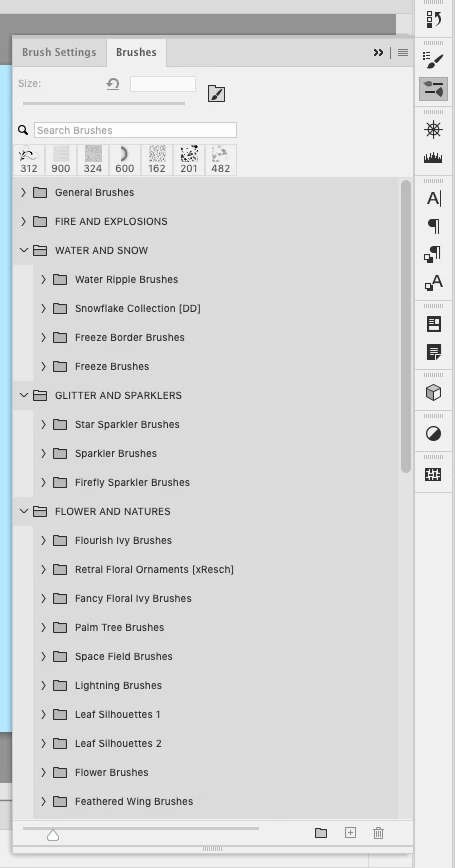


I don't mind stacking them onto a more inner file system, as long as all these brush folders will continue to stay as is, even after a system wipe happens.


Questions:

  1. Is it possible to save a custom brushes file system, so that like importing brushes I can import the above group filing system?
  2. If so, where would I need to move all custom labelled brush group folders to, to have Photoshop consider these brushes "Default" and remember them forever? Or what options would I need to select?


Much thanks in advance!

This topic has been closed for replies.

2 replies

PECourtejoie
Community Expert
Community Expert
September 9, 2021

Hello, did you try saving a copy of  your brushes panel preferences?


(PC) C:\Users\[your username]\AppData\Roaming\Adobe\Adobe Photoshop 2021\Adobe Photoshop 2021 Settings\Brushes.psp


Mac Users/[user name]/Library/Preferences/Adobe Photoshop [version] Settings/Brushes.psp

Participating Frequently
September 9, 2021

Oh thank you I did not think of that! I'll give it a go! Someone also suggested just saving the.psp file and this would also retain the folder structure, so another option to try. Fingers crossed this works! Thanks 😊

Trevor.Dennis
Community Expert
Community Expert
February 23, 2021

Unfortunately, I don't think so.  You can save a copy of your additional brush sets according to your operating system. So if you use Windows 10 it would be:

C:\Users\[your user name]\AppData\Roaming\Adobe\Adobe Photoshop 2021\Presets\Brushes

I have had a good look round both the app data and program files folder archives for custom brush group names, but they do not appear.  What I have not checked is whether they are saved in your Creative Cloud file syncing, but I suspect not.  It ought be saved with custom workspaces — it just feels wrong to me that you could put time into setting up a brush group system and lose it at the next version update.  Surely that doesn't happen?


WyntileAuthor
Participant
February 23, 2021

Alright thanks. I figured not since I couldn't see any options in the brushes panel. I guess for now I'll setup up a seperate file system in the Presets/backup folder and try for the best. As for the wipe, it often happens whenever an update happens. I only happen to mind it whenever I'm working on a project and need brushes immedately, only to see them suddenly gone.