
Bug in 21.1.0 - Actions with "Save" commands no longer work
I recently upgraded my installation to 21.1.0 (Windows, running on Win 7) and discovered a very problematic issue shortly afterwards. I have a bunch of pre-recorded actions that I heavily rely on to do various tasks, and almost all of them make use of Save commands to store various steps of the workflow under their existing filenames, but in different directories. Those action steps look like this:
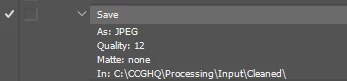
Under previous versions (dating back to Photoshop CC 2015) these actions would save without prompting and store new file versions in the specified directory. Now, when I run the same actions, instead I get:
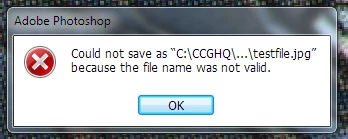
The file name being specified is very much valid, so I have no idea what this message is supposed to indicate, but I can't meaningfully utilize these actions as long as this behavior persists. Is there any solution here?
 AdChoices