medialinx
Participant
November 9, 2022
Question

Bug: Photoshop 24 - Black rectangles on open images

  • November 9, 2022
  • 2 replies
  • 548 views

Hi there,

I am on Windows 10 and have issues with PS24.

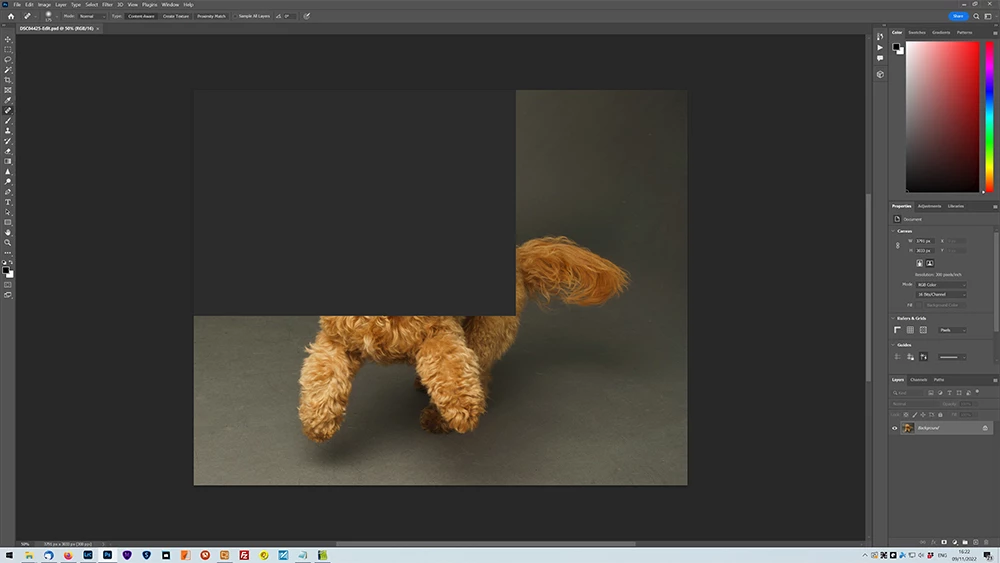
When I open a JPG the image opens, but most of the time as the image opens or when I work on the image black rectangles appear across the image (as if that portion didn't load). As I scroll the images or make modifications to the image, the rectangles move or dissappear.


I have tried with Graphic Processor enabled and disabled and nothing has made a difference.


An example screenshot of the problem can be found here:https://ibb.co/B32Mhbb 
This topic has been closed for replies.

2 replies

Ged_Traynor
Community Expert
Community Expert
November 9, 2022

Hi

Try enabling this option in preferences and restarting Photoshop to see if it helps

Kevin Stohlmeyer
Community Expert
Community Expert
November 9, 2022

Go to Photoshop Help Menu/System Info and copy paste details here.

Normally this is a graphics card related issue. You can try disabling Native Canvas under Preferences/Technology Previews.

medialinx
medialinxAuthor
Participant
November 9, 2022

Hi there,

Thanks for the response. Disabling the Native Canvas appears to have fixed the issue.