
Participant
February 7, 2024
Question

Bug transformation, movement, ...

  • February 7, 2024
  • 1 reply
  • 164 views

Since yesterday I have a bug that is driving me crazy. When I launch Photoshop everything works fine. When I do manual transformations the outline is blue and works well.

Then 10 minutes later, for no reason, the manual transformation starts to bug. The outline becomes gray (that doesn't bother me), movements are jerky, I can't see the result of my actions in real time,...

I'll let you see for yourself.


If anyone could help me I would be grateful!!

(I'm French, I use Google translate)
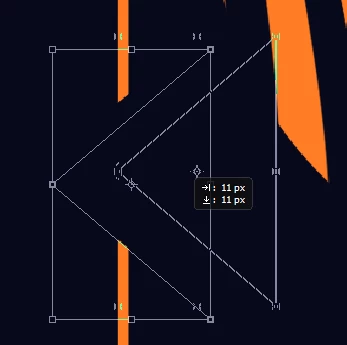
 

This topic has been closed for replies.

1 reply

Sameer K
Community Manager
Community Manager
February 26, 2024

Hey, @Hugo32572458wx3p. Welcome to the Photoshop Community. I'll need more info to help you figure this out. Please share the system info from Photoshop Help > System info > Copy & paste into a text document > upload & attach here. 


I'll move this to discussions for now. Does this happen after a specific series of steps? Do you have another app running that could be sharing resources with Photoshop? 


Ensure there are no stale preferences in your Photoshop. Go to the location of the preference folder below and rename it to backup.

  • Windows 10/11: Users/[user name]/AppData/Roaming/Adobe/Adobe Photoshop [version]/Adobe Photoshop [version] Settings
  • You can press Press the Windows key > Enter 'Run' > Enter %APPDATA%\Adobe
  • Rename the Adobe Photoshop folder by adding a .old at the end. (Adobe Photoshop 2024 > Rename > Adobe Photoshop 2024. old), you can later restore these preferences if needed.(https://adobe.ly/4860qM9)
  • Restart the computer.

These changes will give a fresh start to Photoshop as a fresh install. Let me know how it goes.

Thanks!

Sameer K