
Participant
May 23, 2017
Answered

Bug when I use the Undo shortcut (CMD+OPT+Z) activating Toggle auto select (CMD+CLICK)

  • May 23, 2017
  • 1 reply
  • 381 views

Hello!

I've been having an issue with Photoshop ever since I upgraded my OS to Sierra on my Macbook Pro. I don't know if could possibly be a hardware flaw (like the key could be broken?) but every other time when I'm using the undo shortcut (command + option + z) it triggers the command + click shortcut randomly. Sometimes it does, sometimes it doesn't, but it gets really annoying when you're drawing digitally that every so often you drag the layer out of place and you can't continue drawing smoothly. Also, whenever this happens it starts selecting multiple layers on my layer window, and it only stops if I press Command again so that the function it's off. For some reason even if I'm not holding down the key, the action persists.

I would like to know if this is some sort of bug or if I have to live with it because it's my key that's broken. Also, if there's any way to deactivate the Command + click shortcut. Any light on this matter would help me a lot since I've been having a real hard time focusing with things getting messed up every time I sit to work. Thanks!
This topic has been closed for replies.
Correct answer jane-e

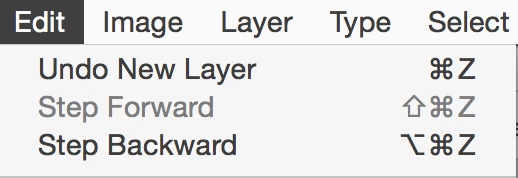
First, Undo is Cmd+ Z and Step Backward is Command + Option + Z. This may or may not make any difference to your issue.

Have you looked in your History panel when this happens? Step Backward steps back through the History panel. You might keep it open for a while and watch what is going on in there to help troubleshoot.

You can change the number of steps from 50 to a larger number in Preferences > Performance.

1 reply

jane-e
Community Expert
jane-eCommunity ExpertCorrect answer
Community Expert
May 23, 2017

First, Undo is Cmd+ Z and Step Backward is Command + Option + Z. This may or may not make any difference to your issue.

Have you looked in your History panel when this happens? Step Backward steps back through the History panel. You might keep it open for a while and watch what is going on in there to help troubleshoot.

You can change the number of steps from 50 to a larger number in Preferences > Performance.

jane-e
Community Expert
Community Expert
May 23, 2017

Also, the Command + Click shortcut is that the Command key is actually a shortcut to activate the Move tool temporarily. I don't think that can be changed.

The fact that you click when you have the Move tool or that you then perform another action is secondary.

Auto Select itself can be turned off in the Options bar.