
Bug: When View > Extras is checked, my brush strokes become jagged. Why? How can I possibly fix this?
After a lot of testing I've pinpointed the cause of my seemingly random jagged brush line problem: Extras keeps activating. My brush strokes behave normally when Extras is unchecked but become jagged and sloppy when Extras is activated. Unfortunately for me, Extras re-activates upon creating any type of selection as the "Show > <Selection Edges>" option is triggered. I've tried every method available to prevent "Extras" from activating after a selection is made as a temporary solution but there's just no way to do that presently. The best I can do right now is manually press Ctrl+H (I changed the hotkey to Ctrl+M) everytime I create a selection. I have no idea why having Extras activated causes my brush tool to malfunction, but it does. I swear this is the issue. What I'm trying to do at this point is find a way to uncouple <Show Selection Edges> from the set of things that activates "Extras". Another solution would be to just figure out why "Extras" is causing my brush to flip out in the first place. The bug creates a very subtle distortion of the brush strokes where instead of smooth clean lines I get almost smooth lines that almost get the job done but not quite, as if they got distracted along the way thinking that they need to snap to something but they don't know what they are supposed to snap to so they just keep drawing after a momentary lag. This is a very strange problem which may not have an obvious solution. I thought it was a driver issue but I don't have this problem in other drawing programs like Painter or Krita.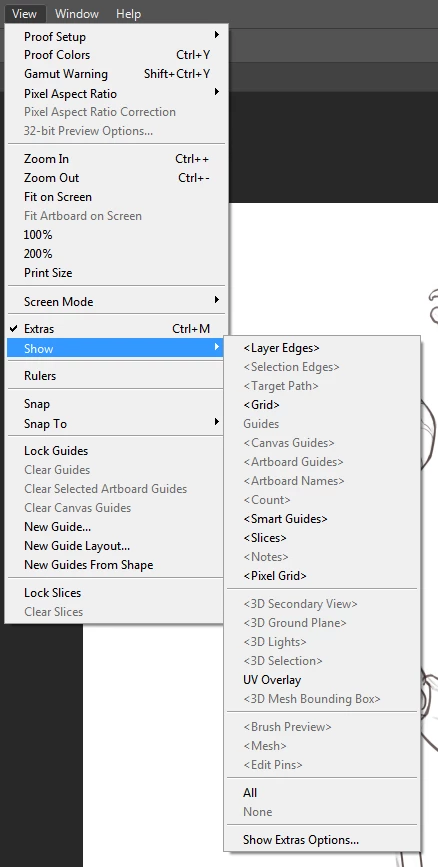 Edit: So I was about to submit this question with an image comparing the working brush strokes to the malfunctioning brush strokes when I realized that having Extras checked doesn't always cause the bug to occur. It's more like it allows the brush strokes to malfunction if Extras is checked. However, it doesn't ensure that the brush strokes will malfunction. Hope that makes sense.
I'm using Windows 7 64-Bit / Photoshop CC2017 64-bit / 32 Gigs Ram / Duel SSD HDs / Nvidia GTX 670 (Potato Series) / Wacom Intuos 5 Pro Large.
 AdChoices