ромаа20880113
Participant
May 19, 2024
Answered

Bugs using type tool
  • May 19, 2024
  • 2 replies
  • 342 views

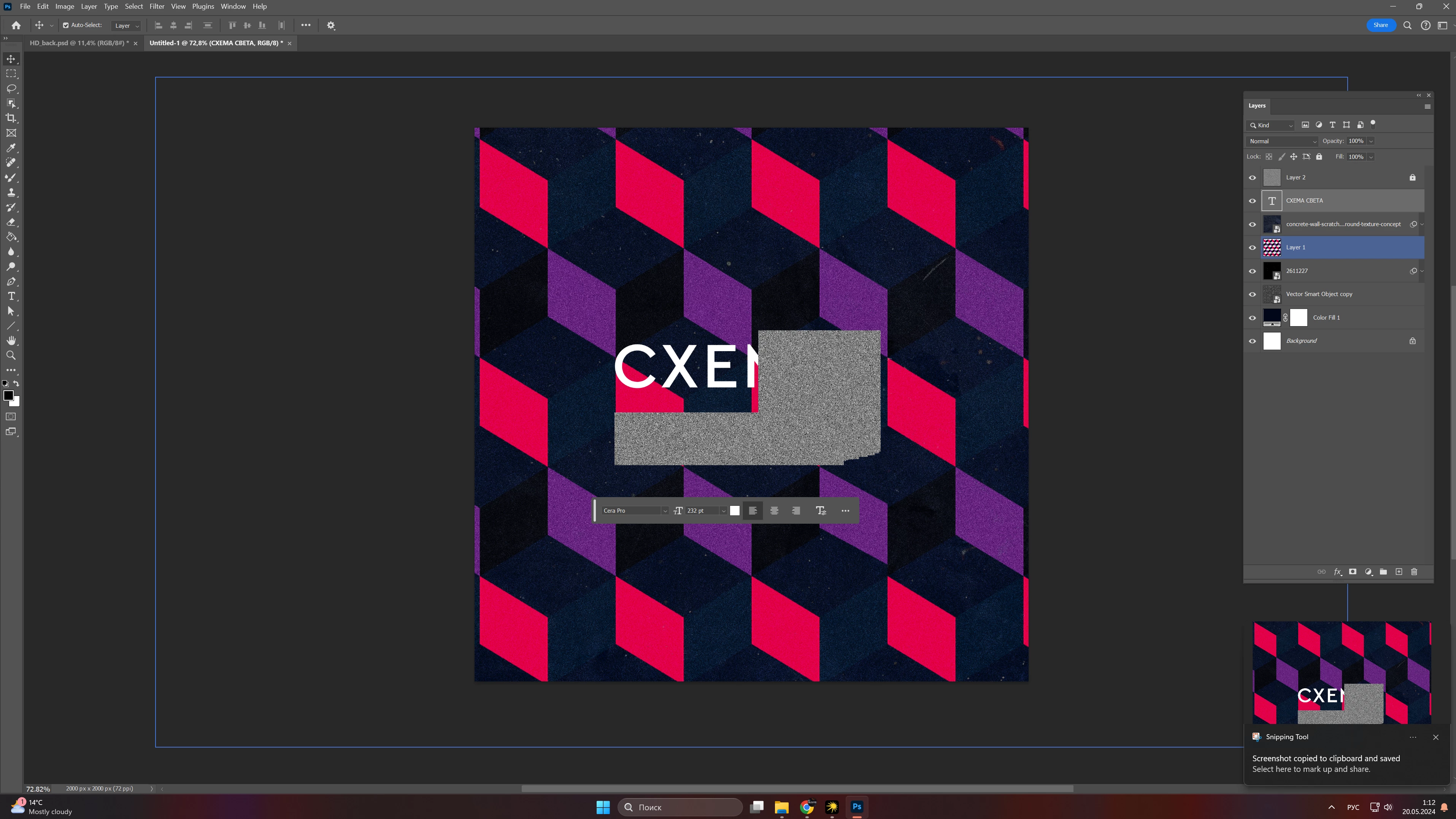
After few updates i am facing strange bug that very annoying when typing texts that doesnt let me work... How to fix it? Maybe there is a solution to fix it? I cant work properly 😞

This topic has been closed for replies.
Correct answer c.pfaffenbichler

Does turning off »Use Graphics Processor« in the Performance Preferences (Photoshop > Preferences > Performance > Graphic Processor Settings) and restarting Photoshop have any bearing on the issue? 
Does turning on »Deactivate Native Canvas« (Photoshop > Preferences > Technology Previews) and restarting Photoshop have any bearing on the issue?

2 replies

c.pfaffenbichler
Community Expert
c.pfaffenbichlerCommunity ExpertCorrect answer
Community Expert
May 20, 2024

Does turning off »Use Graphics Processor« in the Performance Preferences (Photoshop > Preferences > Performance > Graphic Processor Settings) and restarting Photoshop have any bearing on the issue? 
Does turning on »Deactivate Native Canvas« (Photoshop > Preferences > Technology Previews) and restarting Photoshop have any bearing on the issue?

ромаа20880113
Participant
June 2, 2024

Hello, didnt find native canvas deactivation option in technology preview but i checkmarked older version gpu and this helped i guess, so far no bugs appears. Thanks!

kglad
Community Expert
Community Expert
May 19, 2024

in the future, to find the best place to post your message, use the list here, https://community.adobe.com/

p.s. i don't think the adobe website, and forums in particular, are easy to navigate, so don't spend a lot of time searching that forum list. do your best and we'll move the post (like this one has already been moved) if it helps you get responses.


<"moved from cc desktop bugs">