Answered
Business Folders
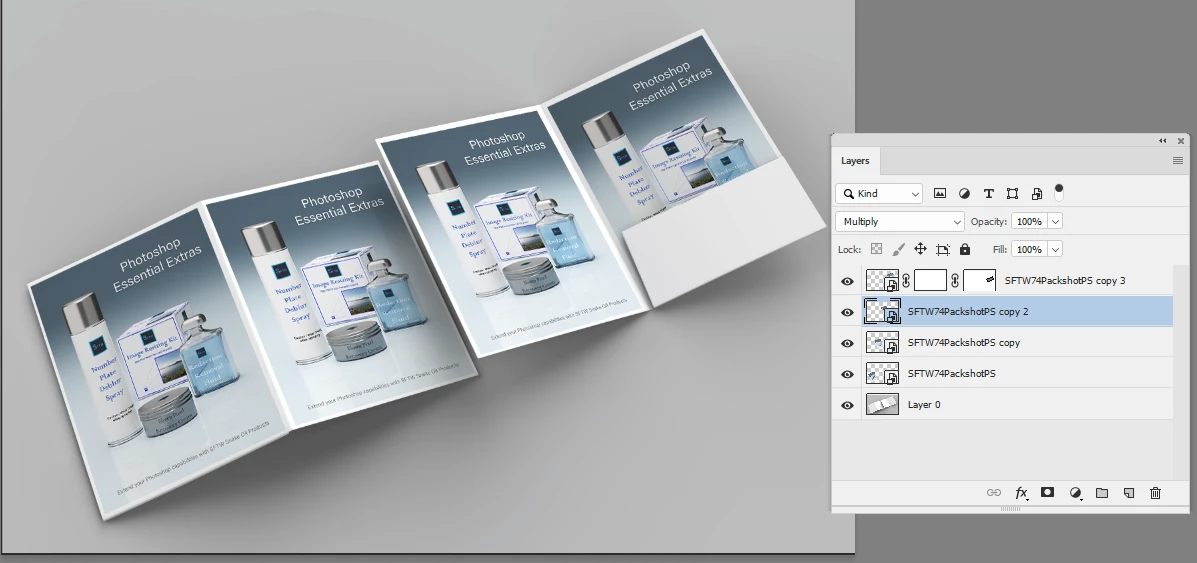
Does anyone know where I can find examples (step by step) on how to modify a folder to put images/pictures on there like the one below? The below is in PS.

Does anyone know where I can find examples (step by step) on how to modify a folder to put images/pictures on there like the one below? The below is in PS.
Hi
Put your image(s) onto new layers and convert them to smart objects
Use Edit >Transform>Distort and drag the corner handles to position each layer on the template pages.
Change the blending mode of the image layer(s) to Multiply so that it blends with the page shadows
On the far right page you will need to add a mask so the image is hidden by the fold
Dave
Already have an account? Login
Enter your E-mail address. We'll send you an e-mail with instructions to reset your password.
 AdChoices