Correct answer AxelMatt

I see such videos very critical. I also don’t understand such statement.

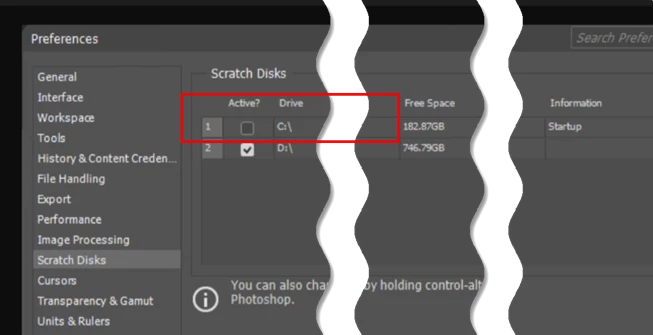
Scrath disk should be configured to the fastest drive(s) (normally this are SSDs) which has enough free disk space.

This statement may have been true in the past when hard drives were not as performant, as there could be simultaneous accesses to the system drive, e.g., from the system, to program files, etc., which could increase access time.


3 replies

Nancy OShea
Community Expert
Community Expert
February 23, 2026

My C drive has close to a Terabyte of free disk space. Using it for Scratch Disk has never posed any performance problems for me.  

Nancy O'Shea— Product User & Community Expert
D Fosse
Community Expert
Community Expert
February 22, 2026

As Axel says. That advice is outdated and obsolete,  and does not apply to SSD drives.


Spinning HDs had a read-write head that could only be in one place at a time, and had to be physically moved to different adresses. That is no longer the case.


The C drive is normally your fastest drive, and that's where primary scratch should be.

AxelMatt
Community Expert
AxelMattCommunity ExpertCorrect answer
Community Expert
February 22, 2026

I see such videos very critical. I also don’t understand such statement.

Scrath disk should be configured to the fastest drive(s) (normally this are SSDs) which has enough free disk space.

This statement may have been true in the past when hard drives were not as performant, as there could be simultaneous accesses to the system drive, e.g., from the system, to program files, etc., which could increase access time.


My System: Intel i7-8700K - 64GB RAM - NVidia Geforce RTX 3060 - Windows 11 Pro 25H2 -- LR-Classic 15 - Photoshop 27 - Nik Collection 8 - PureRAW 6 - Topaz Photo AI
MahaB82A
MahaB82AAuthor
February 23, 2026

Thanks.

Why is called “Scratch Disks” ?

Claire H.
Community Manager
Community Manager
February 23, 2026

It is called a “scratch disk” because it is not for permanent file saving; it is a temporary, "scratch" area where Photoshop caches data, allowing you to work on large, high-resolution images that cannot fit entirely in your computer's RAM. You can learn more about troubleshooting future scratch disk errors here: https://helpx.adobe.com/photoshop/desktop/troubleshoot/performance-stability-issues/troubleshoot-scratch-disk-full-errors-in-photoshop.html. I hope this helps! ^CH