Known Participant
January 12, 2014
Answered

Calculating width height in script

  • January 12, 2014
  • 1 reply
  • 4047 views

hi i want script for comparing all layers of psd with photo with its width and height ie one psd background is opened script will read the value of that psd's layer whether it is portrait

or landscape by any way say by its width and height if height is greater than width than its portrait vice versa and then it compare with photo by opening it in sequences or firstly it will read the value of photo than compare with layer.if it got same in place of landscape, same and in place of portait same then it will run action if not than it will open new psd.and with compare same photo

This topic has been closed for replies.
Correct answer JJMack

Sir

   i have tried collage script by downloading it .  but I am not able to use it properly or it may be not useful in my case.  and also i m no knowledge of scripting   so pls do a  favour  for  me, u have understood my requirement so  pls make a new single script  nearer to my requirement as how much accurate it is possible, try it should be in single script step by step . so i will only copy and paste in extendedscript  tools and save it and it will work. 

                                       and also in ur last para u r wrote about cropping and all it doesnt matter whether it will crop or not or it will paste into and image is big moreover if it will not rotate in if layer is not straight .then also not matter i will do these thing manually. afterwords but it should save in psd format. and aslo it doensnt matter if layer is not feathered .

                                                                                                                                                                     Thank a lot for responding

                                                                                                                                                                               sunu


You do not need a new script.  All you need to do is create a PSD template adhering to my four rules. They are very simple.

The Four Rules:

  1. Size the photo collage templates for the print size you want - width, height and print DPI resolution.
  2. Photo collage templates must have a Photoshop background layer. The contents of this layer can be anything.
  3. Photo collage templates must have alpha channels named "Image 1", "Image 2", ... "Image n".
  4. Photo collage templates layers above the background layers must provide transparent areas to let the images that will be placed below them show through.

One does not simply pop out a complicated script. Look at my scripts  with a text editor there is a lot of design and programming involved.  I have no idea of what size and resolution you want your collage to have.  I also have no idea of what your images aspect ratios are.  With that knowledge it should only take a few minutes to create a template fewer the ten for sure.

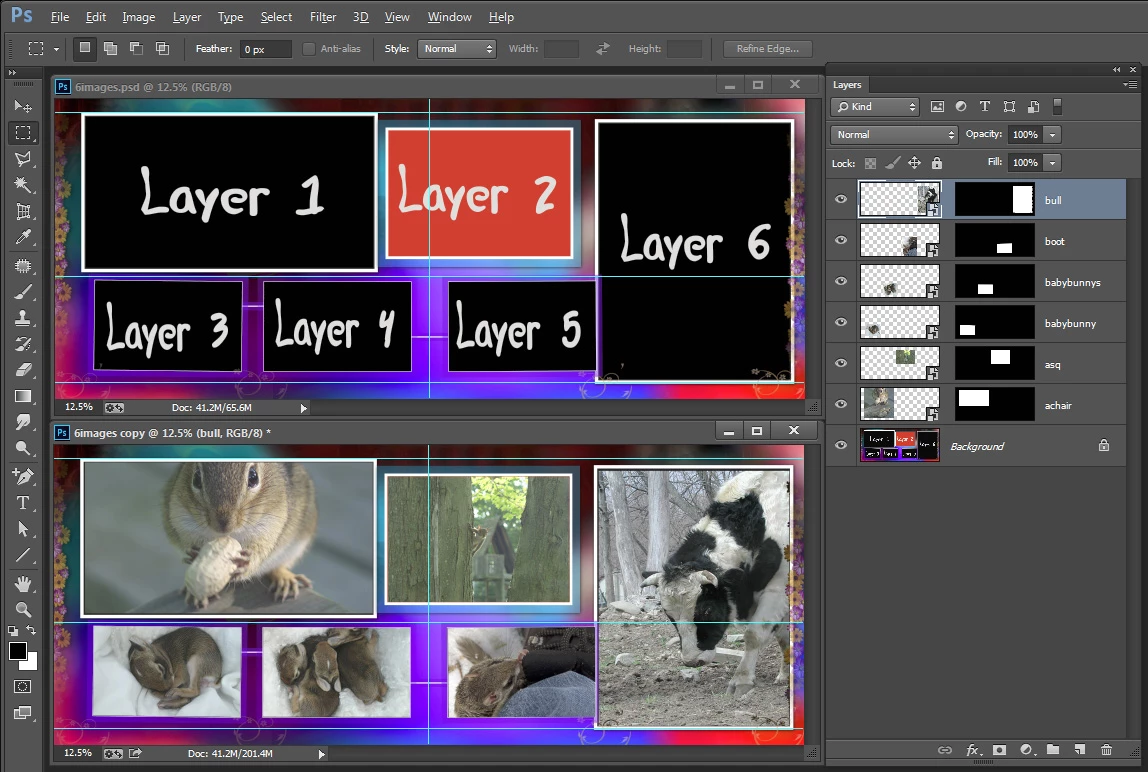
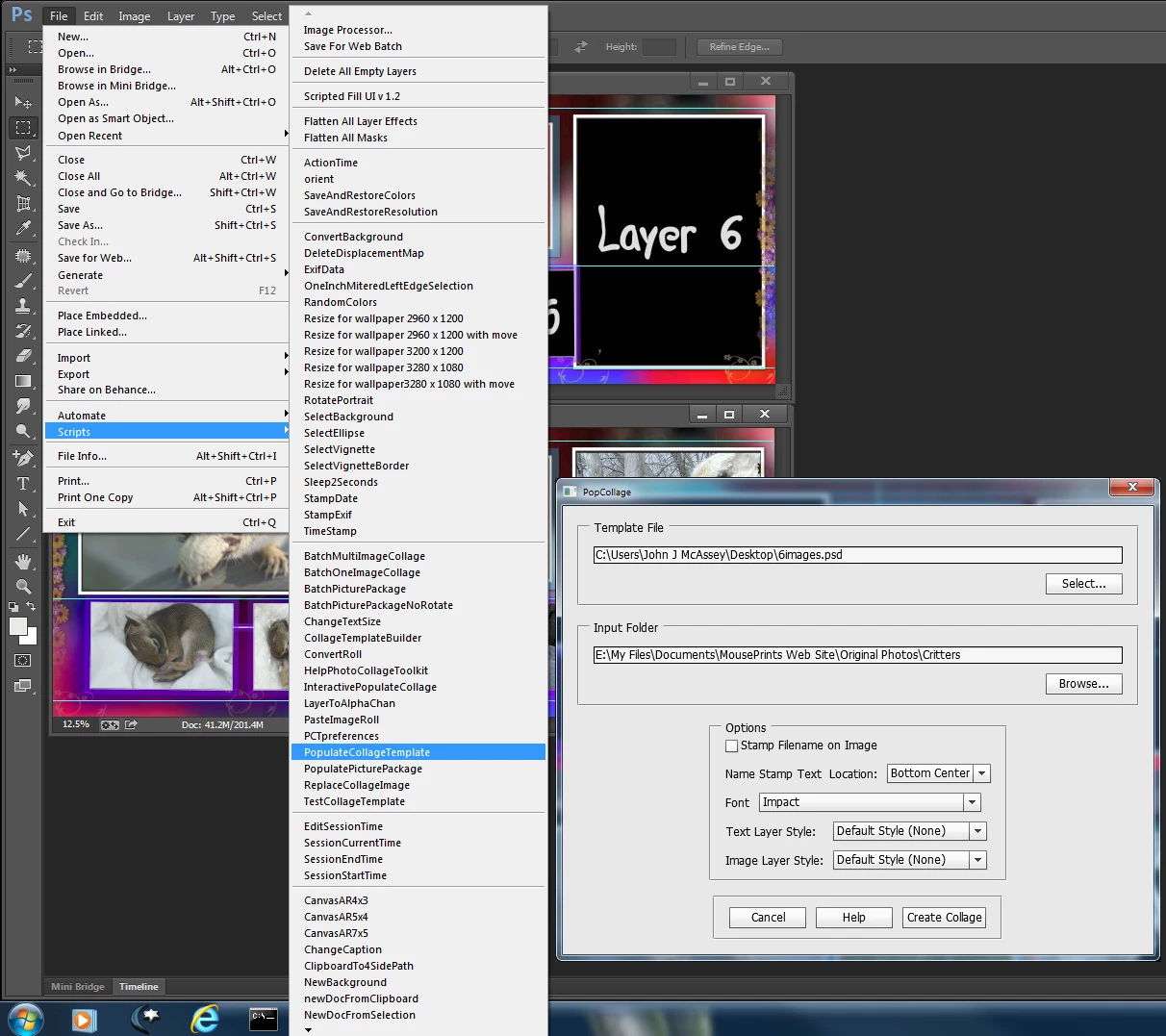
I created a template for you latest example using its size 30" x 12" at 200DPI and the 6 different aspect ratio images. There is still some tilt in image 3 and 5.  You can download the template http://www.mouseprints.net/old/dpr/6images.psd

I only used a Background layer.  I did not add and upper overlay layer however the alpha channel I created for image 6 will let some of the background show through image 6.  Here is a screen capture with the Template in Photoshop and under it a populated version. Also just copy my scripts into Photoshop folder Presets\scripts and use them from Photoshop  menu File>Scripts>My Script Selected. The extendedscript toolkit has problems with some things.
1 reply

c.pfaffenbichler
Community Expert
Community Expert
January 20, 2014

The following should allow you to insert whatever you want in the for-clause.

Currently there is an alert (of width, height, index and name)

Edit: Sorry, I posted before I had finished the sentence … anyway, instead of the alert you could use the width- and height-numbers to determine portrait/landscape and insert the appropriate steps there.

// 2014, use it at your own risk;

#target photoshop

if (app.documents.length > 0) {

var myDocument = app.activeDocument;

main ();

};

////////////////////////////////////

function main () {

// get number of layers;

var ref = new ActionReference();

ref.putEnumerated( charIDToTypeID("Dcmn"), charIDToTypeID("Ordn"), charIDToTypeID("Trgt") );

var applicationDesc = executeActionGet(ref);

var theNumber = applicationDesc.getInteger(stringIDToTypeID("numberOfLayers"));

//////

for (var m = 0; m <= theNumber; m++) {

try {

var ref = new ActionReference();

//ref.putEnumerated( charIDToTypeID("Lyr "), charIDToTypeID("Ordn"), charIDToTypeID("Trgt") );

ref.putIndex( charIDToTypeID( "Lyr " ), m);

var layerDesc = executeActionGet(ref);

var layerSet = layerDesc.getEnumerationValue(stringIDToTypeID("layerSection"));

// if not layer group collect values;

if (layerSet != 2652 && layerSet != 2638) {

var theName = layerDesc.getString(stringIDToTypeID('name'));

var boundsDesc = layerDesc.getObjectValue(stringIDToTypeID('bounds'));

var theWidth = boundsDesc.getUnitDoubleValue(stringIDToTypeID('width'));

var theHeight = boundsDesc.getUnitDoubleValue(stringIDToTypeID('height'));

alert ("width: "+theWidth+", height: "+theHeight+", index: "+m+", name: "+theName);

selectLayerByIndex(m,false);

};

}

catch (e) {};

};

};

// by mike hale, via paul riggott;

// http://forums.adobe.com/message/1944754#1944754

function selectLayerByIndex(index,add){

add = undefined ? add = false:add

var ref = new ActionReference();

    ref.putIndex(charIDToTypeID("Lyr "), index);

    var desc = new ActionDescriptor();

    desc.putReference(charIDToTypeID("null"), ref );

       if(add) desc.putEnumerated( stringIDToTypeID( "selectionModifier" ), stringIDToTypeID( "selectionModifierType" ), stringIDToTypeID( "addToSelection" ) );

      desc.putBoolean( charIDToTypeID( "MkVs" ), false );

   try{

    executeAction(charIDToTypeID("slct"), desc, DialogModes.NO );

}catch(e){

alert(e.message);

}

};

sunu2014Author
Known Participant
January 21, 2014

Thank u Very much for this .

it is helpfull for me but still i need some modification on it becauz i m zero in script so pls help me the problem is that i need it should count only to color fill layer or  if not possible than it should count only to layer , not to bkgrd layer or locked layer more ever it should store that  to determine whether it is landscape or portrait . that data of all the layer is stored in it then it will open an image from folder (if the layer is seven than it will open 1st 7 layer ie it will also count the layer if 7 it will open 7 or if it will  8 than open 8, than it will compare with that color fill layer or with that layer stored  the porpose to compare is that in the place of portrait the opened photo is portrait for eg  say layer 1=a, Layer 2=b Layer 3=c,  a is portrait, b is landscape, C is portrat and opened photo is 1st is Portrat 2nd is landscape 3rd is portrait, then olny it will run action and open another psd and next photo after that other wise it will close that psd which contains colorfill layer and open another psd say 2nd and compare it.  with photos. ) pls pls pls modify it for me thanku so much....

c.pfaffenbichler
Community Expert
Community Expert
January 24, 2014

Quite frankly your explanation seems too convoluted to me.

Ruling out the background layer is fairly easy

// 2014, use it at your own risk;

#target photoshop

if (app.documents.length > 0) {

var myDocument = app.activeDocument;

main ();

};

////////////////////////////////////

function main () {

// get number of layers;

var ref = new ActionReference();

ref.putEnumerated( charIDToTypeID("Dcmn"), charIDToTypeID("Ordn"), charIDToTypeID("Trgt") );

var applicationDesc = executeActionGet(ref);

var theNumber = applicationDesc.getInteger(stringIDToTypeID("numberOfLayers"));

//////

for (var m = 0; m <= theNumber; m++) {

try {

var ref = new ActionReference();

//ref.putEnumerated( charIDToTypeID("Lyr "), charIDToTypeID("Ordn"), charIDToTypeID("Trgt") );

ref.putIndex( charIDToTypeID( "Lyr " ), m);

var layerDesc = executeActionGet(ref);

var layerSet = typeIDToStringID(layerDesc.getEnumerationValue(stringIDToTypeID("layerSection")));

var isBackground = layerDesc.getBoolean(stringIDToTypeID("background"));

// if not layer group collect values;

if (layerSet != "layerSectionEnd" && layerSet != "layerSectionStart" && isBackground != true) {

var theName = layerDesc.getString(stringIDToTypeID('name'));

var boundsDesc = layerDesc.getObjectValue(stringIDToTypeID('bounds'));

var theWidth = boundsDesc.getUnitDoubleValue(stringIDToTypeID('width'));

var theHeight = boundsDesc.getUnitDoubleValue(stringIDToTypeID('height'));

alert ("width: "+theWidth+", height: "+theHeight+", index: "+m+", name: "+theName);

selectLayerByIndex(m,false);

};

}

catch (e) {};

};

};

// by mike hale, via paul riggott;

// http://forums.adobe.com/message/1944754#1944754

function selectLayerByIndex(index,add){

add = undefined ? add = false:add

var ref = new ActionReference();

    ref.putIndex(charIDToTypeID("Lyr "), index);

    var desc = new ActionDescriptor();

    desc.putReference(charIDToTypeID("null"), ref );

       if(add) desc.putEnumerated( stringIDToTypeID( "selectionModifier" ), stringIDToTypeID( "selectionModifierType" ), stringIDToTypeID( "addToSelection" ) );

      desc.putBoolean( charIDToTypeID( "MkVs" ), false );

   try{

    executeAction(charIDToTypeID("slct"), desc, DialogModes.NO );

}catch(e){

alert(e.message);

}

};

Ruling out locked layers is certainly possible, but you can try to figure that out yourself.

Storing the results is also possible; you can create an Array, instead of »alert« push the width/height relation to the array and subsequently process the array or create a file from it.