
Participant
February 15, 2019
Question

Camera Raw 11.2 does not load photos from the NAS with Mac

  • February 15, 2019
  • 3 replies
  • 2043 views

Hello everyone,

since I upgraded Camera Raw from version 11.1 to version 11.2 I can no longer open the photos that reside inside the NAS with my iMac. All other programs work but Camera raw no. This problem was born on all the computers in my studio where I updated Camera Raw. I have already contacted Adobe technical support who made me uninstall and reinstall the programs cleanly but the problem persists. For now, since I can not stop with the work, I restored my system with Time Machine back to version 11.1 but I want adobe to solve this problem that, apparently, I have not just me.

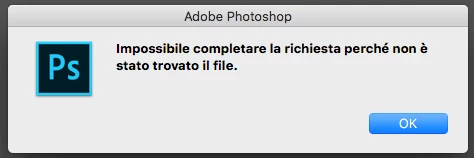
I enclose at the bottom of this post a screenshot of the error message (in Italian language) that I display when I try to open a picture with camera raw from my nas with  imac.

Sorry for my not perfect English.
This topic has been closed for replies.

3 replies

Participant
March 11, 2019

Hello , Just i have same problem with new fresh install of Mojave and photoshop 2019 and Time Capsule or all other network shared folders  . I fix this bug its problem of the new Adobe Camera RAW 11.2 who come with new fresh Photoshit , you need install Camera RAW 11.1 from here http://download.adobe.com/pub/adobe/photoshop/cameraraw/mac/11.1/CameraRaw_11_1_mac.zip  and all be fine !

Regards

Participating Frequently
March 18, 2019

Same here.  Had to revert to 11.1 to work with Camera Raw again from a shared network drive.

Participant
February 17, 2019

I am also experiencing the same issue.  I updated to MAC OS 10.13.6, PS CC 20.0.3 and CR 11.2 and I also use Synology NAS - the only way to open my raw images is to copy from my Synology NAS onto my desktop.  I can then open the images. 

I can open jpgs and tiffs and psd's from the NAS, just not my .NEF files.

Participant
February 17, 2019

I just contacted Adobe tech support via chat - the person was really helpful and solved my problem.  I had to install an older Camera Raw network driver (they did this for me via screen share) - The said the new PS 20.0.3 is not supporting the network drivers.  I kept my same OS, Camera Raw Version and PS version, they just downloaded an older driver .. Camera_Raw_10_5.  I am now able to open my raw files from my Synology.  They are aware of the issue and said it is being worked on by the engineers and will be fixed soon. 

Bosley69
Participating Frequently
February 17, 2019

I've tried a few times to get technical support via the chat window, but it remains unanswered each time I try...

I'm not sure if they are busy or there is a problem my end..

I shall keep trying as it seems only they can provide a fix at the moment until a new release in a couple of weeks or so..

Thanks.

February 15, 2019

Hi

Other people have reported similar issues with Mojave, seems Apple have caused serious issues for Photoshop users with Mojave

Photoshop won't open anything!

Known issues - Running Photoshop CC on macOS 10.14 Mojave

Bosley69
Participating Frequently
February 15, 2019

I have exactly the same problem - I just posted the below in the Lightroom forum, but it does on further exploration seem restricted to Photoshop not being able to access a mounted NAS drive.

Nothing has changed with Mojave OS and the problem only occurred when Photoshop / Lightroom / Camera Raw etc were updated today.

I would suggest its an Adobe problem.

I've tried going back to the previous versions of Lightromm Classic CC and Photoshop CC, but the problem is now still there. I have not had any problems with my NAS server in many years of using it with Adobe products.

COPY OF POST: "

Hi,

I'm a Mac user and about an hour ago Lightroom Classic CC updated to 8.2, Photoshop CC updated to 20.0.3 and Camera Raw CC updated to 11.2.

Since then I can no longer use the 'Edit in Photoshop' option from Lightroom. It used to ask if I wanted to edit a copy, Edit a copy with LR adjustments etc. prior to passing the photo to Photoshop.

Further testing shows that the problem seems to be partially connected to me accessing photos from my Synology NAS drives mounted drive.

Photoshop will no longer load anything from the NAS drive (even from my Recent List). Files show in the Browse window, but when I select an image and hit Open, I just get the message "Could not complete your request because the file was not found."

If I move the file to my desktop, then it loads without problems. I have tried restarting the Mac, but with no change.

I am not sure, but it could seem its primarily a Photoshop issue, as Lightroom is still happy to load my photos from the NAS drive.

Has anyone else experienced this / got a fix for this?

Thanks.

Andy

"