
Known Participant
April 6, 2017
Answered

Camera Raw

  • April 6, 2017
  • 3 replies
  • 744 views

I am trying to get camera raw to work.  I have set up PS so that if I open directly into it I get the Camera Raw window.  Same thing with a raw file direct from my computer that is a Nikon raw.  Going from LR to PS doesn't open the CR window.

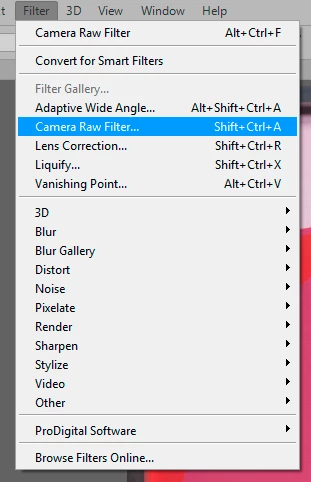
More frustrating, and the main question is how do I ever get back the CR window?  Once I made adjustments and Open Image from CR, I have not be able to get back to that window.   I see that there is a camera raw under the filter.  But when I do that all get is the an entry in the history panel and not the window.

Also I understand that supposedly CR creates an XMP file that contains the edit.  I don't see this file showing up in the folder with my image.

What is going on here, what am I missing?

TIA

Frank
This topic has been closed for replies.
Correct answer D Fosse

francisl61708089  wrote

Going from LR to PS doesn't open the CR window.

It's not supposed to. A script applies the Lightroom settings to ACR, which opens the file silently into Photoshop. You don't need the ACR window, because it's been taken care of in Lightroom.

More frustrating, and the main question is how do I ever get back the CR window?

This is only possible if you open as Smart Object from ACR. Otherwise, the pixel values are baked in and you can't go back.

Also I understand that supposedly CR creates an XMP file that contains the edit.

That only applies to raw files, and proprietary ones at that (NEF, CR2 etc). With DNG, and all RGB formats, it's written into the file header - until it's opened into Photoshop, when it's all, again, baked into the pixel values.

I see that there is a camera raw under the filter.  But when I do that all get is the an entry in the history panel and not the window.

Don't click the top item in the menu. That just applies the last used filter once more, at the same settings. Go down in the main section:

In general, you seem to miss the substantial differences between raw files and rendered RGB files (psd/tiff/jpeg). The anatomy is completely different.

Using ACR on a rendered RGB file is very different from using it on raw files. And using it as a filter is again different from using it as primary processor. And not the least, opening directly from ACR is very different from opening as Smart Object.

3 replies

D Fosse
Community Expert
D FosseCommunity ExpertCorrect answer
Community Expert
April 6, 2017

francisl61708089  wrote

Going from LR to PS doesn't open the CR window.

It's not supposed to. A script applies the Lightroom settings to ACR, which opens the file silently into Photoshop. You don't need the ACR window, because it's been taken care of in Lightroom.

More frustrating, and the main question is how do I ever get back the CR window?

This is only possible if you open as Smart Object from ACR. Otherwise, the pixel values are baked in and you can't go back.

Also I understand that supposedly CR creates an XMP file that contains the edit.

That only applies to raw files, and proprietary ones at that (NEF, CR2 etc). With DNG, and all RGB formats, it's written into the file header - until it's opened into Photoshop, when it's all, again, baked into the pixel values.

I see that there is a camera raw under the filter.  But when I do that all get is the an entry in the history panel and not the window.

Don't click the top item in the menu. That just applies the last used filter once more, at the same settings. Go down in the main section:

In general, you seem to miss the substantial differences between raw files and rendered RGB files (psd/tiff/jpeg). The anatomy is completely different.

Using ACR on a rendered RGB file is very different from using it on raw files. And using it as a filter is again different from using it as primary processor. And not the least, opening directly from ACR is very different from opening as Smart Object.

Known Participant
April 6, 2017

Yes I see that further down the list it the option that opens the ACR.

I understand that most of the basic stuff can (and should be done) in LR, Once I bring a picture into PS, and then decide, I would like to tweak something I did in LR, there doesn't appear to be an easy way to get back to the tweaks that could be done in LR, but appear to be within the ACR. 

Then too, looking at ACR, it not apparent how some of the same tweaks could be done in LR.  What I was most struggling with was a WB issue on a picture, adjusting temp/tint I just couldn't get the skin to come out correct.  The White Balance tool in ACR seemed to do the trick.

b

But didn't at first find the same thing in LR.  Further hunting around and I think this does the same thing

In general whatever I do I want to be non-destructive.  Any heavy modifications I do in PS, I wlll save the results as a JPEG when I am done or if need to stop, then save as tiff/psd to continue later. 

Thanks everyone for the help.

I have taken a few courses in LR/PS but those courses haven't really gone into some of the gory details and especially haven't learned about smart objects.

Eternal Warrior
Inspiring
April 6, 2017

Well - Some screenshots would help but Camera Raw on its own is technically "destructive" (unlike Lightroom).

You can do everything that Camera Raw does directly (and IMHO more easily) from Lightroom - so this is obviously more relevant in the Lightroom to Photoshop workflow....

I believe Adobe hold the same logic and this is why Camera Raw doesn't open from Lightroom to Photoshop.

IF it was a Bridge to Photoshop workflow I believe Camera Raw should open depending on preferences...

With regards to Camera Raw in Photoshop directly... You would first off be better to make the layer a smart object before applying the camera raw filter as this makes it non-destructive and super easy to go back and modify all the little controls you may have applied.

Could you show a screenshot of: "I see that there is a camera raw under the filter.  But when I do that all get is the an entry in the history panel and not the window."

It sounds like some sort of bug/glitch that I am unable to reproduce currently and I suspect something like resetting Photoshop preferences may sort this.

Best,

EW

c.pfaffenbichler
Community Expert
Community Expert
April 6, 2017
Also I understand that supposedly CR creates an XMP file that contains the edit.

Whether a separate XMP file is created depends on your settings.

More frustrating, and the main question is how do I ever get back the CR window?

Did you open the RAW images as Smart Objects?